# 富文本组件
JSON 2.0 结构卡片的富文本(Markdown)组件支持渲染标题、表情、表格、图片、代码块、分割线等元素。
**注意事项**:本文档介绍富文本组件的 JSON 2.0 结构,要查看历史 JSON 1.0 结构,参考[富文本(Markdown)](https://open.feishu.cn/document/uAjLw4CM/ukzMukzMukzM/feishu-cards/card-components/content-components/rich-text)。
## 注意事项
富文本 JSON 2.0 结构不再支持以下差异化跳转语法。你可使用含图标的链接语法(``)替代,如:
`差异化链接`。
```json
{
"tag": "markdown",
"href": {
"urlVal": {
"url": "xxx",
"pc_url":"xxx",
"ios_url": "xxx",
"android_url": "xxx"
}
},
"content":
"[差异化跳转]($urlVal)"
}
```
## 组件属性
### JSON 结构
富文本组件的完整 JSON 2.0 结构如下所示:
```json
{
"schema": "2.0", // 卡片 JSON 结构的版本。默认为 1.0。要使用 JSON 2.0 结构,必须显示声明 2.0。
"body": {
"elements": [
{
"tag": "markdown",
"element_id": "custom_id", // 操作组件的唯一标识。JSON 2.0 新增属性。用于在调用组件相关接口中指定组件。需开发者自定义。
"margin": "0px 0px 0px 0px", // 组件的外边距,JSON 2.0 新增属性。默认值 "0",支持范围 [-99,99]px。
"content": "人员", // 采用 mardown 语法编写的内容。2.0 结构不再支持 "[差异化跳转]($urlVal)" 语法
"text_size": "normal", // 文本大小。默认值 normal。支持自定义在移动端和桌面端的不同字号。
"text_align": "left", // 文本对齐方式。默认值 left。
"icon": {
// 前缀图标。
"tag": "standard_icon", // 图标类型。
"token": "chat-forbidden_outlined", // 图标的 token。仅在 tag 为 standard_icon 时生效。
"color": "orange", // 图标颜色。仅在 tag 为 standard_icon 时生效。
"img_key": "img_v2_38811724" // 图片的 key。仅在 tag 为 custom_icon 时生效。
}
}
]
}
}
```
### 字段说明
富文本组件包含的参数说明如下表所示。
字段名称 | 是否必填 | 类型 | 默认值 | 说明
---|---|---|---|---
tag | 是 | String | / | 组件的标签。富文本组件固定取值为 `markdown`。
element_id | 否 | String | 空 | 操作组件的唯一标识。JSON 2.0 新增属性。用于在调用[组件相关接口](https://open.feishu.cn/document/uAjLw4CM/ukTMukTMukTM/cardkit-v1/card-element/create)中指定组件。在同一张卡片内,该字段的值全局唯一。仅允许使用字母、数字和下划线,必须以字母开头,不得超过 20 字符。
margin | 否 | String | 0 | 组件的外边距。JSON 2.0 新增属性。值的取值范围为 [-99,99]px。可选值:
- 单值,如 "10px",表示组件的四个外边距都为 10 px。
- 双值,如 "4px 0",表示组件的上下外边距为 4 px,左右外边距为 0 px。使用空格间隔(边距为 0 时可不加单位)。
- 多值,如 "4px 0 4px 0",表示组件的上、右、下、左的外边距分别为 4px,12px,4px,12px。使用空格间隔。
text_align | 否 | String | left | 设置文本内容的对齐方式。可取值有:
* left:左对齐
* center:居中对齐
* right:右对齐
text_size | 否 | String | normal | 文本大小。可取值如下所示。如果你填写了其它值,卡片将展示为 `normal` 字段对应的字号。
- heading-0:特大标题(30px)
- heading-1:一级标题(24px)
- heading-2:二级标题(20 px)
- heading-3:三级标题(18px)
- heading-4:四级标题(16px)
- heading:标题(16px)
- normal:正文(14px)
- notation:辅助信息(12px)
- xxxx-large:30px
- xxx-large:24px
- xx-large:20px
- x-large:18px
- large:16px
- medium:14px
- small:12px
- x-small:10px
icon | 否 | Object | / | 添加图标作为文本前缀图标。支持自定义或使用图标库中的图标。
└ tag | 否 | String | / | 图标类型的标签。可取值:
- `standard_icon`:使用图标库中的图标。
- `custom_icon`:使用用自定义图片作为图标。
└ token | 否 | String | / | 图标库中图标的 token。当 `tag` 为 `standard_icon` 时生效。枚举值参见[图标库](https://open.feishu.cn/document/uAjLw4CM/ukzMukzMukzM/feishu-cards/enumerations-for-icons)。
└ color | 否 | String | / | 图标的颜色。支持设置线性和面性图标(即 token 末尾为 `outlined` 或 `filled` 的图标)的颜色。当 `tag` 为 `standard_icon` 时生效。枚举值参见[颜色枚举值](https://open.feishu.cn/document/uAjLw4CM/ukzMukzMukzM/feishu-cards/enumerations-for-fields-related-to-color)。
└ img_key | 否 | String | / | 自定义前缀图标的图片 key。当 `tag` 为 `custom_icon` 时生效。
图标 key 的获取方式:调用[上传图片](https://open.feishu.cn/document/uAjLw4CM/ukTMukTMukTM/reference/im-v1/image/create)接口,上传用于发送消息的图片,并在返回值中获取图片的 image_key。
content | 是 | String | / | Markdown 文本内容。了解支持的语法,参考下文。
### Demo 示例
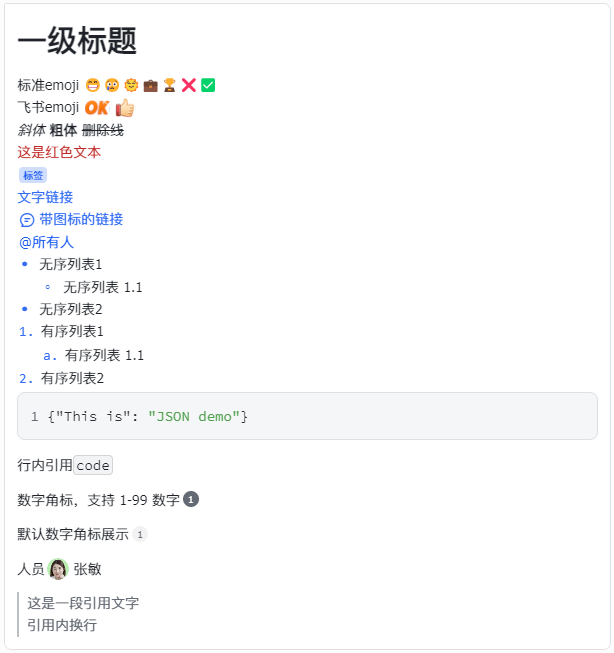
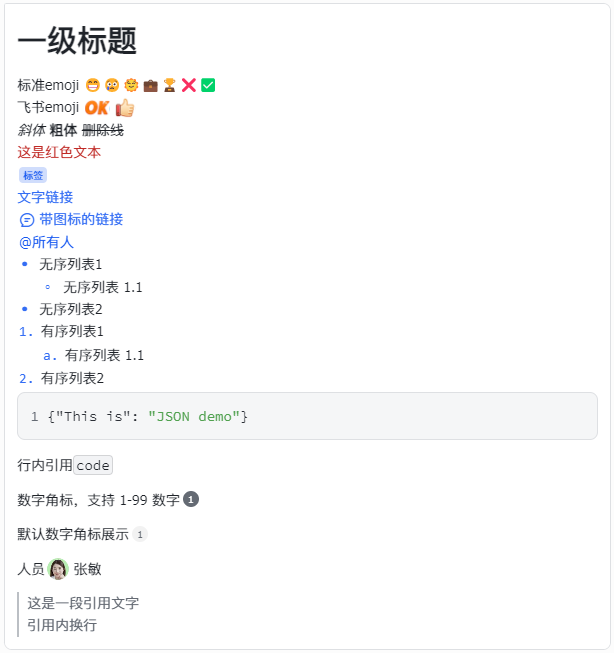
以下 JSON 2.0 结构的示例代码可实现如下图所示的卡片效果:
```json
{
"schema": "2.0",
"body": {
"elements": [
{
"tag": "markdown",
"content": "# 一级标题",
"margin": "0px 0px 0px 0px",
"text_align": "left",
"text_size": "normal"
},
{
"tag": "markdown",
"content": "标准emoji 😁😢🌞💼🏆❌✅\n飞书emoji :OK::THUMBSUP:\n*斜体* **粗体** ~~删除线~~ \n这是红色文本<\/font>\n标签<\/text_tag>\n[文字链接](https:\/\/open.feishu.cn\/document\/server-docs\/im-v1\/message-reaction\/emojis-introduce)\n带图标的链接<\/link>\n<\/at>\n- 无序列表1\n - 无序列表 1.1\n- 无序列表2\n1. 有序列表1\n 1. 有序列表 1.1\n2. 有序列表2\n```JSON\n{\"This is\": \"JSON demo\"}\n```"
},
{
"tag": "markdown",
"content": "行内引用`code`"
},
{
"tag": "markdown",
"content": "数字角标,支持 1-99 数字1"
},
{
"tag": "markdown",
"content": "默认数字角标展示1"
},
{
"tag": "markdown",
"content": "人员"
},
{
"tag": "markdown",
"content": "> 这是一段引用文字\n引用内换行 \n"
}
]
}
}
```
## 支持的 Markdown 语法
[卡片 JSON 2.0 结构](https://open.feishu.cn/document/uAjLw4CM/ukzMukzMukzM/feishu-cards/card-json-v2-structure)支持除 `HTMLBlock` 外所有标准的 Markdown 语法和部分 HTML 语法。了解 Markdown 标准语法,请参考 [CommonMark Spec 官方文档](https://spec.commonmark.org/0.31.2/)。你也可以使用 [CommonMark playground](https://spec.commonmark.org/dingus/) 预览 Markdown 效果。
注意,在卡片的富文本组件中,以下语法的渲染效果与 CommonMark 有差异:
- 富文本组件支持使用一个 Enter 键作为软换行(Soft Break);支持两个 Enter 键作为硬换行(Hard Break)。软换行在渲染时可能会被忽略,具体取决于渲染器如何处理;硬换行在渲染时始终会显示为一个新行。
- 2.0 结构支持以下 HTML 语法:
- 开标签 `
`
- 自闭合标签 `
`
- 开标签 `
`
- 自闭合标签 `
`
- 闭合标签 ``
- 闭合标签 ``
- 闭合标签 ``
- 闭合标签 ``
- 闭合标签 ``
- 闭合标签 ``
- 闭合标签 ``
- 闭合标签 ``,支持嵌套其它标签,如 `redgreenagain`。其它标签包括:
- 闭合标签 ``
- 闭合标签 ``
- 闭合标签 ``
- 闭合标签 ``
- 闭合标签 ``
以下是一些常见的渲染效果及其对应的 Markdown 或 HTML 语法。
名称 | 语法 | 效果 | 注意事项
---|---|---|---
换行 | ```
第一行
第二行
第一行
第二行
``` | 第一行
第二行 | - 如果你使用卡片 JSON 构建卡片,也可使用字符串的换行语法 `\n` 换行。
- 如果你使用卡片搭建工具构建卡片,也可使用回车键换行。
斜体 | ```
*斜体*
``` | *斜体* | 无
加粗 | ```
**粗体**
或
__粗体__
``` | __粗体__ | - 不要连续使用 4 个 `*` 或 `_` 加粗。该语法不规范,可能会导致渲染不正确。
- 若加粗效果未显示,请确保加粗语法前后保留一个空格。
删除线 | ```
~~删除线~~
``` | ~~删除线~~ | 无
@指定人 | ```
``` | @用户名 | - 该语法用于在卡片中实现 @ 人的效果,被 @ 的用户将收到提及通知。但对于转发的卡片,用户将不再收到提及通知。
- 要在卡片中展示人员的用户名、头像、个人名片等,你可使用[人员](https://open.feishu.cn/document/uAjLw4CM/ukzMukzMukzM/feishu-cards/card-json-v2-components/content-components/user-profile)或[人员列表](https://open.feishu.cn/document/uAjLw4CM/ukzMukzMukzM/feishu-cards/card-json-v2-components/content-components/user-list)组件。但人员和人员列表组件仅作为展示,用户不会收到提及通知。
- [自定义机器人](https://open.feishu.cn/document/ukTMukTMukTM/ucTM5YjL3ETO24yNxkjN)仅支持使用 `open_id`、`user_id` @指定人。
- 支持使用 `` 传入多个 ID,使用 `,` 连接。
- 了解如何获取 user_id、open_id,参考[如何获取不同的用户 ID](https://open.feishu.cn/document/home/user-identity-introduction/open-id)。
@所有人 | ```
``` | @所有人 | @所有人需要群主开启权限。若未开启,卡片将发送失败。
超链接 | ```
``` | [https://open.feishu.cn](https://open.feishu.cn) | - 超链接必须包含 schema 才能生效,目前仅支持 HTTP 和 HTTPS。
- 超链接文本的颜色不支持自定义。
彩色文本样式 | ```
这是一个绿色文本
这是一个红色文本
这是一个灰色文本
``` | 

 | * 彩色文本样式不支持对链接中的文本生效
* color 取值:
- **default**:默认的白底黑字样式
- 卡片支持的颜色枚举值和 RGBA 语法自定义颜色。参考[颜色枚举值](https://open.feishu.cn/document/uAjLw4CM/ukzMukzMukzM/feishu-cards/enumerations-for-fields-related-to-color)
可点击的电话号码 | ```
[文本展示的电话号码或其他文案内容](tel://移动端弹窗唤起的电话号码)
``` |  | 该语法仅在移动端生效。
文字链接 | ```
[开放平台](https://open.feishu.cn/)
``` | [开放平台](https://open.feishu.cn/) | 超链接必须包含 schema 才能生效,目前仅支持 HTTP 和 HTTPS。
差异化跳转链接 | ```
{
"tag": "markdown",
"href": {
"urlVal": {
"url": "xxx",
"pc_url":"xxx",
"ios_url": "xxx",
"android_url": "xxx"
}
},
"content":
"[差异化跳转]($urlVal)"
}
``` | \- | * 超链接必须包含 schema 才能生效,目前仅支持 HTTP 和 HTTPS。
- 仅在 PC 端、移动端需要跳转不同链接时使用。
图片 | ```

``` | | * `hover_text` 指在 PC 端内光标悬浮(hover)图片所展示的文案。
* **image_key** 可以调用[上传图片](https://open.feishu.cn/document/uAjLw4CM/ukTMukTMukTM/reference/im-v1/image/create)接口获取。
分割线 | ```
或
---
``` |  | - 推荐使用 `
` 语法
- 分割线必须单独一行使用。即如果分割线前后有文本,你必须在分割线前后添加换行符。
飞书表情 | ```
:DONE:
``` |  | 支持的 Emoji Key 列表可以参看 [表情文案说明](https://open.feishu.cn/document/uAjLw4CM/ukTMukTMukTM/reference/im-v1/message-reaction/emojis-introduce)。
标签 | ```
标签文本
``` | | `color`支持的枚举值范围包括:
- `neutral`: 中性色
- `blue`: 蓝色
- `turquoise`: 青绿色
- `lime`: 酸橙色
- `orange`: 橙色
- `violet`: 紫罗兰色
- `indigo`: 靛青色
- `wathet`: 天蓝色
- `green`: 绿色
- `yellow`: 黄色
- `red`: 红色
- `purple`: 紫色
- `carmine`: 洋红色
有序列表 | ```
1. 有序列表1
1. 有序列表 1.1
2. 有序列表2
``` | 1. 有序列表1
1. 有序列表 1.1
2. 有序列表2 | * 序号需在行首使用
* 4 个空格代表一层缩进
无序列表 | ```
- 无序列表1
- 无序列表 1.1
- 无序列表2
```
在卡片 JSON 中,需添加 `\n` 换行符:
```
\n- 无序列表1\n - 无序列表 1.1\n- 无序列表2\n1. 有序列表1\n
``` | - 无序列表1
- 无序列表 1.1
- 无序列表2 | * 序号需在行首使用
* 4 个空格代表一层缩进
代码块 | `````markdown
```JSON
{"This is": "JSON demo"}
```
````` | ```JSON
{"This is": "JSON demo"}
``` | * 代码块语法和代码内容需在行首使用
* 支持指定编程语言解析。未指定默认为 Plain Text
- 四个及以上空格([缩进式代码块语法](https://spec.commonmark.org/0.30/#indented-code-blocks))也将触发代码块效果
含图标的链接 | ```
战略研讨会
``` |  | 该语法中的字段说明如下所示:
- `icon`:链接前缀的图标。仅支持图标库中的图标,枚举值参见[图标库](https://open.feishu.cn/document/uAjLw4CM/ukzMukzMukzM/feishu-cards/enumerations-for-icons)。图标颜色固定为蓝色。可选。
- `url`:默认的链接地址,未按设备配置下述字段时,该配置生效。必填。
- `pc_url`:pc 端的链接地址,优先级高于 `url`。可选。
- `ios_url`:ios 端的链接地址,优先级高于 `url`。可选。
- `android_url`:android 端的链接地址,优先级高于 `url`。可选。
人员 | `````markdown
````` |  | 该语法中的字段说明如下所示:
- `id`:用户的 ID,支持 open_id、union_id 和 user_id。不填、为空、数据错误时展示为兜底的“未知用户”样式。了解更多,参考[如何获取不同的用户 ID](https://open.feishu.cn/document/home/user-identity-introduction/open-id)。
- `show_name`:是否展示用户名。默认为 true。
- `show_avatar`:是否展示用户头像,默认为 true。
- `style`:人员组件的展示样式。可选值有:
- `normal`:普通样式(默认)
- `capsule`:胶囊样式
标题 | ```
# 一级标题
## 二级标题
###### 六级标题
``` |  | 支持一级到 6 级标题。从一级到六级的字号梯度为 26, 22 , 20, 18, 17, 14px。
引用 | ```
>[空格]这是一段引用文字\n引用内换行
``` |  |
行内引用 | ```
`code`
``` |  |
表格 | ```
| Syntax | Description |
| -------- | -------- |
| Paragraph | Text |
| Paragraph | Text |
| Paragraph | Text |
| Paragraph | Text |
| Paragraph | Text |
| Paragraph | Text |
``` |  | - 除标题行外,最多展示五行数据,超出五行将分页展示。不支持自定义。
- 该语法仅支持 JSON 2.0 结构。
- 单个富文本组件中,最多可放置四个表格。
- 表格的富文本语法不支持设置列宽等。要设置列宽、数据对齐方式等,可使用[表格](https://open.feishu.cn/document/uAjLw4CM/ukzMukzMukzM/feishu-cards/card-json-v2-components/content-components/table)组件。
数字角标 | `````markdown
1
`````
`````markdown
1````` |  | 数字圆形角标,支持添加 0-99 之间的数字。该语法中的字段说明如下所示:
- `background_color`:圆圈内的背景颜色。可选。
- `font_color`:数字颜色。可选。
- `url`:点击角标时默认的跳转链接,未按设备配置下述字段时,该配置生效。可选。
- `pc_url`:点击角标时 PC 端的跳转链接,优先级高于 `url`。可选。
- `ios_url`:点击角标时 iOS 端的跳转链接,优先级高于 `url`。可选。
- `android_url`:点击角标时 Android 端的跳转链接,优先级高于 `url`。可选。
国际化时间 | ```
``` | 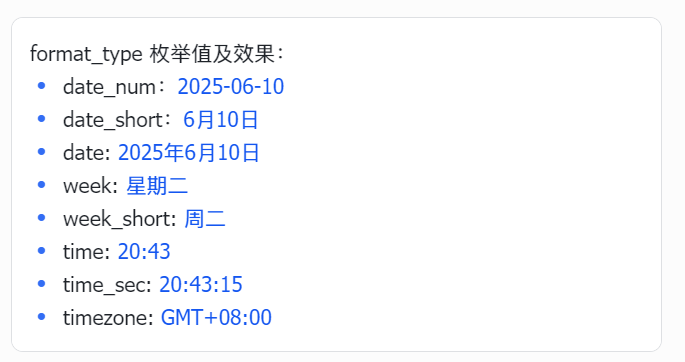 | 国际化时间标签。支持自动展示用户当地时区下的时间。该语法中的字段说明如下所示:
- `millisecond`:要展示的时间的 Unix 毫秒时间戳。若不填,则:
- 对于使用卡片 JSON 发送的卡片,默认展示发送卡片时的时间
- 对于使用搭建工具搭建的卡片,默认展示卡片发布的时间
- `format_type`:定义时间展示的格式。默认使用数字展示,如:`2019-03-15`。枚举值如下所示:
- `date_num`:用数字表示的日期,例如 `2019-03-15`。
- `date_short`:不含年份的简写日期,支持多语种自动适配,例如 `3月15日`、`Mar 15`。
- `date`:完整国际化日期文案,支持多语种自动适配,例如 `2019年3月15日`、`Mar 15, 2019`。
- `week`:完整星期文案,支持多语种自动适配,例如 `星期二`、`Tuesday`。
- `week_short`:简写星期文案,支持多语种自动适配,例如 `周二`、`Tue`。
- `time`:时间(小时:分钟)文案,例如 `13:42`。
- `time_sec`:时间(小时:分钟:秒)文案,例如 `13:42:53`。
- `timezone`:设备所属时区,格式为 `GMT±hh:mm`,例如 `GMT+8:00`。
- `link`:点击该时间时跳转的链接地址。
音频 | ```
```
参考本文末尾了解音频语法使用示例。 | - style 为 normal 时:

- style 为 speak 时:
 | 富文本内嵌音频播放器。该语法中的字段说明如下所示:
- `file_key`:音频文件 key,需通过[上传文件](https://open.feishu.cn/document/uAjLw4CM/ukTMukTMukTM/reference/im-v1/file/create)获取。详情参考[音频](https://open.feishu.cn/document/uAjLw4CM/ukzMukzMukzM/feishu-cards/card-json-v2-components/content-components/audio)组件。必填。
- `audio_id`:音频实例唯一标识,使用方式同[音频](https://open.feishu.cn/document/uAjLw4CM/ukzMukzMukzM/feishu-cards/card-json-v2-components/content-components/audio)组件。可选。
- `show_time`:是否显示时长。可选,默认值为 false。
- `style`:音频样式。可选,支持以下值:
- `normal`:默认值,三角形播放按钮样式
- `speak`:语音样式
- `background_color`:组件背景颜色。可选。支持 default、[颜色枚举值](https://open.feishu.cn/document/uAjLw4CM/ukzMukzMukzM/feishu-cards/enumerations-for-fields-related-to-color)和 RGBA 语法自定义颜色。
- `fill_color`:图标和时间颜色。可选。支持颜色枚举值和 RGBA 语法自定义颜色。
- `fallback_text`:在低于飞书 V7.49.0 版本客户端上,音频播放器将展示为文字链接。你可设置文本和 URL,引导用户点击链接访问音频。该字段指定显示文本。可选。若不指定,则低版本客户端展示时将丢弃该组件。
- `fallback_url`:在低于飞书 V7.49.0 版本客户端上,音频播放器将展示为文字链接。你可设置文本和 URL,引导用户点击链接访问音频。该字段指定文字链接的兜底 URL。若指定`fallback_text`,则必须指定 `fallback_url`。
- `fallback_pc_url`:为 PC 端低版本客户端上的音频播放器额外指定 URL,可选。优先级高于兜底的 `fallback_url`。
- `fallback_ios_url`:为 iOS 端低版本客户端上的音频播放器额外指定 URL,可选。优先级高于兜底的 `fallback_url`。
- `fallback_android_url`:为 Android 端低版本客户端上的音频播放器额外指定 URL,可选。优先级高于兜底的 `fallback_url`。
- `fallback_harmony_url`:为原生鸿蒙端低版本客户端上的音频播放器额外指定 URL,可选。优先级高于兜底的 `fallback_url`。
### 特殊字符转义说明
如果要展示的字符命中了 markdown 语法使用的特殊字符(例如 `*、~、>、<` 这些特殊符号),需要对特殊字符进行 HTML 转义,才可正常展示。常见的转义符号对照表如下所示。查看更多转义符,参考 [HTML 转义通用标准](https://www.w3school.com.cn/charsets/ref_html_8859.asp)实现,转义后的格式为 `&#实体编号;`。
| **特殊字符** | **转义符** | **描述** |
| --- | --- | --- |
| ` ` | ` ` | 不换行空格 |
| ` ` | ` ` | 半角空格 |
| ` ` | ` ` | 全角空格 |
| `>` | `>` | 大于号 |
| `<` | `<` | 小于号 |
| `~` | `∼` | 飘号 |
| `-` | `-` | 连字符 |
| `!` | `!` | 惊叹号 |
| `*` | `*` | 星号 |
| `/` | `/` | 斜杠 |
| `\` | `\` | 反斜杠 |
| `[` | `[` | 中括号左边部分 |
| `]` | `]` | 中括号右边部分 |
| `(` | `(` | 小括号左边部分 |
| `)` | `)` | 小括号右边部分 |
| `#` | `#` | 井号 |
| `:` | `:` | 冒号 |
| `+` | `+` | 加号 |
| `"` | `"` | 英文引号 |
| `'` | `'` | 英文单引号 |
| \` | ``` | 反单引号 |
| `$` | `$` | 美金符号 |
| `_` | `_` | 下划线 |
| `-` | `-` | 无序列表 |
### 代码块支持的编程语言
富文本组件支持通过代码块语法渲染代码,支持的编程语言如下列表所示,且对大小写不敏感:
`````markdown
```JSON
{"This is": "JSON demo"}
```
`````
- plain_text
- abap
- ada
- apache
- apex
- assembly
- bash
- c_sharp
- cpp
- c
- cmake
- cobol
- css
- coffee_script
- d
- dart
- delphi
- diff
- django
- docker_file
- erlang
- fortran
- gherkin
- go
- graphql
- groovy
- html
- htmlbars
- http
- haskell
- json
- java
- javascript
- julia
- kotlin
- latex
- lisp
- lua
- matlab
- makefile
- markdown
- nginx
- objective_c
- opengl_shading_language
- php
- perl
- powershell
- prolog
- properties
- protobuf
- python
- r
- ruby
- rust
- sas
- scss
- sql
- scala
- scheme
- shell
- solidity
- swift
- toml
- thrift
- typescript
- vbscript
- visual_basic
- xml
- yaml
## 为移动端和桌面端定义不同的字号
在普通文本组件和富文本组件中,你可为同一段文本定义在移动端和桌面端的不同字号。相关字段描述如下表所示。
字段 | 是否必填 | 类型 | 默认值 | 说明
---|---|---|---|---
text_size | 否 | Object | / | 文本大小。你可在此自定义移动端和桌面端的不同字号。
└ custom_text_size_name | 否 | Object | / | 自定义的字号。你需自定义该字段的名称,如 `cus-0`、`cus-1` 等。
└└ default | 否 | String | / | 在无法差异化配置字号的旧版飞书客户端上,生效的字号属性。建议填写此字段。可取值如下所示。
- heading-0:特大标题(30px)
- heading-1:一级标题(24px)
- heading-2:二级标题(20 px)
- heading-3:三级标题(18px)
- heading-4:四级标题(16px)
- heading:标题(16px)
- normal:正文(14px)
- notation:辅助信息(12px)
- xxxx-large:30px
- xxx-large:24px
- xx-large:20px
- x-large:18px
- large:16px
- medium:14px
- small:12px
- x-small:10px
└└ pc | 否 | String | / | 桌面端的字号。可取值如下所示。
- heading-0:特大标题(30px)
- heading-1:一级标题(24px)
- heading-2:二级标题(20 px)
- heading-3:三级标题(18px)
- heading-4:四级标题(16px)
- heading:标题(16px)
- normal:正文(14px)
- notation:辅助信息(12px)
- xxxx-large:30px
- xxx-large:24px
- xx-large:20px
- x-large:18px
- large:16px
- medium:14px
- small:12px
- x-small:10px
└└ mobile | 否 | String | / | 移动端的文本字号。可取值如下所示。
**注意**:部分移动端的字号枚举值的具体大小与 PC 端有差异,使用时请注意区分。
- heading-0:特大标题(26px)
- heading-1:一级标题(24px)
- heading-2:二级标题(20 px)
- heading-3:三级标题(17px)
- heading-4:四级标题(16px)
- heading:标题(16px)
- normal:正文(14px)
- notation:辅助信息(12px)
- xxxx-large:26px
- xxx-large:24px
- xx-large:20px
- x-large:18px
- large:17px
- medium:14px
- small:12px
- x-small:10px
具体步骤如下所示。
1. 在卡片 JSON 代码的全局行为设置中的 `config` 字段中,配置 `style` 字段,并添加自定义字号:
```json
{
"config": {
"style": { // 在此添加并配置 style 字段。
"text_size": { // 分别为移动端和桌面端添加自定义字号,同时添加兜底字号。用于在组件 JSON 中设置字号属性。支持添加多个自定义字号对象。
"cus-0": {
"default": "medium", // 在无法差异化配置字号的旧版飞书客户端上,生效的字号属性。选填。
"pc": "medium", // 桌面端的字号。
"mobile": "large" // 移动端的字号。
},
"cus-1": {
"default": "medium", // 在无法差异化配置字号的旧版飞书客户端上,生效的字号属性。选填。
"pc": "normal", // 桌面端的字号。
"mobile": "x-large" // 移动的字号。
}
}
}
}
}
```
1. 在普通文本组件或富文本组件的 `text_size` 属性中,应用自定义字号。以下为在富文本组件中应用自定义字号的示例:
```json
{
"elements": [
{
"tag": "markdown",
"text_size": "cus-0", // 在此处应用自定义字号。
"href": {
"urlVal": {
"url": "xxx1",
"pc_url": "xxx2",
"ios_url": "xxx3",
"android_url": "xxx4"
}
},
"content": "普通文本\n标准emoji😁😢🌞💼🏆❌✅\n*斜体*\n**粗体**\n~~删除线~~\n文字链接\n差异化跳转\n"
},
{
"tag": "hr"
},
{
"tag": "markdown",
"content": "上面是一行分割线\n!hover_text\n上面是一个图片标签"
}
],
"header": {
"template": "blue",
"title": {
"content": "这是卡片标题栏",
"tag": "plain_text"
}
}
}
```
## 富文本语法使用示例
### 音频
以下富文本语法示例代码可实现如下图所示的卡片效果。请将 `file_key` 替换为实际值后再查看效果。获取音频文件 `file_key` 时,请确保调用[上传文件](https://open.feishu.cn/document/uAjLw4CM/ukTMukTMukTM/reference/im-v1/file/create)接口的应用与发送卡片的应用一致。
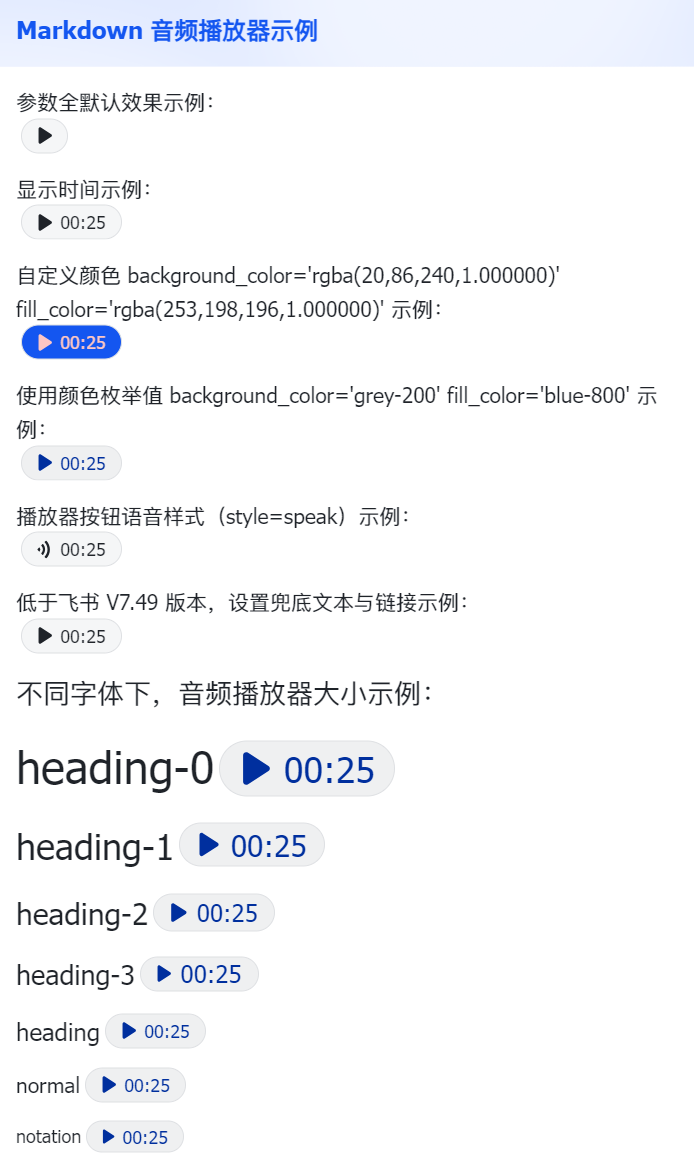
```json
{
"schema": "2.0",
"config": {
"wide_screen_mode": true,
"enable_forward": false,
"update_multi": true,
"enable_forward_interaction": true,
"style": {
"color": {
"color_0": {
"light_mode": "rgba(20,86,240,1.000000)",
"dark_mode": "rgba(20,86,240,1.000000)"
},
"color_1": {
"light_mode": "rgba(149,229,153,1.000000)",
"dark_mode": "rgba(149,229,153,1.000000)"
},
"color_2": {
"light_mode": "rgba(253,198,196,1.000000)",
"dark_mode": "rgba(253,198,196,1.000000)"
}
}
}
},
"body": {
"direction": "vertical",
"padding": "12px 12px 12px 12px",
"elements": [
{
"tag": "markdown",
"content": "参数全默认效果示例:\n