# 获取部门直属用户列表
调用该接口获取指定部门直属的用户信息列表。用户信息包括用户 ID、名称、邮箱、手机号以及状态等信息。
## 注意事项
- 使用用户身份(user_access_token)调用该接口时,接口将根据该用户的组织架构可见范围进行过滤,仅返回组织架构可见范围内的用户数据。
- 使用应用身份(tenant_access_token)调用该接口时,接口将根据应用的通讯录权限范围进行过滤。 如果请求的部门 ID 为 0(即根部门),则接口会校验应用是否具有全员的通讯录权限;如果请求的是非 0 的部门 ID,则会校验应用是否具有该部门的通讯录权限。无权限时,接口会返回无权限的报错信息;有权限则返回对应部门下的直属用户列表。
- 使用应用身份(tenant_access_token)调用本接口时,响应结果中不会返回部门路径字段(department_path)。如需获取部门路径字段值,请为应用申请 **获取成员所在部门路径(contact:user.department_path:readonly)** API 权限,并使用用户身份(user_access_token)调用接口。
关于用户组织架构可见范围和通讯录权限范围的更多信息,可参见[权限范围资源介绍](https://open.feishu.cn/document/ukTMukTMukTM/uETNz4SM1MjLxUzM/v3/guides/scope_authority)。
## 请求
基本 |
---|---
HTTP URL | https://open.feishu.cn/open-apis/contact/v3/users/find_by_department
HTTP Method | GET
接口频率限制 | [1000 次/分钟、50 次/秒](https://open.feishu.cn/document/ukTMukTMukTM/uUzN04SN3QjL1cDN)
支持的应用类型 | Custom App、Store App
权限要求
**调用该 API 所需的权限。开启其中任意一项权限即可调用**
开启任一权限即可 | 获取通讯录基本信息(contact:contact.base:readonly)
获取通讯录部门组织架构信息(contact:department.organize:readonly)
以应用身份访问通讯录(contact:contact:access_as_app)
读取通讯录(contact:contact:readonly)
以应用身份读取通讯录(contact:contact:readonly_as_app)
字段权限要求 | **注意事项**:该接口返回体中存在下列敏感字段,仅当开启对应的权限后才会返回;如果无需获取这些字段,则不建议申请
获取用户基本信息(contact:user.base:readonly)
获取用户组织架构信息(contact:user.department:readonly)
获取成员所在部门路径(contact:user.department_path:readonly)
查看成员的虚线上级 ID(contact:user.dotted_line_leader_info.read)
获取用户受雇信息(contact:user.employee:readonly)
查看成员工号(contact:user.employee_number:read)
获取用户性别(contact:user.gender:readonly)
获取用户邮箱信息(contact:user.email:readonly)
获取用户手机号(contact:user.phone:readonly)
获取用户 user ID(contact:user.employee_id:readonly)
查看成员数据驻留地(contact:user.user_geo)
查询用户职级(contact:user.job_level:readonly)
查询用户所属的工作序列(contact:user.job_family:readonly)
以应用身份访问通讯录(contact:contact:access_as_app)
读取通讯录(contact:contact:readonly)
以应用身份读取通讯录(contact:contact:readonly_as_app)
### 请求头
名称 | 类型 | 必填 | 描述
---|---|---|---
Authorization | string | 是 | `tenant_access_token`
或
`user_access_token`
**值格式**:"Bearer `access_token`"
**示例值**:"Bearer u-7f1bcd13fc57d46bac21793a18e560"
[了解更多:如何选择与获取 access token](https://open.feishu.cn/document/uAjLw4CM/ugTN1YjL4UTN24CO1UjN/trouble-shooting/how-to-choose-which-type-of-token-to-use)
### 查询参数
名称 | 类型 | 必填 | 描述
---|---|---|---
user_id_type | string | 否 | 用户 ID 类型
**示例值**:open_id
**可选值有**:
- open_id:标识一个用户在某个应用中的身份。同一个用户在不同应用中的 Open ID 不同。[了解更多:如何获取 Open ID](https://open.feishu.cn/document/uAjLw4CM/ugTN1YjL4UTN24CO1UjN/trouble-shooting/how-to-obtain-openid)
- union_id:标识一个用户在某个应用开发商下的身份。同一用户在同一开发商下的应用中的 Union ID 是相同的,在不同开发商下的应用中的 Union ID 是不同的。通过 Union ID,应用开发商可以把同个用户在多个应用中的身份关联起来。[了解更多:如何获取 Union ID?](https://open.feishu.cn/document/uAjLw4CM/ugTN1YjL4UTN24CO1UjN/trouble-shooting/how-to-obtain-union-id)
- user_id:标识一个用户在某个租户内的身份。同一个用户在租户 A 和租户 B 内的 User ID 是不同的。在同一个租户内,一个用户的 User ID 在所有应用(包括商店应用)中都保持一致。User ID 主要用于在不同的应用间打通用户数据。[了解更多:如何获取 User ID?](https://open.feishu.cn/document/uAjLw4CM/ugTN1YjL4UTN24CO1UjN/trouble-shooting/how-to-obtain-user-id)
**默认值**:`open_id`
**当值为 `user_id`,字段权限要求**:
获取用户 user ID(contact:user.employee_id:readonly)
department_id_type | string | 否 | 此次调用中使用的部门 ID 类型。关于部门 ID 的详细介绍,可参见[部门 ID 说明](https://open.feishu.cn/document/uAjLw4CM/ukTMukTMukTM/reference/contact-v3/department/field-overview#23857fe0)。
**示例值**:open_department_id
**可选值有**:
- department_id:支持用户自定义配置的部门 ID。自定义配置时可复用已删除的 department_id,因此在未删除的部门范围内 department_id 具有唯一性。
- open_department_id:由系统自动生成的部门 ID,ID 前缀固定为 `od-`,在租户内全局唯一。
**默认值**:`open_department_id`
department_id | string | 是 | 部门 ID,ID 类型与 department_id_type 的取值保持一致。
**说明**:
- 根部门的部门 ID 为 0。
- 你可以调用[搜索部门](https://open.feishu.cn/document/uAjLw4CM/ukTMukTMukTM/reference/contact-v3/department/search)接口,通过部门名称关键词获取对应的部门 ID。
**示例值**:od-xxxxxxxxxxxxx
page_size | int | 否 | 分页大小,即本次请求所返回的用户信息列表内的最大条目数。
**示例值**:10
**默认值**:`10`
**数据校验规则**:
- 最大值:`50`
page_token | string | 否 | 分页标记,第一次请求不填,表示从头开始遍历;分页查询结果还有更多项时会同时返回新的 page_token,下次遍历可采用该 page_token 获取查询结果
**示例值**:AQD9/Rn9eij9Pm39ED40/dk53s4Ebp882DYfFaPFbz00L4CMZJrqGdzNyc8BcZtDbwVUvRmQTvyMYicnGWrde9X56TgdBuS+JKiSIkdexPw=
**Go 请求示例**
```go
import (
"context"
"github.com/larksuite/oapi-sdk-go/v3"
"github.com/larksuite/oapi-sdk-go/v3/service/contact/v3"
)
func main() {
// 创建 Client
client := lark.NewClient("appID", "appSecret")
// 创建请求对象
req := larkcontact.NewFindByDepartmentUserReqBuilder().
UserIdType(`open_id`).
DepartmentIdType(`open_department_id`).
DepartmentId(`od-xxxxxxxxxxxxx`).
PageSize(10).
Build()
// 发起请求
resp, err := client.Contact.User.FindByDepartment(context.Background(), req)
}
```
**Java 请求示例**
```java
import com.lark.oapi.Client;
import com.lark.oapi.service.contact.v3.model.*;
import com.lark.oapi.core.request.RequestOptions;
public class Main {
public static void main(String arg[]) throws Exception {
// 构建client
Client client = Client.newBuilder("appId", "appSecret").build();
// 创建请求对象
FindByDepartmentUserReq req = FindByDepartmentUserReq.newBuilder()
.userIdType("open_id")
.departmentIdType("open_department_id")
.departmentId("od-xxxxxxxxxxxxx")
.pageSize(10)
.build();
// 发起请求
FindByDepartmentUserResp resp = client.contact().user().findByDepartment(req, RequestOptions.newBuilder().build());
}
}
```
## 响应
### 响应体
名称 | 类型 | 描述
---|---|---
code | int | 错误码,非 0 表示失败
msg | string | 错误描述
data | \- | \-
has_more | boolean | 是否还有更多项
page_token | string | 分页标记,当 has_more 为 true 时,会同时返回新的 page_token,否则不返回 page_token
items | user\[\] | 用户信息列表。
union_id | string | 用户的 union_id,是应用开发商发布的不同应用中同一用户的标识。不同用户 ID 的说明参见 [用户相关的 ID 概念](https://open.feishu.cn/document/home/user-identity-introduction/introduction)。
user_id | string | 用户的 user_id,租户内用户的唯一标识。不同用户 ID 的说明参见 [用户相关的 ID 概念](https://open.feishu.cn/document/home/user-identity-introduction/introduction)。
**字段权限要求**:
获取用户 user ID(contact:user.employee_id:readonly)
open_id | string | 用户的 open_id,应用内用户的唯一标识。不同用户 ID 的说明参见 [用户相关的 ID 概念](https://open.feishu.cn/document/home/user-identity-introduction/introduction)。
name | string | 用户名。
**字段权限要求(满足任一)**:
获取用户基本信息(contact:user.base:readonly)
以应用身份访问通讯录(contact:contact:access_as_app)
读取通讯录(contact:contact:readonly)
以应用身份读取通讯录(contact:contact:readonly_as_app)
en_name | string | 英文名。
**字段权限要求(满足任一)**:
获取用户基本信息(contact:user.base:readonly)
以应用身份访问通讯录(contact:contact:access_as_app)
读取通讯录(contact:contact:readonly)
以应用身份读取通讯录(contact:contact:readonly_as_app)
nickname | string | 别名。
**字段权限要求(满足任一)**:
获取用户基本信息(contact:user.base:readonly)
以应用身份访问通讯录(contact:contact:access_as_app)
读取通讯录(contact:contact:readonly)
以应用身份读取通讯录(contact:contact:readonly_as_app)
email | string | 邮箱。
**字段权限要求**:
获取用户邮箱信息(contact:user.email:readonly)
mobile | string | 手机号。
**字段权限要求**:
获取用户手机号(contact:user.phone:readonly)
mobile_visible | boolean | 手机号码是否可见。
**可能值有**:
- true:可见。
- false:不可见。不可见时,企业内的员工将无法查看该用户的手机号码。
gender | int | 性别。
**可选值有**:
- 0:保密
- 1:男
- 2:女
- 3:其他
**字段权限要求(满足任一)**:
获取用户性别(contact:user.gender:readonly)
以应用身份访问通讯录(contact:contact:access_as_app)
读取通讯录(contact:contact:readonly)
以应用身份读取通讯录(contact:contact:readonly_as_app)
avatar_key | string | 头像的文件 Key。该参数实际无返回值,请忽略,获取头像信息可使用 `avatar` 参数。
avatar | avatar_info | 用户头像信息。
**字段权限要求(满足任一)**:
获取用户基本信息(contact:user.base:readonly)
以应用身份访问通讯录(contact:contact:access_as_app)
读取通讯录(contact:contact:readonly)
以应用身份读取通讯录(contact:contact:readonly_as_app)
avatar_72 | string | 72*72 像素头像链接。
avatar_240 | string | 240*240 像素头像链接。
avatar_640 | string | 640*640 像素头像链接。
avatar_origin | string | 原始头像链接。
status | user_status | 用户状态。通过 is_frozen、is_resigned、is_activated、is_exited 布尔值类型参数进行展示。
用户状态的转关逻辑可参见[用户资源介绍](https://open.feishu.cn/document/uAjLw4CM/ukTMukTMukTM/reference/contact-v3/user/field-overview#4302b5a1)。
**字段权限要求(满足任一)**:
获取用户受雇信息(contact:user.employee:readonly)
以应用身份访问通讯录(contact:contact:access_as_app)
读取通讯录(contact:contact:readonly)
以应用身份读取通讯录(contact:contact:readonly_as_app)
is_frozen | boolean | 是否为暂停状态。
**可能值有**:
- true:是
- false:否
is_resigned | boolean | 是否为离职状态。
**可能值有**:
- true:是
- false:否
is_activated | boolean | 是否为激活状态。
**可能值有**:
- true:是
- false:否
is_exited | boolean | 是否为主动退出状态。主动退出一段时间后用户状态会自动转为已离职。
**可能值有**:
- true:是
- false:否
is_unjoin | boolean | 是否为未加入状态,需要用户自主确认才能加入企业或团队。
**可能值有**:
- true:是
- false:否
department_ids | string\[\] | 用户所属部门的 ID 列表,一个用户可属于多个部门。ID 值的类型与查询参数中的 department_id_type 取值一致。
**字段权限要求(满足任一)**:
获取用户组织架构信息(contact:user.department:readonly)
以应用身份访问通讯录(contact:contact:access_as_app)
读取通讯录(contact:contact:readonly)
以应用身份读取通讯录(contact:contact:readonly_as_app)
leader_user_id | string | 用户的直接主管的用户ID。ID 值的类型与查询参数中的 user_id_type 取值一致。
**字段权限要求(满足任一)**:
获取用户组织架构信息(contact:user.department:readonly)
以应用身份访问通讯录(contact:contact:access_as_app)
读取通讯录(contact:contact:readonly)
以应用身份读取通讯录(contact:contact:readonly_as_app)
city | string | 工作城市。
**字段权限要求(满足任一)**:
获取用户受雇信息(contact:user.employee:readonly)
以应用身份访问通讯录(contact:contact:access_as_app)
读取通讯录(contact:contact:readonly)
以应用身份读取通讯录(contact:contact:readonly_as_app)
country | string | 国家或地区 Code 缩写,具体格式参考 [国家/地区 Code 参照表](https://open.feishu.cn/document/uAjLw4CM/ukTMukTMukTM/reference/contact-v3/user/country-code-description)。
**字段权限要求(满足任一)**:
获取用户受雇信息(contact:user.employee:readonly)
以应用身份访问通讯录(contact:contact:access_as_app)
读取通讯录(contact:contact:readonly)
以应用身份读取通讯录(contact:contact:readonly_as_app)
work_station | string | 工位。
**字段权限要求(满足任一)**:
获取用户受雇信息(contact:user.employee:readonly)
以应用身份访问通讯录(contact:contact:access_as_app)
读取通讯录(contact:contact:readonly)
以应用身份读取通讯录(contact:contact:readonly_as_app)
join_time | int | 入职时间。秒级时间戳格式,表示从 1970 年 1 月 1 日开始所经过的秒数。
**字段权限要求(满足任一)**:
获取用户受雇信息(contact:user.employee:readonly)
以应用身份访问通讯录(contact:contact:access_as_app)
读取通讯录(contact:contact:readonly)
以应用身份读取通讯录(contact:contact:readonly_as_app)
is_tenant_manager | boolean | 用户是否为租户超级管理员。
**可能值有**:
- true:是
- false:否
**字段权限要求(满足任一)**:
获取用户受雇信息(contact:user.employee:readonly)
以应用身份访问通讯录(contact:contact:access_as_app)
读取通讯录(contact:contact:readonly)
以应用身份读取通讯录(contact:contact:readonly_as_app)
employee_no | string | 工号。
**字段权限要求(满足任一)**:
查看成员工号(contact:user.employee_number:read)
获取用户受雇信息(contact:user.employee:readonly)
以应用身份访问通讯录(contact:contact:access_as_app)
读取通讯录(contact:contact:readonly)
以应用身份读取通讯录(contact:contact:readonly_as_app)
employee_type | int | 员工类型。
**可能值有**:
- 1:正式员工
- 2:实习生
- 3:外包
- 4:劳务
- 5:顾问
同时支持自定义员工类型的 int 值。你可通过[获取人员类型](https://open.feishu.cn/document/uAjLw4CM/ukTMukTMukTM/reference/contact-v3/employee_type_enum/list)接口获取到当前租户内自定义员工类型的名称。
**字段权限要求(满足任一)**:
获取用户受雇信息(contact:user.employee:readonly)
以应用身份访问通讯录(contact:contact:access_as_app)
读取通讯录(contact:contact:readonly)
以应用身份读取通讯录(contact:contact:readonly_as_app)
orders | user_order\[\] | 用户排序信息。用于标记通讯录下组织架构的人员顺序,人员可能存在多个部门中,且有不同的排序。
**字段权限要求(满足任一)**:
获取用户组织架构信息(contact:user.department:readonly)
以应用身份访问通讯录(contact:contact:access_as_app)
读取通讯录(contact:contact:readonly)
以应用身份读取通讯录(contact:contact:readonly_as_app)
department_id | string | 排序信息对应的部门 ID,表示用户所在的、且需要排序的部门。ID 类型与查询参数中的 department_id_type 取值一致。
user_order | int | 用户在其直属部门内的排序。数值越大,排序越靠前。
department_order | int | 用户所属的多个部门间的排序。数值越大,排序越靠前。
is_primary_dept | boolean | 标识是否为用户的唯一主部门。主部门为用户所属部门中排序第一的部门(department_order 最大)。
**可能值有**:
- true:是
- false:否
custom_attrs | user_custom_attr\[\] | 自定义字段。了解自定义字段可参见[自定义字段资源介绍](https://open.feishu.cn/document/uAjLw4CM/ukTMukTMukTM/reference/contact-v3/custom_attr/overview)。
**注意事项**:当企业管理员在管理后台配置了自定义字段,且开启了 **允许开放平台 API 调用** 功能后,该字段才会生效。
**字段权限要求(满足任一)**:
获取用户受雇信息(contact:user.employee:readonly)
以应用身份访问通讯录(contact:contact:access_as_app)
读取通讯录(contact:contact:readonly)
以应用身份读取通讯录(contact:contact:readonly_as_app)
type | string | 自定义字段类型。
**可能值有**:
- TEXT:文本
- HREF:网页
- ENUMERATION:枚举
- PICTURE_ENUM:图片
- GENERIC_USER:用户
id | string | 自定义字段 ID。
value | user_custom_attr_value | 自定义字段取值。
text | string | - 字段类型为 TEXT 时,该参数返回定义的字段值。
- 字段类型为 HREF 时,该参数返回定义的网页标题。
url | string | 字段类型为 HREF 时,该参数返回定义的默认 URL。
pc_url | string | 字段类型为 HREF 时,该参数返回定义的 PC 端 URL。
option_id | string | 字段类型为 ENUMERATION 或 PICTURE_ENUM 时,该参数返回定义的选项 ID。
option_value | string | 枚举类型中选项的选项值。
name | string | 图片类型中图片选项的名称。
picture_url | string | 图片类型中图片选项的链接。
generic_user | custom_attr_generic_user | 字段类型为 GENERIC_USER 时,该参数返回定义的引用人员信息。
id | string | 引用人员的用户 ID。ID 类型与查询参数 user_id_type 一致。
type | int | 用户类型。目前固定为 1,表示用户类型。
enterprise_email | string | 企业邮箱。
**注意事项**:企业管理员在管理后台启用飞书邮箱服务后,才会生效该参数。
**字段权限要求(满足任一)**:
获取用户受雇信息(contact:user.employee:readonly)
以应用身份访问通讯录(contact:contact:access_as_app)
读取通讯录(contact:contact:readonly)
以应用身份读取通讯录(contact:contact:readonly_as_app)
job_title | string | 职务。
**字段权限要求(满足任一)**:
获取用户受雇信息(contact:user.employee:readonly)
以应用身份访问通讯录(contact:contact:access_as_app)
读取通讯录(contact:contact:readonly)
以应用身份读取通讯录(contact:contact:readonly_as_app)
is_frozen | boolean | 是否为暂停状态的用户。
**可能值有**:
- true:是
- false:否
geo | string | 数据驻留地。
**字段权限要求**:
查看成员数据驻留地(contact:user.user_geo)
job_level_id | string | 职级 ID。
**字段权限要求**:
查询用户职级(contact:user.job_level:readonly)
job_family_id | string | 序列 ID。
**字段权限要求**:
查询用户所属的工作序列(contact:user.job_family:readonly)
department_path | department_detail\[\] | 部门路径。
**注意**:使用应用身份(tenant_access_token)调用本接口时,响应结果中不会返回部门路径字段(department_path)。如需获取部门路径字段值,请为应用申请 **获取成员所在部门路径(contact:user.department_path:readonly)** API 权限,并使用用户身份(user_access_token)调用接口。
**字段权限要求**:
获取成员所在部门路径(contact:user.department_path:readonly)
department_id | string | 部门 ID。ID 类型与查询参数 department_id_type 的取值保持一致。
department_name | department_path_name | 部门名称信息。
name | string | 部门名。
i18n_name | department_i18n_name | 部门国际化名。
zh_cn | string | 部门的中文名。
ja_jp | string | 部门的日文名。
en_us | string | 部门的英文名。
department_path | department_path | 部门路径。
department_ids | string\[\] | 部门路径 ID 列表。
department_path_name | department_path_name | 部门路径名字信息。
name | string | 部门名。
i18n_name | department_i18n_name | 部门国际化名。
zh_cn | string | 部门的中文名。
ja_jp | string | 部门的日文名。
en_us | string | 部门的英文名。
dotted_line_leader_user_ids | string\[\] | 虚线上级的用户 ID。ID 类型与查询参数 user_id_type 的取值保持一致。
**字段权限要求**:
查看成员的虚线上级 ID(contact:user.dotted_line_leader_info.read)
### 响应体示例
```json
{
"code": 0,
"msg": "success",
"data": {
"has_more": true,
"page_token": "AQD9/Rn9eij9Pm39ED40/RD/cIFmu77WxpxPB/2oHfQLZ%2BG8JG6tK7%2BZnHiT7COhD2hMSICh/eBl7cpzU6JEC3J7COKNe4jrQ8ExwBCR",
"items": [
{
"union_id": "on_94a1ee5551019f18cd73d9f111898cf2",
"user_id": "3e3cf96b",
"open_id": "ou_7dab8a3d3cdcc9da365777c7ad535d62",
"name": "张三",
"en_name": "San Zhang",
"nickname": "Alex Zhang",
"email": "zhangsan@gmail.com",
"mobile": "13011111111",
"mobile_visible": false,
"gender": 1,
"avatar_key": "2500c7a9-5fff-4d9a-a2de-3d59614ae28g",
"avatar": {
"avatar_72": "https://foo.icon.com/xxxx",
"avatar_240": "https://foo.icon.com/xxxx",
"avatar_640": "https://foo.icon.com/xxxx",
"avatar_origin": "https://foo.icon.com/xxxx"
},
"status": {
"is_frozen": false,
"is_resigned": false,
"is_activated": true,
"is_exited": false,
"is_unjoin": false
},
"department_ids": [
"od-4e6ac4d14bcd5071a37a39de902c7141"
],
"leader_user_id": "ou_7dab8a3d3cdcc9da365777c7ad535d62",
"city": "杭州",
"country": "CN",
"work_station": "北楼-H34",
"join_time": 2147483647,
"is_tenant_manager": false,
"employee_no": "1",
"employee_type": 1,
"orders": [
{
"department_id": "od-4e6ac4d14bcd5071a37a39de902c7141",
"user_order": 100,
"department_order": 100,
"is_primary_dept": true
}
],
"custom_attrs": [
{
"type": "TEXT",
"id": "DemoId",
"value": {
"text": "DemoText",
"url": "http://www.fs.cn",
"pc_url": "http://www.fs.cn",
"option_id": "edcvfrtg",
"option_value": "option",
"name": "name",
"picture_url": "https://xxxxxxxxxxxxxxxxxx",
"generic_user": {
"id": "9b2fabg5",
"type": 1
}
}
}
],
"enterprise_email": "demo@mail.com",
"job_title": "xxxxx",
"is_frozen": false,
"geo": "cn",
"job_level_id": "mga5oa8ayjlp9rb",
"job_family_id": "mga5oa8ayjlp9rb",
"department_path": [
{
"department_id": "od-4e6ac4d14bcd5071a37a39de902c7141",
"department_name": {
"name": "测试部门名1",
"i18n_name": {
"zh_cn": "测试部门名1",
"ja_jp": "試験部署名 1",
"en_us": "Test department name 1"
}
},
"department_path": {
"department_ids": [
"od-4e6ac4d14bcd5071a37a39de902c7141"
],
"department_path_name": {
"name": "测试部门名1",
"i18n_name": {
"zh_cn": "测试部门名1",
"ja_jp": "試験部署名 1",
"en_us": "Test department name 1"
}
}
}
}
],
"dotted_line_leader_user_ids": [
"ou_7dab8a3d3cdcc9da365777c7ad535d62"
]
}
]
}
}
```
### 错误码
HTTP状态码 | 错误码 | 描述 | 排查建议
---|---|---|---
400 | 41050 | no user authority error | 无用户权限。需将当前操作的用户添加到应用或用户的权限范围内。根据调用 API 的身份不同,解决方案也不同,具体说明如下:
- **使用 tenant_access_token 调用 API**
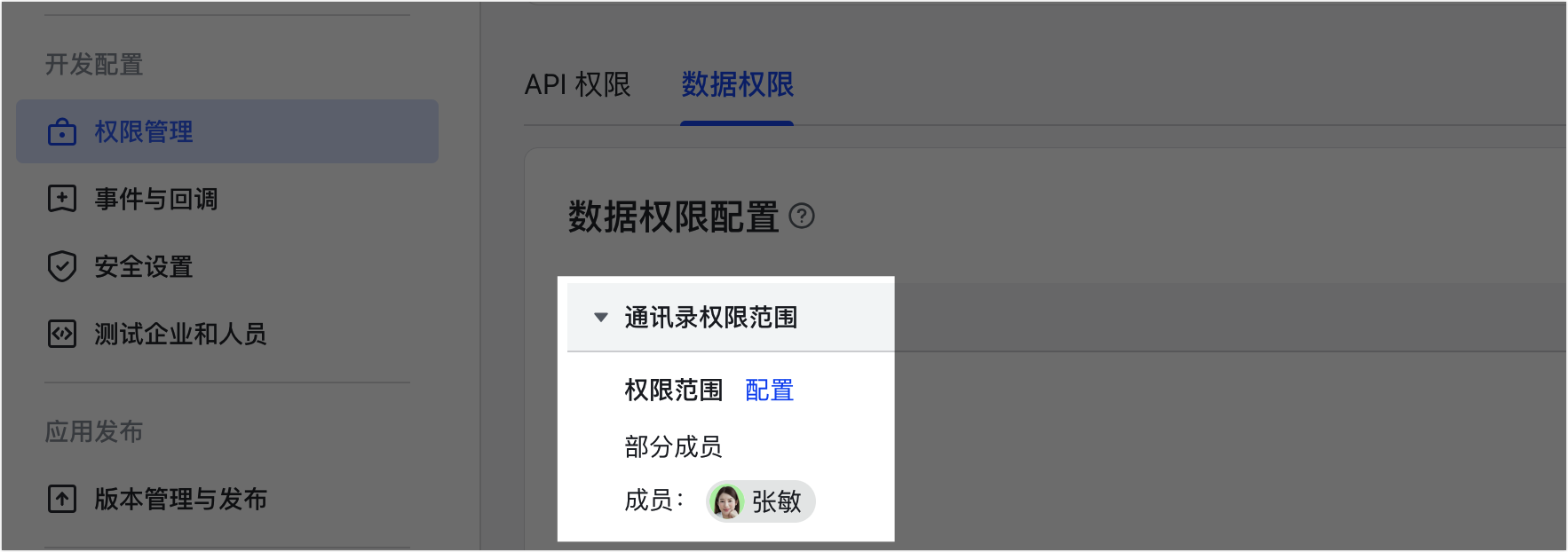
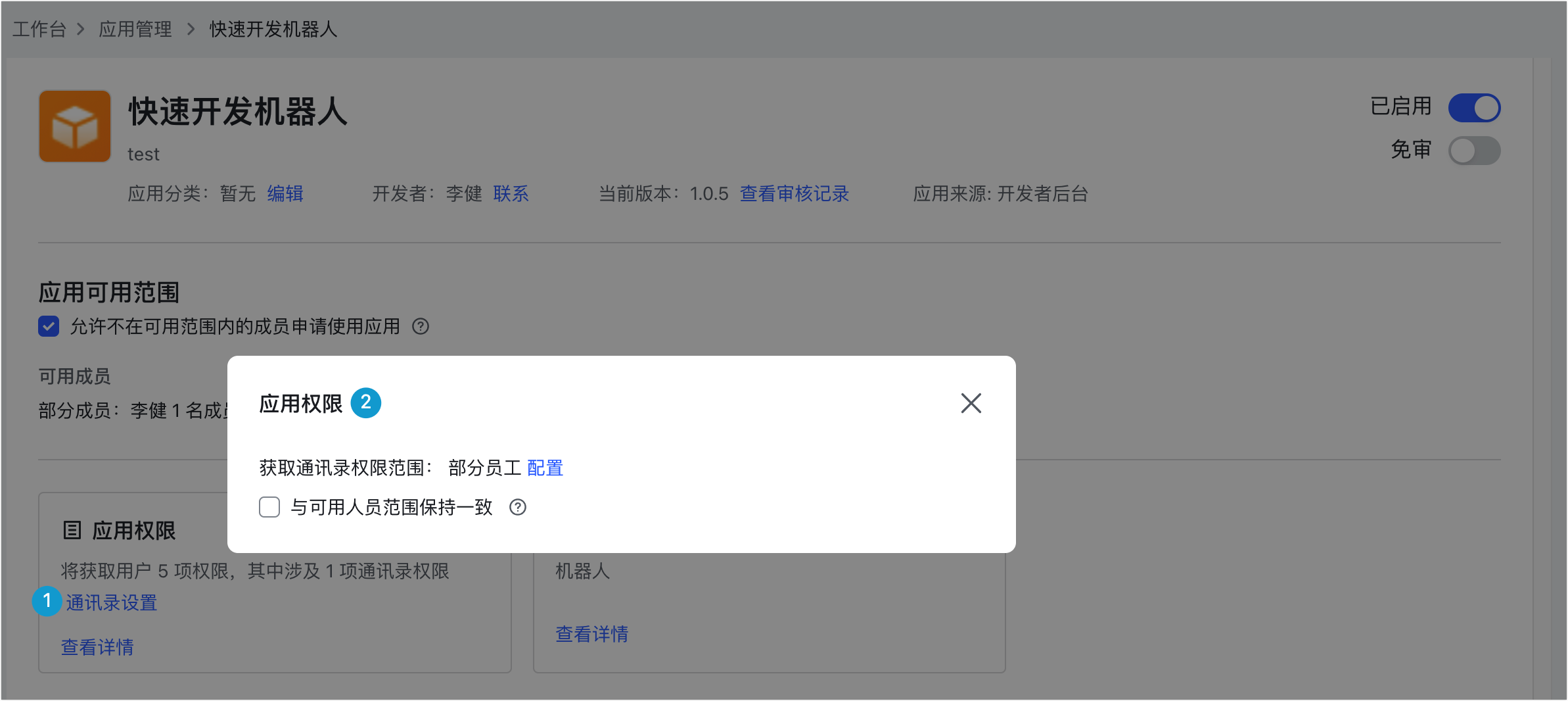
当前操作的用户需要添加在应用的通讯录权限范围内。通讯录权限范围定义了应用在调用通讯录 API 时可获取的部门、用户的数据范围。应用无法访问不在通讯录权限范围内的数据。
由开发者登录[开发者后台](https://open.feishu.cn/app),在应用详情页的 **开发配置** > **权限管理** > **数据权限** 页面内,配置 **通讯录权限范围**,添加指定用户。
已发布的应用企业管理员可在[管理后台](http://feishu.cn/admin) > **工作台** > **应用管理** 页面,修改应用的通讯录权限范围。
- **使用 user_access_token 调用 API**
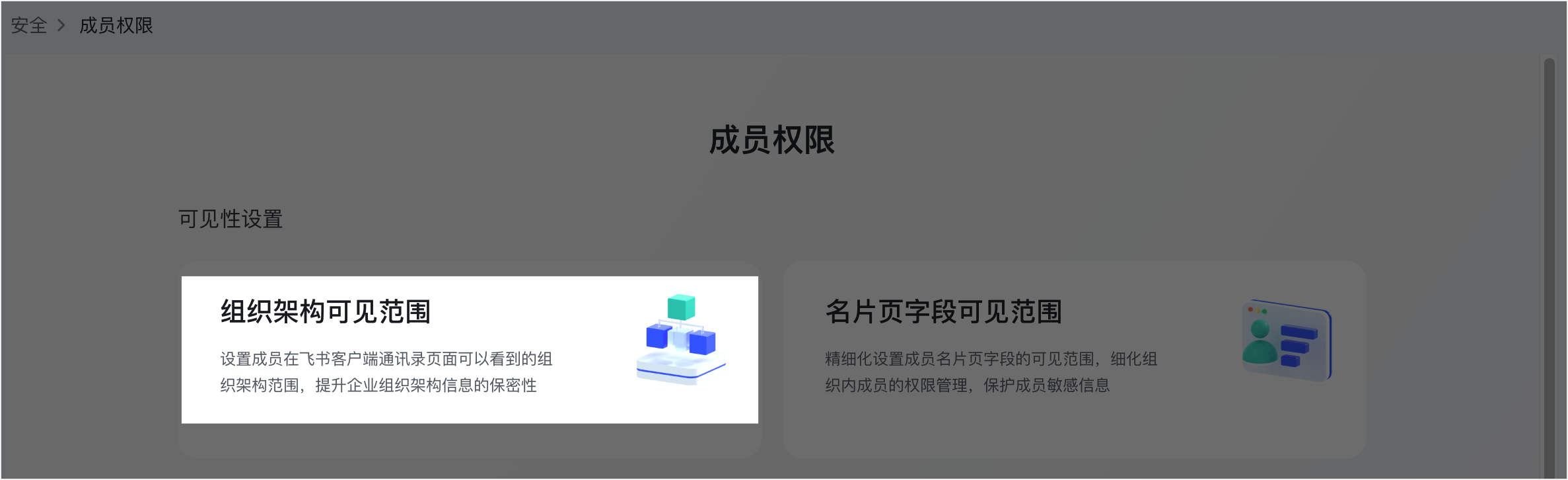
当你使用用户身份调用通讯录 API 时,可操作的权限范围不受应用的通讯录权限范围影响,而是受当前用户的组织架构可见范围影响,该范围限制了用户在企业内可见的组织架构数据范围。
由企业管理员在[管理后台](http://feishu.cn/admin) > **安全** > **成员权限** 页面中,点击 **组织架构可见范围** 进行管理。
完整介绍参见[权限范围资源介绍](https://open.feishu.cn/document/ukTMukTMukTM/uETNz4SM1MjLxUzM/v3/guides/scope_authority)。
400 | 40011 | page size is invalid | 无效的分页参数。page_size 的取值上限为 50。
400 | 40012 | page token is invalid error | 无效的分页参数。你需要检查传入的 page_token 是否为上次请求返回的 page_token 值。
403 | 40004 | no dept authority error | 无部门权限。当前操作的部门需在应用的通讯录权限范围内。通讯录权限范围的介绍与设置方式,参见[权限范围资源介绍](https://open.feishu.cn/document/ukTMukTMukTM/uETNz4SM1MjLxUzM/v3/guides/scope_authority)。
更多错误码信息,参见[通用错误码](https://open.feishu.cn/document/ukTMukTMukTM/ugjM14COyUjL4ITN)。