# Task overview
## Product Introduction
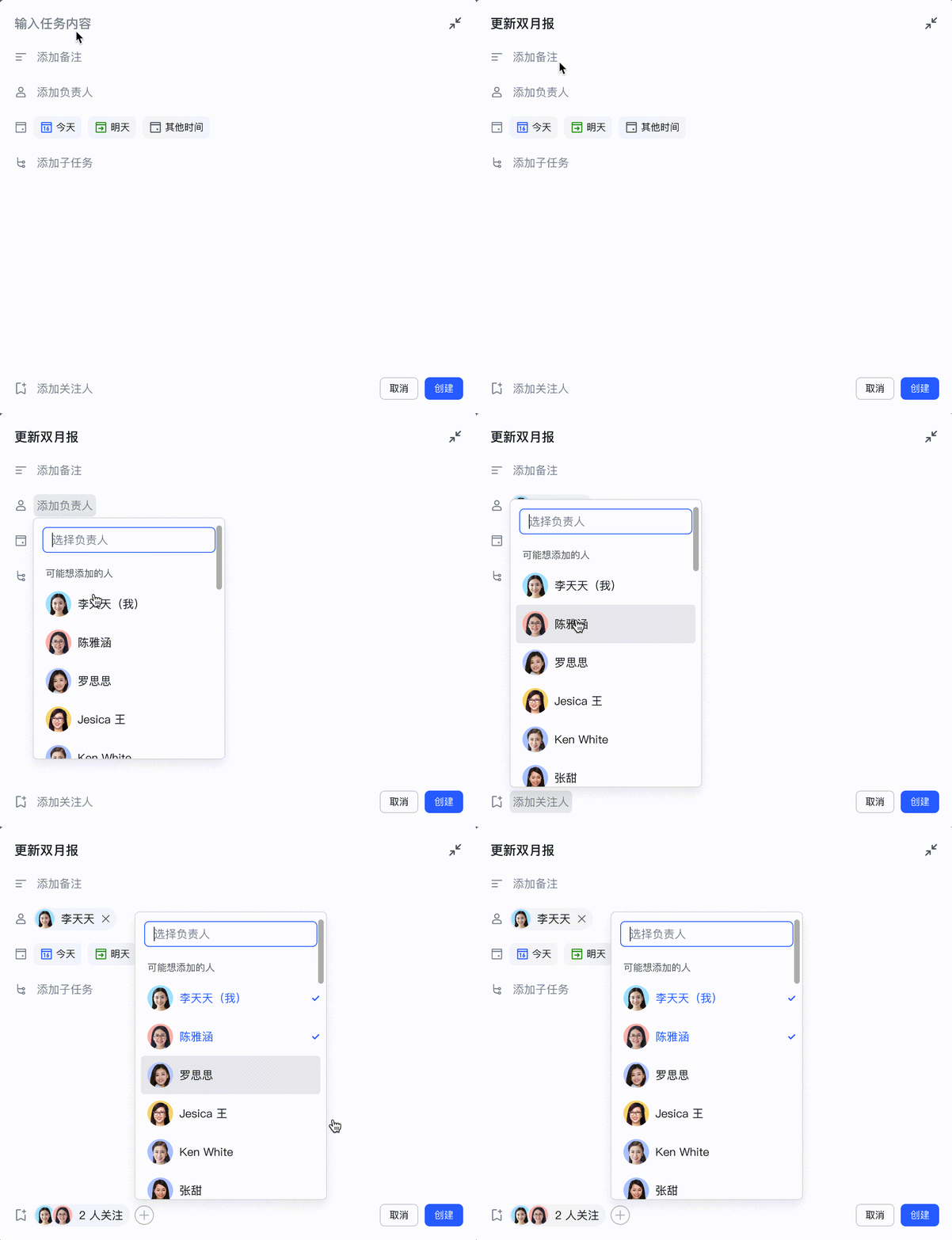
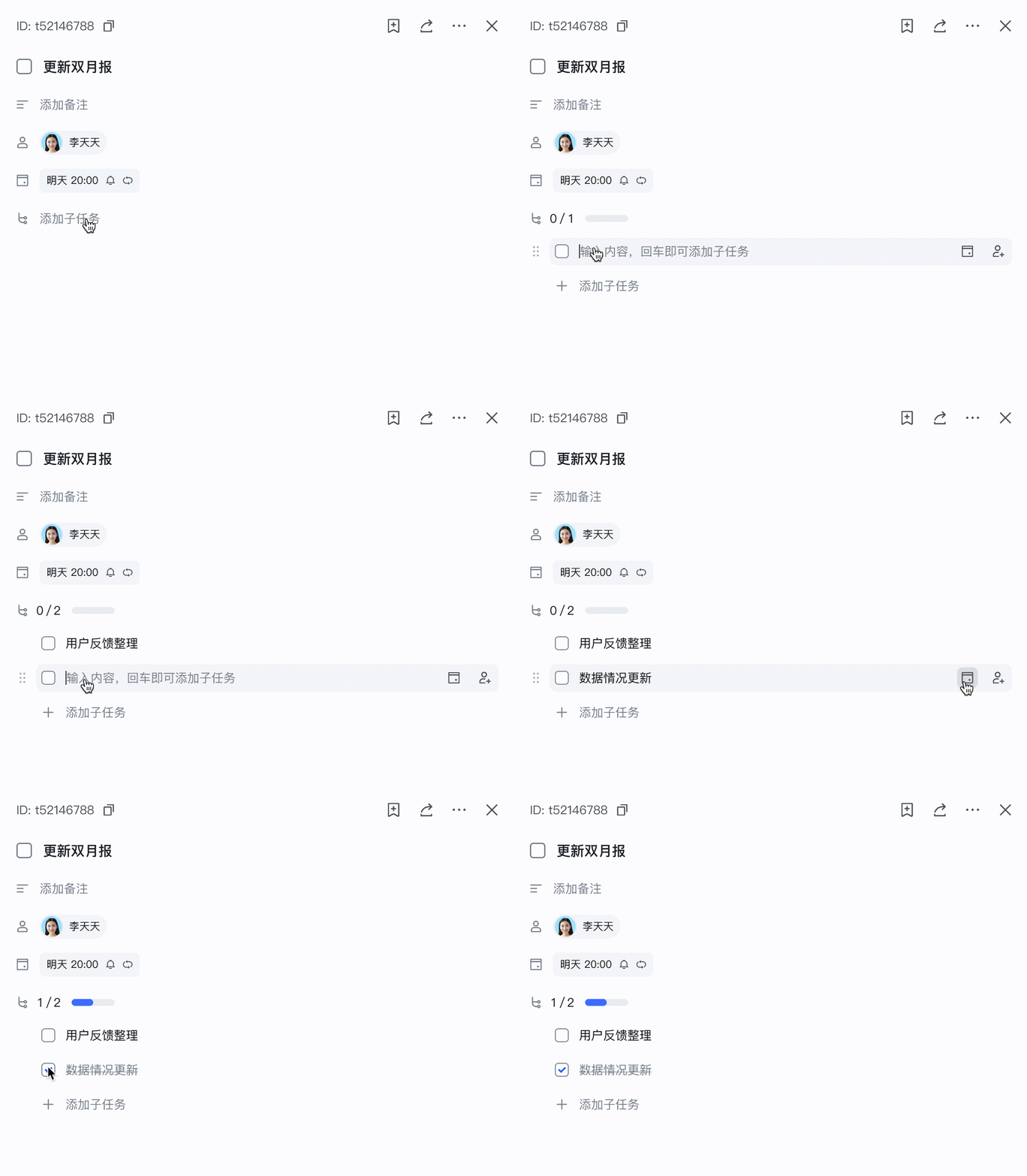
Lark Tasks is a universal task/project management tool that comes with Lark, with strong collaboration capabilities. You can easily create tasks in Lark App Task Center, groups, documents, and other scenarios. You can also share tasks with interested members or follow and track some interesting tasks.

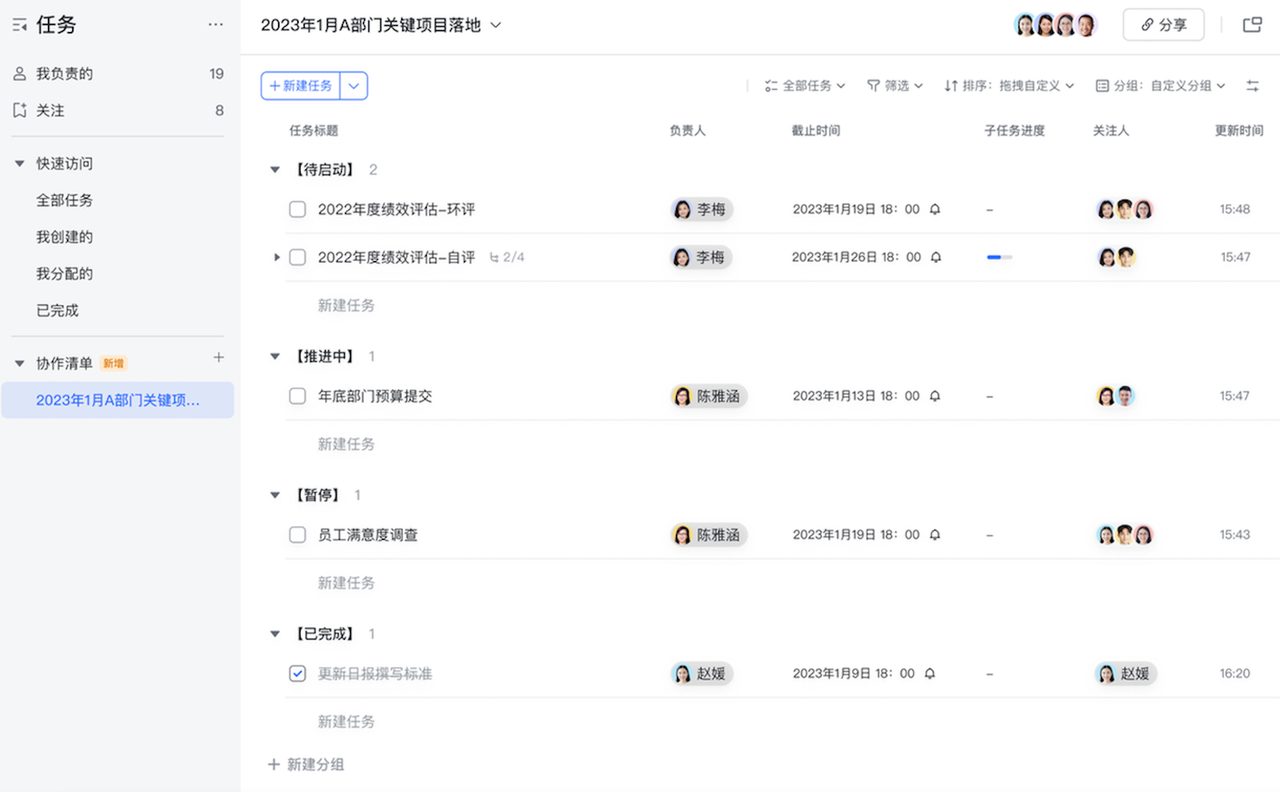
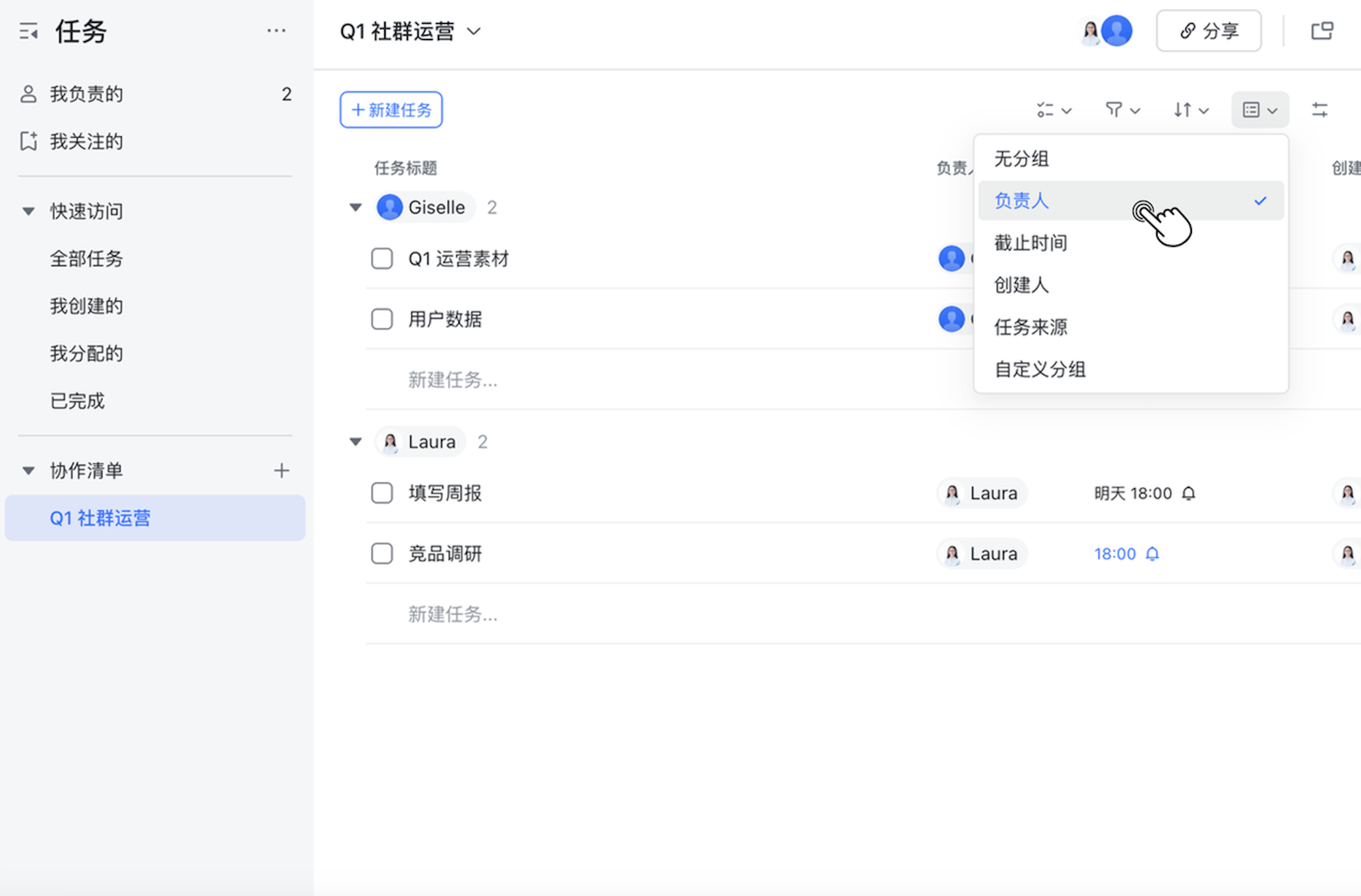
A group of tasks can be added to the collaboration list to decompose and track the work of specific projects, resulting lightweight and efficient task management within the team.

| Application Scenarios         |        |
| --------- | --------------- | 
|**Create tasks, assignees and followers**<br>![c707ac1f-6777-4adf-863a-d594c9d4effa.gif](//sf3-cn.feishucdn.com/obj/open-platform-opendoc/2f0238e05f009e8283236142c1abaa84_elRA5G0HiX.gif?height=976&lazyload=true&width=1184)|**Decompose subtasks and set due**<br>![bc24a2cd-2175-4f1a-84d9-8712ff638af6.gif](//sf3-cn.feishucdn.com/obj/open-platform-opendoc/4cf6deab75aa662a6d1867b9b148a3d9_y4glitDSS9.gif?height=976&lazyload=true&width=1184) |
|**Use tasklists to organize and manage tasks**<br>![image.png](//sf3-cn.feishucdn.com/obj/open-platform-opendoc/e24401a97e45f0e22c592a03934710b6_vbXolF1XSn.png?height=1774&lazyload=true&width=2696)| **Group and filter list tasks**<br>![image.png](//sf3-cn.feishucdn.com/obj/open-platform-opendoc/bbf70a231d98e694aff8f52eda8ec1ab_k2m1XGLKSE.png?height=1414&lazyload=true&width=2134)｜

## Task Openapi V2 Capabilities
The capabilities of Task v2 Openapi include:

* **[Task API](https://open.feishu.cn/document/uAjLw4CM/ukTMukTMukTM/task-v2/task/overview)**: Supports adding, deleting, modifying, and querying tasks; adding/removing task members; adding/removing tasks from the list; accessing/adding task subtasks, etc.
* **[Tasklist API](https://open.feishu.cn/document/uAjLw4CM/ukTMukTMukTM/task-v2/tasklist/overview)**: Supports adding, deleting, modifying, and querying tasklists; adding/removing tasklist collaboration members, etc.
* **[Comment API](https://open.feishu.cn/document/uAjLw4CM/ukTMukTMukTM/task-v2/comment/overview)**: Supports adding, deleting, modifying, and querying comments. Currently, only tasks support comments.
* **[Section API](https://open.feishu.cn/document/uAjLw4CM/ukTMukTMukTM/task-v2/section/section-feature-overview)**: Supporting adding, deleting, modifying, and querying setcions.
* **[Custom Field API](https://open.feishu.cn/document/uAjLw4CM/ukTMukTMukTM/task-v2/custom_field/custom-field-overview)**：Supporting adding, deleting, modifying, and querying custom fields.
* **[Attachment API](https://open.feishu.cn/document/uAjLw4CM/ukTMukTMukTM/task-v2/attachment/attachment-feature-overview)**： Supporting uploading, getting, listing and deleting attachments.

## How to Use Task API

### 1. Apply scopes for the application

API scopes means whether a Lark open application can invoke a specific API.

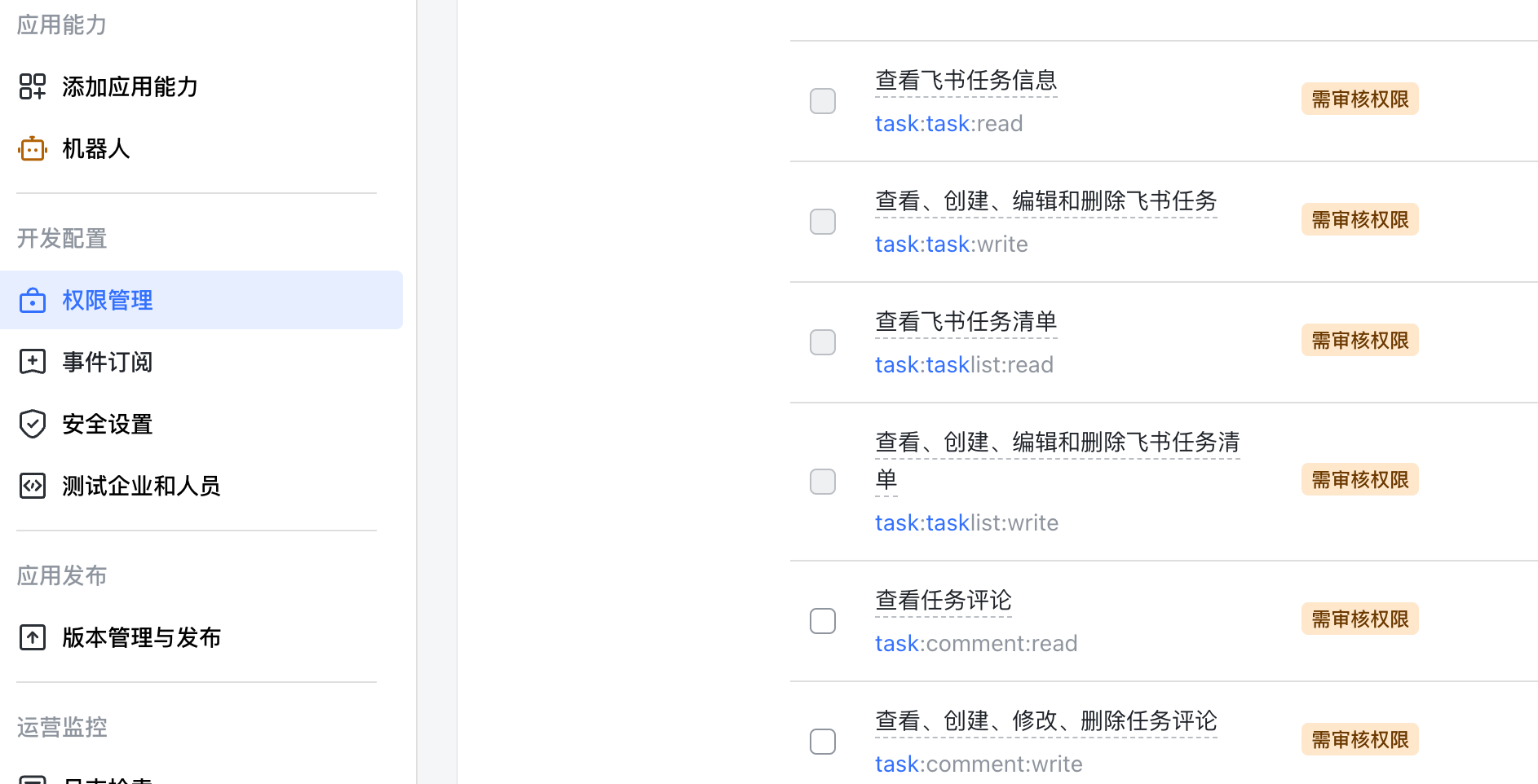
Task API, Subtask API, Tasklist API, and Comment API all have their own read-only and write scopes. Apply for scopes, submit for review, and obtain approval before you can invoke the corresponding apis.

| API Category        | Scope           | Function        | 
| --------- | --------------- | -------   | 
|Task API, Subtask API | View Task Information<br>`task:task:read` | After authorization, you can call task read-only APIs, such as [Get Task Details](https://open.feishu.cn/document/uAjLw4CM/ukTMukTMukTM/task-v2/task/get). |
|Task API, Subtask API | View, create, edit, and delete tasks<br>`task:task:write` | After authorization, you can call any task APIs. |
|Tasklist API | View Tasklist<br>`task:tasklist:read` | After authorization, you can call tasklist read-only APIs, such as the [Get Tasklist Details](https://open.feishu.cn/document/uAjLw4CM/ukTMukTMukTM/task-v2/tasklist/get). |
|Tasklist API | View, create, edit, and delete Tasklist<br>`task:tasklist:write` | After authorization, you can call any tasklist APIs. |
|Comment API | View Task Comments<br>`task:comment:read` | After authorization, you can call comment read-only APIs, such as [Get Comment](https://open.feishu.cn/document/uAjLw4CM/ukTMukTMukTM/task-v2/comment/get). |
|Comment API | View, create, edit, and delete Task Comments<br>`task:comment:write` | After authorization, you can call any comment APIs. |
|Section API | View Task Sections<br>`task:section:read` | After authorization, you can call section read-only APIs, such as [Get Setction](https://open.feishu.cn/document/uAjLw4CM/ukTMukTMukTM/task-v2/section/get). |
|Section API | View, create, edit and delete Section<br>`task:section:write` | After authorization, you can call any Section APIs. |
|Custom Field API | View custom fields<br>`task:custom_field:read` | After authorization, you can call Custom Field read-only APIs, such as [Get Custom Field](https://open.feishu.cn/document/uAjLw4CM/ukTMukTMukTM/task-v2/custom_field/get). |
|Custom Field API | View, create, edit and delete Custom Fields<br>`task:custom_field:write` | After authorization, you can call any Custom Field APIs. |
|Attachment API | View Attachments<br>`task:attachment:read` | After authorization, you can call attachment read-only APIs, such as [List Attachment](https://open.feishu.cn/document/uAjLw4CM/ukTMukTMukTM/task-v2/attachment/list). |
|Attachment API | View, create, edit and delete Attachment<br>`task:attachment:write` | After authorization, you can call any Attachment APIs. |

> Note: The current version of API uses different scopes from the v1 task API. For example, calling the v1 Create Task interface requires the "View, create, edit, and delete Lark tasks (historical version)" (`task:task`) scope, while the new API uses "View, create, edit, and delete Lark tasks" (`task:task:write`). If you are a task openapi v1 user and want to switch to v2, you need to reapply for new scopes and complete the publishing process.
>
> To make it easier to distinguish, the names of v1 openapi scopes are marked with suffix "historical version".

To apply scopes, go to the “Permissions & Scopes” page of the application development console and search for the corresponding scopes.
![image.png](//sf3-cn.feishucdn.com/obj/open-platform-opendoc/8bdf70df8d36d88cd9ebd26858e5847e_uirEZlkM89.png?height=1384&lazyload=true&width=2562)

For Custom Apps (enterprise built-in apps), the enterprise administrator needs to approve the application in the Lark Admin Console; for Store Apps, the platform administrator needs to review and approve the application, and the enterprise administrator needs to install or upgrade the application in the app market. For more detailed steps, please refer to [Apply for scopes](https://open.feishu.cn/document/ukTMukTMukTM/uQjN3QjL0YzN04CN2cDN).

After applying scopes and getting authorization, the application can invoke the corresponding apis. However, this does not mean that caller can access any task data. Access task data requires the calling identity to meet data permission rules.

### 2. Apply for access_token with calling identity

To invoke some API, you must apply an access_token which indicates the **calling identity**. Lark tasks will perform specific authorization based on the calling identity.

Task API supports `tenant_access_token` and `user_access_token`.
Type                        | tenant_access_token              |    user_access_token                     
| ---- | ------------------------- | ----------------------------------- |-------- |
| Description | Invoke the task api with the application identity, and perform CRUD operations on the task data created by the application. | Invoke the task api with the user identity, which is equivalent to the user directly operating the Lark App task user interface.        
| Use case | Use this token when the application needs to have its own task data. For example:<br>In a project management application, you need to create tasks for project members. You can use `tenant_access_token` to create tasks with the application identity and add specific users as task owners. | Users develop third-party task applications, using Lark's identity information and Lark task capabilities, but want to provide a different user interface from Lark.
| Acquisition method | The application can directly obtain the tenant_access_token through the app_id and app_secret from Lark's open platform authorization interface. | Guide users to log in to Feishu, and then obtain the user_access_token under user authorization.

The calling identity of `tenant_access_token` and `user_access_token` are both "users" from the perspective of the task system interal, and both have names, avatars, and other attributes, and will be authorized in the same way. In other words, `tenant_access_token` **has NO special privileges** and cannot access the task data belonging to other users or other applications, nor can it be used as the "tenant administrator" role. The difference between `tenant_access_token` and `user_access_token` is simply how they are acquired: `user_access_token` requires a real user's authorization to generate; while `tenant_access_token` does not require it and can be applied directly through the application's appid/secret.

> Both `tenant_access_token` and `user_access_token` have expiration. Normally, it is about 2 hours. Formal applications need to implement a component to re-generate new access tokens periodically to ensure the application can always use a valid access token.
>
> For more information, please refer to [Get access token](https://open.feishu.cn/document/ukTMukTMukTM/uMTNz4yM1MjLzUzM).

### 3. Invoke APIs

After completing the above two steps, you can now invoke the apis. You can view the api documentation to obtain the domain name and URL information of the interface, and pass the access_token mentioned above in the form of `Authorization` Header (the token should be prefixed with "Bearer "). For example:

```
POST <api url>

Authorization: Bearer <access_token>

<req body>
```

For example, apply for a `tenant_access_token` and invoke the [Create Task](https://open.feishu.cn/document/uAjLw4CM/ukTMukTMukTM/task-v2/task/create) api to create a task. Then use the [Add Task Members](https://open.feishu.cn/document/uAjLw4CM/ukTMukTMukTM/task-v2/task/add_members) api to add your user (represented by the user's open id) as the task assignee. The task should now also appear in the "My Owned" task list in Lark Task.

Afterwards, you can switch to `user_access_token` of yourself to invoke the [Get Task Details](https://open.feishu.cn/document/uAjLw4CM/ukTMukTMukTM/task-v2/task/get) api to view the details of the task. Since the current user is the task assignee, they have permission to get the details of it. Then try to use another user' `user_access_token` to invoke the same api to get the same task details, and you will get an error code of 1470403, because that user is not a member of the task and cannot access the task.

## Task Terminology and Concepts

To effectively use the api, it is necessary to understand some task terminology and concepts.

* **Task**: A task records a user's to-do item. It has properties such as summary, description, and whether it is completed, etc. Each task has a globally unique ID, or **Task GUID** with which you can manipulate it through api.
* **Subtask**: A sub task belonging to a task, generally used for work breakdown. A task can have multiple subtasks, and subtasks can also have their own subtasks. Apart from having a reference to a parent task, subtasks are no different from normal tasks.
* **Task Assignee**: Each task can have several assignees. The assignee can modify the task and mark it as completed, etc. According to the principle of "one person responsible for one thing", it is recommended that a task should have only one assignee, but the system does not enforce this.
* **Task Follower**: Each task can have several followers. Followers can receive notifications when task is changed. Task assignees and followers are collectively referred to as Task Members. A user can be an assignee and a follower simultaneously in the same task.
* **Task Completion Mode**: When a task has multiple assignees, it can be set to either of two modes: "Or-Sign Task" - when any assignee marks the task as completed, the entire task is completed; "Countersign Task" - when all assignees mark the task as completed, the entire task is considered completed.
* **My Tasks**: The collection of tasks for which the user is the assignee. They are displayed in the "Owned" UI of the Lark App Task Center.
* **Tasklist**: It is a container for a group of tasks. It is used for organizing, managing, and tracking the progress of tasks related to a single project. Each tasklist also has a globally unique Tasklist ID (abbreviated as Tasklist GUID) for API operations.
* **Tasklist Owner**: Each list has one user with management permissions for the list. When a list is created, the creator is the owner of the tasklist. The owner can transfer ownership to other users, but the owner cannot be absent. Only the tasklist owner can change the owner, and only the owner can delete the tasklist.
* **Tasklist Member**: Each tasklist can have multiple members. Members can be either users or chats. Members can have "viewer" or "editor" roles. "Viewer" member can view the tasklist and the tasks in the tasklist; "editor" members can modify the tasklist name, add or remove tasks from the tasklist, adjust the task order, etc. A user can only have one role in the same tasklist.
* **Comment**: Comments can be made on tasks to record information related to the task. Comments can be updated or deleted by the comment creator.
* **Section**：Sections can be defined in "My Tasks" and tasklist by which user can categorize their tasks manually.
* **Custom Field**: Each tasklist can be added several custom fields(number, member, datetime, single_select, multi_select). Task in such tasklists can be set custom field values.
* **Attachment**: Each task can attach multiple files, such as images, PDF documents or zip files, etc. These files can be previewed or downloaded by the task members.

Note: The Task API v2 adjusts some terminology for the Task v1 API.
 * The task GUID is referred to "task ID" in v1 api. And in the v2 API, the term "task GUID" is always used to refer to the globally unique ID of a task, such as `df8a7aff-18c1-4b9c-9959-0dda10c49309`; task ID is used to refer to the multi-digit numerical ID starting with "t" generated for each task (e.g., `t1002325`).
 * The task assignee is referred to as "collaborator" in the v1 api 。

## API Design Principles and Specifications

### API Style

The whole API adopts the Restful-like style. Each core business concept is designed as a resource, including: "task", "tasklist", "comment", etc. The regular creation, retrieval of details, retrieval of lists, updates, and deletion of resources all use the Restful style. For example, for a task, the main operations are designed as follows:

| Operation       | HTTP Method | HTTP URL                     |
| --------------- | ----------- | ---------------------------- |
| Create Task     | POST        | /task/v2/tasks               |
| View Task Detail | GET         | /task/v2/tasks/:task_guid    |
| Get Task List   | GET         | /task/v2/tasks               |
| Update Task     | PATCH       | /task/v2/tasks/:task_guid    |
| Delete Task     | DELETE      | /task/v2/tasks/:task_guid    |

For other non-standard Restful APIs, for write apis, use `POST` and add the action name after the resource ID in the URL. Such as:

| Operation       | HTTP Method | HTTP URL                               |
| --------------- | ----------- | -------------------------------------- |
| Add Task Members | POST        | /task/v2/tasks/:task_guid/add_members |
| Remove Task from List | POST   | /task/v2/tasks/:task_guid/remove_tasklist |

For read apis, use the `GET` method and add the sub-resource to be obtained after the resource ID in the URL. Such as:

| Operation                | HTTP Method | HTTP URL                               |
| ------------------------ | ----------- | -------------------------------------- |
| Get All Lists of a Task  | GET         | /task/v2/tasks/:task_guid/tasklists   |
| Get Task List in a List  | GET         | /task/v2/tasklists/:tasklist_guid/tasks |

## About Resource Update

In the Restful style, resource updates can use PUT (whole update) or PATCH (partial update). In the Task API, PATCH (partial update) is always used. The advantage of partial update is that the caller can accurately specify which field to update without worrying about accidentally cleaning the corresponding data due to forgetting to fill in some fields. At the same time, using the partial update style can clearly distinguish between "not update a field" and "clean a field".

To support partial updates, the update api request normally includes a resource field and an `update_fields` field . `update_fields` is used to declare which fields to update. The data of resource fields declare what data should be changed to. For example, for the update task api:

```json
PATCH /task/v2/tasks/d1fd19fd-4810-479d-a093-fb9b0442c6f6
{
  "task": {
     "summary": "New Title",
     "due": {
       "timestamp": "1682924400000",
       "is_all_day": false
     },
     "description": "New Description"
  },
  "update_fields":["summary","due"]
}
```
This request only updates the `summary` and `due` of the task with guid "d1fd19fd-4810-479d-a093-fb9b0442c6f6". Since the "update_fields" don not include "description", the `description` field of the task will not change.

If "update_fields" is filled but the data of this field is not set in the resource, it is equivalent to cleaning it. For example:

```json
PATCH /task/v2/tasks/d1fd19fd-4810-479d-a093-fb9b0442c6f6
{
  "task": {

},
  "update_fields":["description"]
}
```
This request will clean the description of the task to empty.

However, some fields are not allowed to be set to empty. Updating such fields to empty will result in an error. For example, the following api call attempts to clean the task summary.

```json
PUT /task/v2/tasks/d1fd19fd-4810-479d-a093-fb9b0442c6f6
{
  "task": {
  },
  "update_fields":["summary"]
}
```
But because the task title cannot be empty, an error will be reported:

```json
{
    "code": 1470400,
    "msg": "Invalid Param 'summary', must not be empty.",
    "error": {
        "log_id": "2023070718115246FF085B0B55C60858A5"
    }
}
```

## How to represent members of tasks and tasklists?

In the task api, members of tasks and tasklists are uniformly represented by the `member` data structure. A member contains three fields: `type`, `id`, and `role`. Where
* `type` indicates what type of member this is, which can be `user`,`chat`,`app`, etc., depending on the scene.
* `id` indicates the specific ID of the member, which varies with `type`.
  * When `type` is "user", `id` is an ID representing the user (use different formats according to `user_id_type`, see below "How to modify the user ID format using user_id_type?")
  * When `type` is "chat", `id` is an open_chat_id representing the chat, such as "oc_e9fe7b7f9237286bc3541aa863a94f11". chat_open_id can be obtained through the chat's open api.
  * When `type` is "app", `id` is an appid representing the application, such as "cli_a4af8f8e8af89023". Appid can be obtained through the application development console.
* `role` indicates what role the member has in the current scene.

Tasks and tasklists support different member types and roles.

| Resource Type         | Supported Member Types          | Supported Roles    | 
| --------- | --------------- | -------   | 
| Task | "user"<br>"app" | "assignee" <br>"follower" |
| Tasklist | "user"<br>"chat"<br>"app"| "owner"<br>"editor"<br>"viewer"|

For example, the following code calls the create task api with `tenant_access_token` and adds one assignee and one follower.

```
POST /task/v2/tasks
Authorization: Bearer t-g10275aDL3ZEMVDEUYXRBXXKZ5NSWWQNX3F5Y24N
{
  "summary": "Create a task",
  "members": [
    {
      "type": "user",
      "id": "ou_1400208f15333e20e11339d39067844b",
      "role": "assignee"
    },
    {
      "type": "user",
      "id": "ou_d9f343c6c051ad2ef631f596dbea839f",
      "role": "follower"
    }
  ]
}
```

Then following response is obtained (with other fields hidden except the task GUID and member fields). There are one assignee and one follower, both of which are users.

```json
{
    "code": 0,
    "data": {
        "task": {
            "guid": "3555af03-3379-445c-a758-00720ed5c135",
            "members": [
                {
                    "id": "ou_1400208f15333e20e11339d39067844b",
                    "role": "assignee",
                    "type": "user"
                },
                {
                    "id": "ou_d9f343c6c051ad2ef631f596dbea839f",
                    "role": "follower",
                    "type": "user"
                }
            ],
        }
    },
    "msg": ""
}
```

## How to modify user ID format using user_id_type?
Lark Open Platform supports different ID formats for representing "users", i.e., `user_id_type`. When calling an api, you can set the query string parameter `user_id_type` to choose different user ID format. The `user_id_type` setting of each request will affect the format of the `id` field of all **user** members in the **current request and response**.

There are 3 kind of `user_id_type` formats:

- open_id：Represents a user's identity in an application. The Open ID of the same user is different in different applications. An example of an Open ID is "ou_1400208f15333e20e11339d39067844b". [Learn more: How to get Open ID](https://open.feishu.cn/document/uAjLw4CM/ugTN1YjL4UTN24CO1UjN/trouble-shooting/how-to-obtain-openid)
  - union_id：Represents a user's identity under an application developer. The Union ID of the same user is the same in applications under the same developer, and different in applications under different developers. By using Union ID, application developers can associate the identity of the same user in multiple applications. An example of a Union ID is "on_e4d65380f2a0556cbc0ca6ea89b286boc". [Learn more: How to get Union ID?](https://open.feishu.cn/document/uAjLw4CM/ugTN1YjL4UTN24CO1UjN/trouble-shooting/how-to-obtain-union-id)
  - user_id：Represents a user's identity within a tenant. The User ID of the same user is different in tenant A and tenant B. Within the same tenant, a user's User ID is consistent across all applications (including store applications). User ID is mainly used to associate user data across different applications. In addition, when creating new employee info in the Lark Admin Console, operator can provide a User ID (if not provided, a User ID will be automatically generated), so that Lark and the enterprise's internal HR system can use the same set of IDs for employees. An example of a User ID is "f19d4656". [Learn more: How to get User ID?](https://open.feishu.cn/document/uAjLw4CM/ugTN1YjL4UTN24CO1UjN/trouble-shooting/how-to-obtain-user-id)

If the `user_id_type` parameter is not set, the default is "open_id". If there is no special requirement, you should use "open_id".

`user_id_type` will not affect the format of non-user type `id` fields. For example, a group member's `id` field format is always Open Chat ID; if it is an application, its `id` field format is always APP ID.

For example, use add tasklist member api to add two members to a tasklist, one editor user, and one viewer chat. If you use Open ID, and set "user_id_type=open_id" (or don't set it, and use the default value), then the user's ID will be in Open ID format.
```json
POST /task/v2/tasklists/:task_guid/add_members?user_id_type=open_id
{
 "members": [
   {
     "type":"user",
     "id": "ou_d9f343c6c051ad2ef631f596dbea839f",
     "role": "editor"
   },
   {
     "type":"chat",
     "id": "oc_e9fe7b7f9237286bc3541aa863a94f11",
     "role": "viewer"
   },
  ]
}
```

If you set "user_id_type=user_id", the user's ID will be changed to the User ID format. Note that the chat member's ID is still in Open Chat ID format.

```json
POST /task/v2/tasklists/:task_guid/add_members?user_id_type=user_id
{
 "members": [
   {
     "type":"user",
     "id": "1ef19g02",
     "role": "editor"
   },
   {
     "type":"chat",
     "id": "oc_e9fe7b7f9237286bc3541aa863a94f11",
     "role": "viewer"
   },
  ]
}
```

## Time format, precision, and timezone
In the task api, all fields representing time use timestamps in milliseconds since 1970-01-01 00:00:00 UTC. However, due to the precision issues of programming language such as javascript when converting json, such fields in the request/return json of the api always use string type.

For example, the due of a task is +0800 time instance "2023-05-21 15:00:00", and it is represented as:
```json
{
  "timestamp": "1684652400000",
  "is_all_day": false
}
```

Developers can use some libraries to directly get this timestamp. For example, using javascript, you can use moment.js to generate this timestamp:
```javascript
let m = require('moment');
console.log(m("2023-05-21T15:00:00+0800").valueOf());
```

However, "in milliseconds" only refers to the format used in the api protocol and does not necessarily mean that the service supports millisecond precision. For example, the precision of due time (time instance) is seconds. Even if you input a timestamp with millisecond precision for the due, only the second, minute, hour, ... parts will be parsed and stored. The millisecond part will be ignored. For example, when setting the due in the Update Task API:
```json
{
  "timestamp": "1684654215956",
  "is_all_day": false
}
```
The returned due will be changed to:
```json
{
  "timestamp": "1684654215000",
  "is_all_day": false
}
```

The millisecond timestamp string expressions is to ensure that future api changes and enhancements will not cause chaos due to the diversity and changes of time precision in business domain.

Timezone is not recoreded in Lark Task system internally, who simply records time in timestamps format. Developers need to manage their own applications to display time in which timezone. For example, the Lark App supports each user to configure their UI timezone. For the same task with a specific due, if there are multiple members, and each member's device uses different timezones, the same due in different timezones will be **displayed differently**.
> However, in the case of all-day tasks, the above rules will be different, see [How to use the start and due times of tasks?](https://open.feishu.cn/document/uAjLw4CM/ukTMukTMukTM/task-v2/task/overview).

## API Error Specification

Each Lark Tasks api can returns several major error codes.

| HTTP Status Code | code   | Meaning       |  Troubleshooting suggestions |
| --------- | --------------- | -------------------------|-------------------------|
| 400       | 1470400        | The request parameter is incorrect, such as not filling in the summary when creating a task.| The error message will explain the specific error reason. |
| 403       | 1470403        | Lack of permission. For example, to update a task, but without the edit permission of the task. | You need to query the permission section of the relevant API documentation to confirm that the caller has the permission. |
| 404       | 1470404        | The resource requested does not exist or has been deleted. Such as updating a task, but the task has been deleted.| Confirm whether the resource still exists. If it is confirmed that it still exists, then check whether the resource ID has been truncated or contains invisible characters. <br> A common cause of this problem is that some characters are dropped when copying and pasting the resource ID.|
| 500       | 1470500            | Server error. It may be caused by internal timeouts, temporary throttling, server instability, etc. | When encountered, you can try to call again with the same request parameters. If the problem persists after multiple retries, please contact the support staff to report the problem. <br> Please provide the logid and request parameters when submitting feedback.|

For 400 errors, because they are numerous and most of them can be discovered and solved during development, generally they share the same code in order to avoid introducing too many fragmented error codes. The error msg will tell the reason. For example:

| Error Scenario | Error Message |
|--------|---------------|
| When creating a task, the `due` parameter is set, but the required `timestamp` is not provided.|Invalid Param 'due.timestamp', param is required.
| When adding a task member, the role is neither "assignee" nor "follower"|Invalid Param 'members', role is invalid. Only 'assignee', 'follower' are supported.  |
| Invoke the Update Task API, set the task repeat rule, but the task has no due.<br> The repeat rule can only be set for tasks with due.|Invalid Param 'repeat_rule', cannot set repeat_rule without setting due.  |

For some special cases, additional specific error codes are defined to help developers write correct error handling codes. For example, each task supports only one reminder. When using the [Add Task Reminder](https://open.feishu.cn/document/uAjLw4CM/ukTMukTMukTM/task-v2/task/add_reminders) api to add more than one reminder to a task, you will get an error code of 1470613. In this way, developers can develop logic to remove the existing reminder first by calling the [Remove Task Reminder](https://open.feishu.cn/document/uAjLw4CM/ukTMukTMukTM/task-v2/task/remove_reminders) api.

**We very much welcome developers to provide feedbacks on the return of errors, to improve the quality of error message, or add necessary error codes for specific scenarios**.

## Pagination API Convention

Some API (such as the [Get Task List](https://open.feishu.cn/document/uAjLw4CM/ukTMukTMukTM/task-v2/tasklist/tasks) interface) support pagination. API supporting pagination have a special calling convention.

The parameters of the pagination api request are `page_size` and `page_token`. `page_size` is the size of each page. Unless otherwise specified, the minimum value of `page_size` is 1, the maximum value is 100, and the default value is 50. Setting `page_size` to 0,  a negative number, or a number greater than 100 will result in an error.

`page_token` is used to locate the position (offset) of the pagination. Due to internal implementation reasons, the offset may not necessarily be a simple position number, but some internal data structure that can accurately locate the position. And the internal implementation of different api may be different. Therefore, those internal position data are encoded to `page_token` and returned  to developers.

When calling a paginated api for the first time, donot set `page_token` parameter or simply write `page_token=`. This indicates that api should return the first page. For example:

```
GET /task/v2/tasklist/:task_guid/tasks?page_size=10
```

will produce the response:

```json
{
  "code": 0,
  "msg": "success",
  "data": {
     "items": [
        {...},
        {...},
        ...
        {...}
      ],
     "has_more": true,
     "page_token": "Cg1UYXNrc1Rhc2tMaXN0EAMY.biLg5Mx"
  }
}
```

In the `data` of response body, there must be 3 fields `items`, `has_more`, and `page_token`. Among them,

* `items` is the list of data for the current page, and the data is returned in the order specified in the request;
* `has_more` indicates whether there are more data;
* `page_token` is the token locating the next page. If `has_more` is true, it must exist; otherwise, `page_token` will be an empty string.

Use the returned `page_token` and keep other request parameters unchanged. Call the api again to get the data on the next page. If there is more data, a new `page_token` will be returned.

```
GET /task/v2/tasklist/:task_guid/tasks?page_size=10&page_token=Cg1UYXNrc1Rhc2tMaXN0EAMY.biLg5Mx
```

Repeat this process until `has_more` is false. All data are retruend.  This is called a "traversal".

There are the following precautions when using the paging interface:
* During the repeated calls to the paging api, the data itself may change. For example, the original data list is A, B, C, D, E. Suppose you call the api with `page_size=3` to get the first page A, B, C. Before calling the api next time, a new piece of data is inserted and placed after A, resulting in A, X, B, C, D, E. When you get the second page, you can only get D, E. X can only be obtained when you start over again from the first page.
* During a traversal, do not modify any parameters other than page_token, including `page_size` and parameters for filtering data range. If you do this, you may get inaccurate paging results.
* Always check the `has_more` field in the response. Only call the api to get the next page data when `has_more` is true. If you directly use the `page_token` in the response to initiate the next call, because the `page_token` of the last page is always an empty string, it will lead you back to the first page.

## Idempotent Invocation

Consider the following scenario: A third-party ticket system creates tasks associated with the ticket through the Create Task API. For example, for a ticket A, call Create Task API. It should create a task T, which is one-to-one associated with A. At the same time, the task creation also sets the "custom completion" function, allowing the task to automatically jump to the ticket A when the user clicks "complete" of T. However, the first invocation is timed out, so normally a retry was initiated to create the task. But in fact, the first timeout call has already taken effect, and a task has also been created. Therefore, 2 tasks are actually created, T1 and T2. But from the perspective of the ticket system, only T2 can be seen, and the relationship between A and T2 is established. In Lark App, however, both T1 and T2 tasks can be seen. Since T1 also has the "custom completion" function, clicking its "complete" will jump to ticket A. But if complete A, because A is only associated with T2, only T2 will be set to completed. This will result in a task T1 that can never be completed. To eliminate T1, the user can only choose to "exit task T1" or forcibly delete it manually.

When Lark system is under heavy load, there may be a large number of timeouts. It is impossible to determine how many times timeout occurred and how many duplicate tasks would be created.

To solve this problem, Idempotent processing is introduced. For example, for the Create Task API, in addition to filling in the regular task fields, you can also set the `client_token` field. This field should be a string type that can uniquely determine the request source, such as the unique ID of ticket A in the above scenario. The Lark Task system guarantees that, when using the same `client_token` for a request within a time period, no matter how many times it is called, only one task will be created. This behavior is called idempotent invocation.

```
POST /task/v2/tasks
{
   "summary": "Idempotent task",
   "client_token": "mBDlrQwWRkiuDckhFzoMy00l4026jK"
}
```

After invoking this api, if 500 Http Status Code is received, indicating an internal Error, the caller can wait for a while and retry the call with the same parameters until the interface is successful.

> If the maximum number of retries is exceeded and the 500 status code is still reported, and the error message does not provide a specific reason, you can provide feedback, and Lark developers will assist in troubleshooting the problem.

Interfaces that currently support idempotent capabilities include: [Create Task](https://open.feishu.cn/document/uAjLw4CM/ukTMukTMukTM/task-v2/task/create), [Create Subtask](https://open.feishu.cn/document/uAjLw4CM/ukTMukTMukTM/task-v2/task-subtask/create), and [Add Task Members](https://open.feishu.cn/document/uAjLw4CM/ukTMukTMukTM/task-v2/task/add_members). If you need other interfaces to support idempotent capabilities, please provide feedback.

Precautions for using idempotent capabilities:
* `client_token` should be globally unique. It is recommended to use the ID of the associated business data or generate it by UUID. Lark system interanally only perform basic string comparison on the `client_token`. The comparison is case-sensitive.
* The parameters of requests using the same `client_token` must remain unchanged. When Lark system checks whether to perform idempotent behavior, it only checks the `client_token` to determine whether it is the same request in business semantics, but not check the all request parameters. The behavior of an api request that uses the same `client_token` but provides different parameters is undefined. The correctness of such calls are not guaranteed.
* When concurrently initiating multiple requests with the same `client_token` and completely identical parameters, only the first request to reach the server will be processed; the remaining requests will be automatically rejected and will receive an error code of `code:1470422`.
* Idempotent behavior has isolation:
  * Idempotent behaviors between different api are isolated. For example, after calling api A using the `client_token`, call api B using the same `client_token`. The call to api B will not be considered as an idempotent call to api A.
  * Idempotent behaviors between different callers are isolated. After access_token A uses the `client_token` to call the api, access_token B uses the same `client_token`  will not be considered as an idempotent call to access_token A and will not return the result of request from access_token A.
* `client_token` has a time limit. After it expires, calling the api with a previously used `client_token` will not get the result will be treated as a brand new `client_token`. In simple terms, the `client_token` cannot be used as a resource ID. The specific time limit of the `client_token` is:
  * If the api is actually successful, the idempotent behavior will last for 5 minutes. After it expires, the same `client_token` will also be treated as a new token. The "actual success" here means that the internal call is successful, but the caller has timed out due to the gateway settings of the open platform.
  * If the interface api fails, the same `client_token` will immediately be treated as a new token.