# 发送仅特定人可见的消息卡片
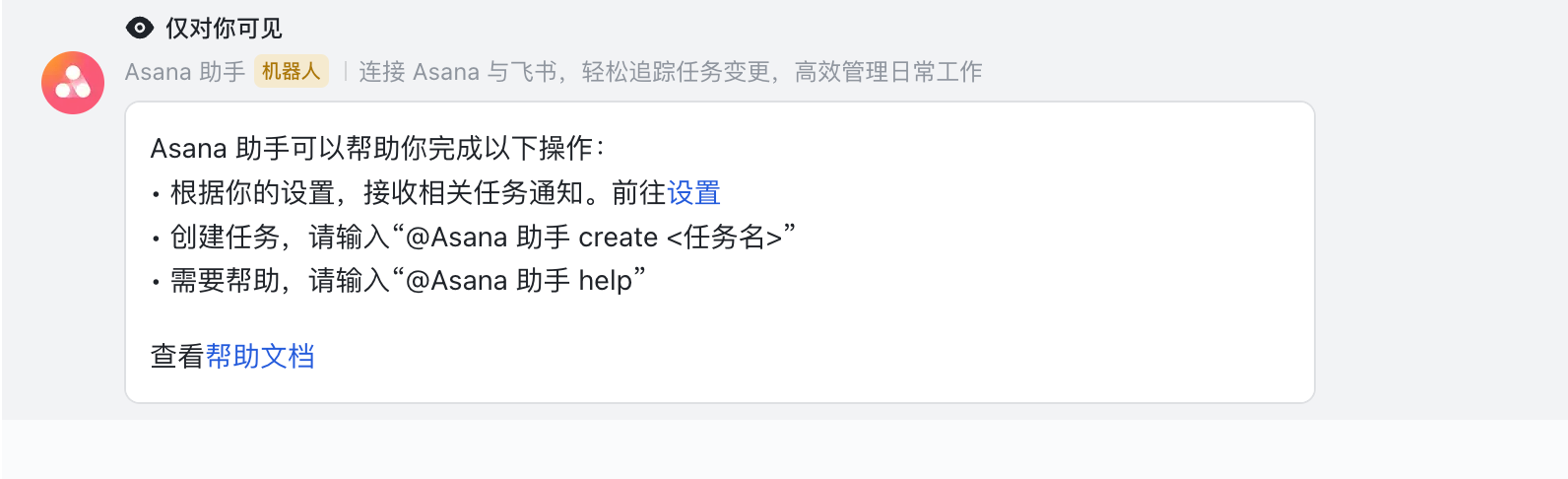
调用该接口,可以使应用机器人在指定群聊中发送仅指定用户可见的卡片消息。卡片上将展示 **仅对你可见** 标识,如下图所示。
## 使用场景
仅特定人可见卡片一般作为临时的交互卡片使用,交互过程仅该用户可见,群内其他成员只会看到最终设置完成的提醒卡片,可以减少消息对群聊中不相关用户的打扰,有效降低群消息的噪声。
**具体场景示例**:在群聊内,管理员需要通过机器人推送的待办事项表单卡片,设置提醒日期和提醒内容。设置完成后再将卡片推送给全部群成员。该过程中,机器人可以先通过本接口推送仅群管理员可见的表单卡片,待管理员与卡片完成交互后,机器人再调用[删除仅特定人可见的消息卡片](https://open.feishu.cn/document/ukTMukTMukTM/uITOyYjLykjM24iM5IjN)接口,删除该卡片消息,并将完善后的待办事项卡片发送给全部群成员查看。
## 前提条件
调用该接口前,请确保你的应用已启用[机器人能力](https://open.feishu.cn/document/uAjLw4CM/ugTN1YjL4UTN24CO1UjN/trouble-shooting/how-to-enable-bot-ability)且机器人在会话群里。
## 频率限制
对同一个群组发送仅特定人可见的消息卡片时,该接口的调用频率上限是 40 QPS。
## 使用限制
- 该接口不支持群模式为话题的话题群(topic),仅支持普通对话群组(group)。相关概念参考[群组基本概念](https://open.feishu.cn/document/uAjLw4CM/ukTMukTMukTM/im-v1/chat/chat-info/intro)。
- 该接口不支持[为卡片局部配置多语言](https://open.feishu.cn/document/uAjLw4CM/ukzMukzMukzM/feishu-cards/configure-multi-language-content#559f0561),仅支持[为卡片全局配置多语言](https://open.feishu.cn/document/uAjLw4CM/ukzMukzMukzM/feishu-cards/configure-multi-language-content#ae4b3cb1)。
- 通过本接口发送的卡片:
- 不支持转发
- 只能发送给群聊中的特定用户,且该用户不会收到消息通知
- 仅在处于在线状态的用户的飞书客户端上可见
- 如果卡片中使用了@指定人语法,被@的成员将不会收到提及通知
## 请求
基本 |
---|---
HTTP URL | https://open.feishu.cn/open-apis/ephemeral/v1/send
HTTP Method | POST
接口频率限制 | [1000 次/分钟、50 次/秒](https://open.feishu.cn/document/ukTMukTMukTM/uUzN04SN3QjL1cDN)
支持的应用类型 | Custom App、Store App
权限要求
**调用该 API 所需的权限。开启其中任意一项权限即可调用**
开启任一权限即可 | 获取与发送单聊、群组消息(im:message)
以应用的身份发消息(im:message:send_as_bot)
更新消息(im:message:update)
### 请求头
名称 | 类型 | 必填 | 描述
---|---|---|---
Authorization | string | 是 | `tenant_access_token`
以应用身份调用 API,可读写的数据范围由应用自身的[数据权限范围](https://open.feishu.cn/document/home/introduction-to-scope-and-authorization/configure-app-data-permissions)决定。参考[自建应用获取 tenant_access_token](https://open.feishu.cn/document/ukTMukTMukTM/ukDNz4SO0MjL5QzM/auth-v3/auth/tenant_access_token_internal)或[商店应用获取 tenant_access_token](https://open.feishu.cn/document/ukTMukTMukTM/ukDNz4SO0MjL5QzM/auth-v3/auth/tenant_access_token)。
**值格式**:"Bearer `access_token`"
**示例值**:"Bearer t-g1044qeGEDXTB6NDJOGV4JQCYDGHRBARFTGT1234"
Content-Type | string | 是 | **固定值**:"application/json; charset=utf-8"
### 请求体
名称 | 类型 | 必填 | 描述
---|---|---|---
chat_id | string | 是 | 目标群 ID。仅支持群模式为对话的普通群,不支持话题群。群 ID 获取方式参见[群 ID 说明](https://open.feishu.cn/document/uAjLw4CM/ukTMukTMukTM/reference/im-v1/chat-id-description)。
示例值:oc_5ad573a6411d72b8305fda3a9c1abcef
open_id | string | 否 | 可见卡片的用户 open_id。ID 获取方式参考[如何获取 Open ID](https://open.feishu.cn/document/uAjLw4CM/ugTN1YjL4UTN24CO1UjN/trouble-shooting/how-to-obtain-openid)。
**注意**:你仅需填写 `open_id`、`email`、或 `user_id` 其中之一,且三个字段不可同时为空。若填写多个,字段生效的顺序为 `open_id` > `user_id` > `email`。 推荐使用 `open_id` 字段。
示例值:ou_449b53ad6aee526f7ed311b216aabcef
user_id | string | 否 | 可见卡片的用户 user_id。ID 获取方式参考[如何获取 User ID](https://open.feishu.cn/document/uAjLw4CM/ugTN1YjL4UTN24CO1UjN/trouble-shooting/how-to-obtain-user-id)。
**注意**:你仅需填写 `open_id`、`email`、或 `user_id` 其中之一,且三个字段不可同时为空。若填写多个,字段生效的顺序为 `open_id` > `user_id` > `email`。 推荐使用 `open_id` 字段。
**示例值**:gg895344
email | string | 否 | 可见卡片的用户邮箱地址。
**注意**:你仅需填写 `open_id`、`email`、或 `user_id` 其中之一,且三个字段不可同时为空。若填写多个,字段生效的顺序为 `open_id` > `user_id` > `email`。 推荐使用 `open_id` 字段。
**示例值**:zhangmin@feishu.com
msg_type | string | 是 | 消息的类型,固定取值 `interactive`。
**示例值**:interactive
card | object | 是 | 消息卡片的内容。支持[卡片 JSON](https://open.feishu.cn/document/uAjLw4CM/ukzMukzMukzM/feishu-cards/card-json-v2-structure) 或[搭建工具](https://open.feishu.cn/cardkit?from=open_docs)构建的卡片模板。
- 要使用卡片 JSON,参考[卡片 JSON 结构](https://open.feishu.cn/document/uAjLw4CM/ukzMukzMukzM/feishu-cards/card-json-v2-structure)。示例值可参考下文的请求体示例。
- 要使用[搭建工具](https://open.feishu.cn/cardkit?from=open_docs)构建的卡片模板,你需传入 `type` 和 `data` 参数。详情参考下文示例。
### 请求体示例
- **使用 JSON 发送卡片示例(以 JSON 2.0 结构为例)**
```json
{
"open_id": "ou_b9600a00cda86b8fad2378eafe3abcef",
"chat_id": "oc_20aa1ed9b18ba49f73f5773453aabcef",
"msg_type": "interactive",
"card": { // 此处传入完整卡片 JSON,支持 1.0 和 2.0 结构
"schema": "2.0",
"config": {
"update_multi": true,
"style": {
"text_size": {
"normal_v2": {
"default": "normal",
"pc": "normal",
"mobile": "heading"
}
}
}
},
"body": {
"direction": "vertical",
"padding": "12px 12px 12px 12px",
"elements": [
{
"tag": "markdown",
"content": "西湖,位于中国浙江省杭州市西湖区龙井路1号,杭州市区西部,汇水面积为21.22平方千米,湖面面积为6.38平方千米。",
"text_align": "left",
"text_size": "normal_v2",
"margin": "0px 0px 0px 0px"
},
{
"tag": "button",
"text": {
"tag": "plain_text",
"content": "🌞更多景点介绍"
},
"type": "default",
"width": "default",
"size": "medium",
"behaviors": [
{
"type": "open_url",
"default_url": "https://baike.baidu.com/item/%E8%A5%BF%E6%B9%96/4668821",
"pc_url": "",
"ios_url": "",
"android_url": ""
}
],
"margin": "0px 0px 0px 0px"
}
]
},
"header": {
"title": {
"tag": "plain_text",
"content": "今日旅游推荐"
},
"subtitle": {
"tag": "plain_text",
"content": ""
},
"template": "blue",
"padding": "12px 12px 12px 12px"
}
}
}
```
- **使用搭建工具的卡片模板发送卡片示例**
```json
{
"open_id": "ou_b9600a00cda86b8fad2378eafe3abcef",
"chat_id": "oc_20aa1ed9b18ba49f73f5773453aabcef",
"msg_type": "interactive",
"card": {
"type": "template",
"data": {
"template_id": "AAqigYkzabcef" // 此处填写实际卡片模板 ID
}
}
}
```
`card` 中 `type` 和 `data` 参数说明如下表所示:
参数 | 必填 | 说明
---|---|---
type | 是 | 卡片类型。要发送由搭建工具搭建的卡片(也称卡片模板),固定取值为 `template`。
data | 是 | 卡片模板的数据,要发送由搭建工具搭建的卡片,此处需传入卡片模板 ID、卡片版本号等。
└ template_id | 是 | 搭建工具中创建的卡片(也称卡片模板)的 ID,如 `AAqigYkzabcef`。可在搭建工具中通过复制卡片模板 ID 获取。
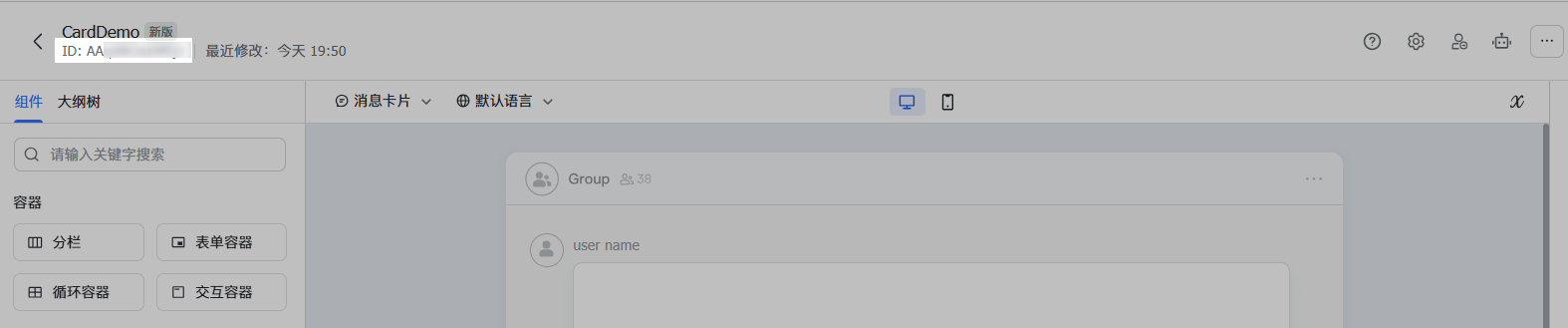
└ template_version_name | 否 | 搭建工具中创建的卡片的版本号,如 `1.0.0`。卡片发布后,将生成版本号。可在搭建工具 **版本管理** 处获取。

**注意**:
若不填此字段,将默认使用该卡片的最新版本。即在搭建工具发布卡片新版本后,该新版本的卡片内容将立即对卡片 API 调用生效。
└└ template_variable | 否 | 若卡片绑定了变量,你需在该字段中传入实际变量数据的值。详情参考[配置卡片变量](https://open.feishu.cn/document/uAjLw4CM/ukzMukzMukzM/feishu-cards/feishu-card-cardkit/configure-card-variables)。
## 响应
### 响应体
|参数|类型|说明|
|-|-|-|
|code|int|返回码,非 0 表示失败|
|msg|string|返回码描述|
data | - | -
∟message_id |string| 消息 ID
### 响应体示例
```json
{
"code": 0,
"data": {
"message_id": "om_fd2057276f16243756ff8eb6fcdabcef"
},
"msg": "ok"
}
```
## 错误码
具体可参考:[服务端错误码说明](https://open.feishu.cn/document/ukTMukTMukTM/ugjM14COyUjL4ITN)