# Add permissions
Add collaborators to the specified cloud document. Collaborators can be users, groups, departments, user groups, etc.
## Prerequisites
- To call this API, the calling identity must have the permission to add collaborators to the cloud document. The permission to add collaborators can be controlled through options such as **Who can view, add, and remove collaborators** in the cloud document settings.
- When calling this API, the calling identity and the authorized object must be **mutually visible**, for example:
- **Adding a user collaborator**: The calling identity and the authorized object must be contacts or searchable within the same organization, and not blocked by each other.
- **Adding a group collaborator**: The calling identity must be in the group. To add a group collaborator using the `tenant_access_token` identity, the app must be added to the group as a Bot to make the app visible to the group. For detailed steps, refer to [How to grant permissions to the app for cloud document-related resources](https://open.feishu.cn/document/uAjLw4CM/ugTN1YjL4UTN24CO1UjN/trouble-shooting/how-to-add-permissions-to-app).
- **Adding a department collaborator**: The calling identity must be visible to the department. Since apps are not visible to the organizational structure within the enterprise, adding department collaborators via `tenant_access_token` is currently not supported.
## Notes
Adding an app directly as a collaborator to a folder is not supported (the addition will succeed but the app will still have no permissions). If you want to grant folder permissions to an app, add the app as a Bot to a group and then grant the group management permissions. For detailed steps, refer to [How to grant permissions to the app for cloud document-related resources](https://open.feishu.cn/document/uAjLw4CM/ugTN1YjL4UTN24CO1UjN/trouble-shooting/how-to-add-permissions-to-app).
## Request
Facts |
---|---
HTTP URL | https://open.feishu.cn/open-apis/drive/v1/permissions/:token/members
HTTP Method | POST
Rate Limit | [100 per minute](https://open.feishu.cn/document/ukTMukTMukTM/uUzN04SN3QjL1cDN)
Supported app types | Custom App、Store App
Required scopes
**To use this API, you must have at least 1 of the listed scopes.**
Enable any scope from the list | View, comment, edit and manage Base(bitable:app)
View, edit, and manage Wiki(wiki:wiki)
View, comment, edit, and manage Docs(docs:doc)
Add document collaborator(docs:permission.member:create)
View, comment, edit, and manage all files in My Space(drive:drive)
Upload and download files to My Space(drive:file)
View, comment, edit, and manage Sheets(sheets:spreadsheet)
View, comment, edit, and manage Base (In Suite)(bitable:bitable)
### Request header
Parameter | Type | Required | Description
---|---|---|---
Authorization | string | Yes | `tenant_access_token`
or
`user_access_token`
**Value format**: "Bearer `access_token`"
**Example value**: "Bearer u-7f1bcd13fc57d46bac21793a18e560"
[How to choose and get access token](https://open.feishu.cn/document/uAjLw4CM/ugTN1YjL4UTN24CO1UjN/trouble-shooting/how-to-choose-which-type-of-token-to-use)
Content-Type | string | Yes | **Fixed value**: "application/json; charset=utf-8"
For more information about how to call the AccessToken in the Docs API, see [Get started with the Docs API](https://open.feishu.cn/document/ukTMukTMukTM/uczNzUjL3czM14yN3MTN).
### Path parameters
Parameter | Type | Description
---|---|---
token | string | Token of the file. For more information about how to obtain the token, see [How to get the token of docs resources](https://open.feishu.cn/document/ukTMukTMukTM/uczNzUjL3czM14yN3MTN#036e0b0f).
**Example value**: "doccnBKgoMyY5OMbUG6FioTXuBe"
### Query parameters
Parameter | Type | Required | Description
---|---|---|---
type | string | Yes | File type, which needs to match the token of the file
**Example value**: doc
**Optional values are**:
- doc:Documentation
- sheet:Spreadsheet
- file:Cloud space file
- wiki:Wiki node
- bitable:Bitable
- docx:Upgraded docs
- folder:Folders (not supported for `tenant_access_token`)
- mindnote:Mindnote
- minutes:Minutes
- slides:Slides
need_notification | boolean | No | Specifies whether to notify the user after the permissions are added for the user.
**Note:** When you use `tenant_access_token` to access the API, you cannot use this parameter.
**Example value**: false
**Default value**: `false`
### Request body
Parameter | Type | Required | Description
---|---|---|---
member_type | string | Yes | Collaborator type, which needs to match the collaborator id
**Example value**: "openid"
**Optional values are**:
- email:Email
- openid:The Open ID of the application or user.
- To get the application OpenID, refer to [How to get the application open_id](https://open.feishu.cn/document/ukTMukTMukTM/uczNzUjL3czM14yN3MTN#6dbaa8df)
- Get user OpenID, refer to [How to get different user IDs](https://open.feishu.cn/document/home/user-identity-introduction/open-id)
- unionid:Open platform unionID
- openchat:Open platform chat ID
- opendepartmentid:Open platform department ID
- userid:User customized ID
- groupid:Custom user group ID
- wikispaceid:Wiki space ID
- **NOTE**: This parameter is only supported by the wiki document, and it is required when you need to operate the "wiki space member" type collaborator in the wiki document
member_id | string | Yes | Collaborator ID, which needs to match the collaborator type
**Example value**: "ou_67e5ecb64ce1c0bd94612c17999db411"
perm | string | Yes | Permission role of the collaborator
**Example value**: "view"
**Optional values are**:
- view:Readable role
- edit:Editable role
- full_access:Manageable role
perm_type | string | No | Collaborator's permission role type
**Example value**: "container"
**Optional values are**:
- container:Current page and its sub-pages
- single_page:Current page only
**Default value**: `container`
type | string | No | Type of collaborator
**NOTE**: This parameter is required when the `member_type` parameter is `wikispaceid`
**Default value**: ""
**Example value**: "user"
**Optional values are**:
- user:User
- chat:Chat
- department:Organizational structure
- group:User group
- wiki_space_member:Wiki space member
- **NOTE**: This parameter is not supported after the wiki space has member grouping enabled
- wiki_space_viewer:Wiki space viewer
- **NOTE**: This parameter is only supported if the wiki space has member grouping enabled
- wiki_space_editor:Wiki space editor
- **NOTE**: This parameter is only supported if the wiki space has member grouping enabled
### Request body example
```json
{
"member_type": "openid",
"member_id": "ou_67e5ecb64ce1c0bd94612c17999db411",
"perm": "view",
"perm_type": "container",
"type": "user"
}
```
## Response
### Response body
Parameter | Type | Description
---|---|---
code | int | Error codes, fail if not zero
msg | string | Error descriptions
data | \- | \-
member | base_member | Information about the user for whom you need to add the permissions.
member_type | string | Collaborator type, which needs to match the collaborator id
**Optional values are**:
- email:Email
- openid:Open platform ID
- unionid:Open platform unionID
- openchat:Open platform chat ID
- opendepartmentid:Open platform department ID
- userid:User customized ID
- groupid:Custom user group ID
- wikispaceid:Wiki space ID
- **NOTE**: This parameter is only supported by the wiki document, and it is required when you need to operate the "wiki space member" type collaborator in the wiki document
member_id | string | Collaborator ID, which needs to correspond to the collaborator ID type
perm | string | Permission role of the collaborator
**Optional values are**:
- view:Readable role
- edit:Editable role
- full_access:Manageable role
perm_type | string | Type of collaborator
**Optional values are**:
- container:Collaborator's permission role type
- single_page:Current page and its sub-pages
type | string | Current page only
**Optional values are**:
- user:User
- chat:Chat
- department:Organizational structure
- group:User group
- wiki_space_member:Wiki space member
- **NOTE**: This parameter is not supported after the wiki space has member grouping enabled
- wiki_space_viewer:Wiki space viewer
- **NOTE**: This parameter is only supported if the wiki space has member grouping enabled
- wiki_space_editor:Wiki space editor
- **NOTE**: This parameter is only supported if the wiki space has member grouping enabled
### Response body example
```json
{
"code": 0,
"msg": "Success",
"data": {
"member": {
"member_type": "openid",
"member_id": "ou_67e5ecb64ce1c0bd94612c17999db411",
"perm": "view",
"perm_type": "container",
"type": "user"
}
}
}
```
### Error code
HTTP status code | Error code | Description | Troubleshooting suggestions
---|---|---|---
400 | 1063001 | Invalid parameter | The parameter is abnormal, which may be due to the following reasons:
- The parameter types do not match, for example, the token and type of the document do not match.
- Abnormal parameter filling, such as token or type filling, which does not meet the requirements of the document.
403 | 1063002 | Permission denied | The user or application associated with the calling identity is not a [collaborator](https://www.feishu.cn/hc/en-US/articles/064037224266-introduction-to-document-and-folder-collaborators) of the cloud document or lacks sufficient permissions (such as editing or management rights) for the document. Please follow the methods below to resolve this issue:
- For the transfer ownership interface, you must ensure that the calling identity is the owner of the cloud document.
- For interfaces related to collaborators and permission settings, first refer to [Who can view, add, or remove collaborators](https://www.feishu.cn/hc/en-US/articles/360049067527-set-share-copy-download-and-comment-permissions-for-documents#tabs0|lineguid-QZmNr) to understand the current permission settings of the cloud document, then grant the required permissions to the calling identity:
- If you are using a `tenant_access_token`, add the necessary permissions for the application via the cloud document's web page by selecting **“...”** in the top-right corner -> **“…More”** -> **"Add Document Application"**.

**Note**:
- Before **adding the document application**, ensure that the target application has at least one [API permission](https://open.feishu.cn/document/ukTMukTMukTM/uYTM5UjL2ETO14iNxkTN/scope-list) for the cloud document or Base (multi-dimensional table). Otherwise, you won't be able to find the target application in the document application window.
- If the Base is configured with advanced permissions, you must add management permission for the application.
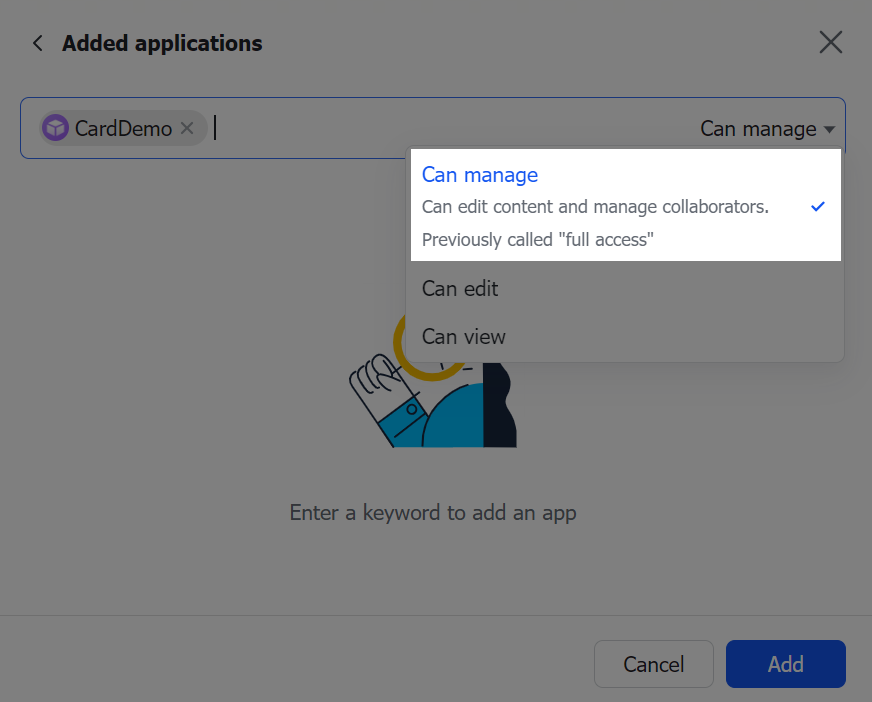
- If you are using a `user_access_token`, add permissions for the current user via the **Share** option on the top-right corner of the cloud document's web page.

For detailed steps or other methods to add permissions, refer to [Cloud Document FAQs 3](https://open.feishu.cn/document/ukTMukTMukTM/uczNzUjL3czM14yN3MTN#16c6475a).
400 | 1063003 | Invalid operation | Illegal operation, which may be due to the following reasons:
- The number of collaborators has reached the upper limit.
- Modify cloud document permission settings but cannot be modified due to enterprise control.
403 | 1063004 | User has no share permission | The user does not have sharing permissions, please confirm whether the calling identity has sharing permissions for the document.
404 | 1063005 | Resource is deleted | The resource has been deleted, please confirm that the cloud document still exists.
500 | 1066001 | Internal Error | Internal service error, such as timeout or failure in processing error codes.
500 | 1066002 | Concurrency error, please retry | Internal service error. Please try again.