# Obtain file view records
Obtain the view records of files, including document, sheet, base, wiki, and more. The view records contains the ID, profile, and last view time of the viewers.
## Request
Facts |
---|---
HTTP URL | https://open.feishu.cn/open-apis/drive/v1/files/:file_token/view_records
HTTP Method | GET
Rate Limit | [1000 per minute & 50 per second](https://open.feishu.cn/document/ukTMukTMukTM/uUzN04SN3QjL1cDN)
Supported app types | Custom App、Store App
Required scopes
**To use this API, you must have at least 1 of the listed scopes.**
Enable any scope from the list | Obtain user's basic information(contact:user.base:readonly)
Get document's view history(drive:file:view_record:readonly)
### Request header
Parameter | Type | Required | Description
---|---|---|---
Authorization | string | Yes | `tenant_access_token`
or
`user_access_token`
**Value format**: "Bearer `access_token`"
**Example value**: "Bearer u-7f1bcd13fc57d46bac21793a18e560"
[How to choose and get access token](https://open.feishu.cn/document/uAjLw4CM/ugTN1YjL4UTN24CO1UjN/trouble-shooting/how-to-choose-which-type-of-token-to-use)
### Path parameters
Parameter | Type | Description
---|---|---
file_token | string | File token. For how to get tokens, see [File overview](https://open.feishu.cn/document/uAjLw4CM/ukTMukTMukTM/reference/drive-v1/file/file-overview).
**Example value**: "XIHSdYSI7oMEU1xrsnxc8fabcef"
### Query parameters
Parameter | Type | Required | Description
---|---|---|---
page_size | int | Yes | Page size
**Example value**: 10
**Data validation rules**:
- Value range: `1` ~ `50`
page_token | string | No | Page identifier. It is not filled in the first request, indicating traversal from the beginning; when there will be more groups, the new page_token will be returned at the same time, and the next traversal can use the page_token to get more groups
**Example value**: 1674037112--7189934631754563585
file_type | string | Yes | File type
**Example value**: docx
**Optional values are**:
- doc:Doc
- docx:Upgraded Docs
- sheet:Sheet
- bitable:Bitable
- mindnote:Mindnote
- wiki:Wiki
- file:File
viewer_id_type | string | No | Type of viewer ID used in this call
**When the value is `user_id`, the following field scopes are required**:
Obtain user ID(contact:user.employee_id:readonly)
**Example value**: open_id
**Optional values are**:
- user_id:Identifies a user to a tenant. The same user has different User IDs in different tenants. In one single tenant, a user has the same User ID in all apps (including store apps). User ID is usually used to communicate user data between different apps.[How to get User ID](https://open.feishu.cn/document/uAjLw4CM/ugTN1YjL4UTN24CO1UjN/trouble-shooting/how-to-obtain-user-id)
- union_id:Identifies a user to a tenant that acts as a developer. A user has the same Union ID in apps developed by the same developer, and has different Union IDs in apps developed by different developers. A developer can use Union ID to link the same user's identities in multiple apps.[How to get Union ID](https://open.feishu.cn/document/uAjLw4CM/ugTN1YjL4UTN24CO1UjN/trouble-shooting/how-to-obtain-union-id)
- open_id:Identifies a user to an app. The same user has different Open IDs in different apps.[How to get Open ID](https://open.feishu.cn/document/uAjLw4CM/ugTN1YjL4UTN24CO1UjN/trouble-shooting/how-to-obtain-openid)
**Default value**: `open_id`
## Response
### Response body
Parameter | Type | Description
---|---|---
code | int | Error codes, fail if not zero
msg | string | Error descriptions
data | \- | \-
items | file.view_record\[\] | Access record list
viewer_id | string | Visitor ID
name | string | Visitor name
avatar_url | string | Visitor profile photo URL
last_view_time | string | Latest access time, in seconds timestamp
page_token | string | Page identifier, when has_more is true, a new page_token will also be returned. Otherwise, page_token will not be returned
has_more | boolean | Whether the response body has more parameters
### Response body example
```json
{
"code": 0,
"msg": "success",
"data": {
"items": [
{
"viewer_id": "ou_cc19b2bfb93f8a44db4b4d6eababcef",
"name": "zhangsan",
"avatar_url": "https://foo.icon.com/xxxx",
"last_view_time": "1679284285"
}
],
"page_token": "1674037112--7189934631754563585",
"has_more": true
}
}
```
### Error code
HTTP status code | Error code | Description | Troubleshooting suggestions
---|---|---|---
500 | 1069601 | server internal error | Internal service errors, including server level internal timeout, error code not handled, etc.
400 | 1069602 | invalid param | The parameter is abnormal, which may be due to the following reasons:
* Parameter types do not match, such as: the token and type of the document do not match.
* Parameter filling is abnormal, such as page_size less than or equal to 0
403 | 1069603 | forbidden | Unauthorized operation may be due to the following reasons:
* The calling identity has no manage permission
* The tenant has not turned on the document access recording function
Refer to the following methods to authorize the calling identity manage permission:
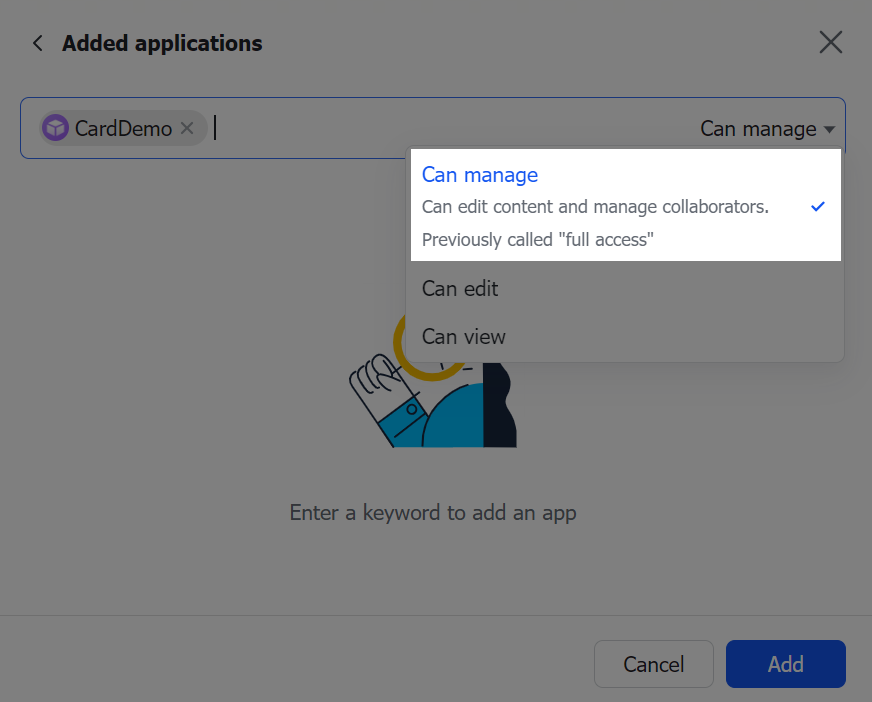
- If you are using a `tenant_access_token`, it means the current application does not have the manage permission. You need to add permissions for the application through the cloud document webpage by navigating to the top right corner **"..."** -> **"... More"** -> **"Add Application"**.
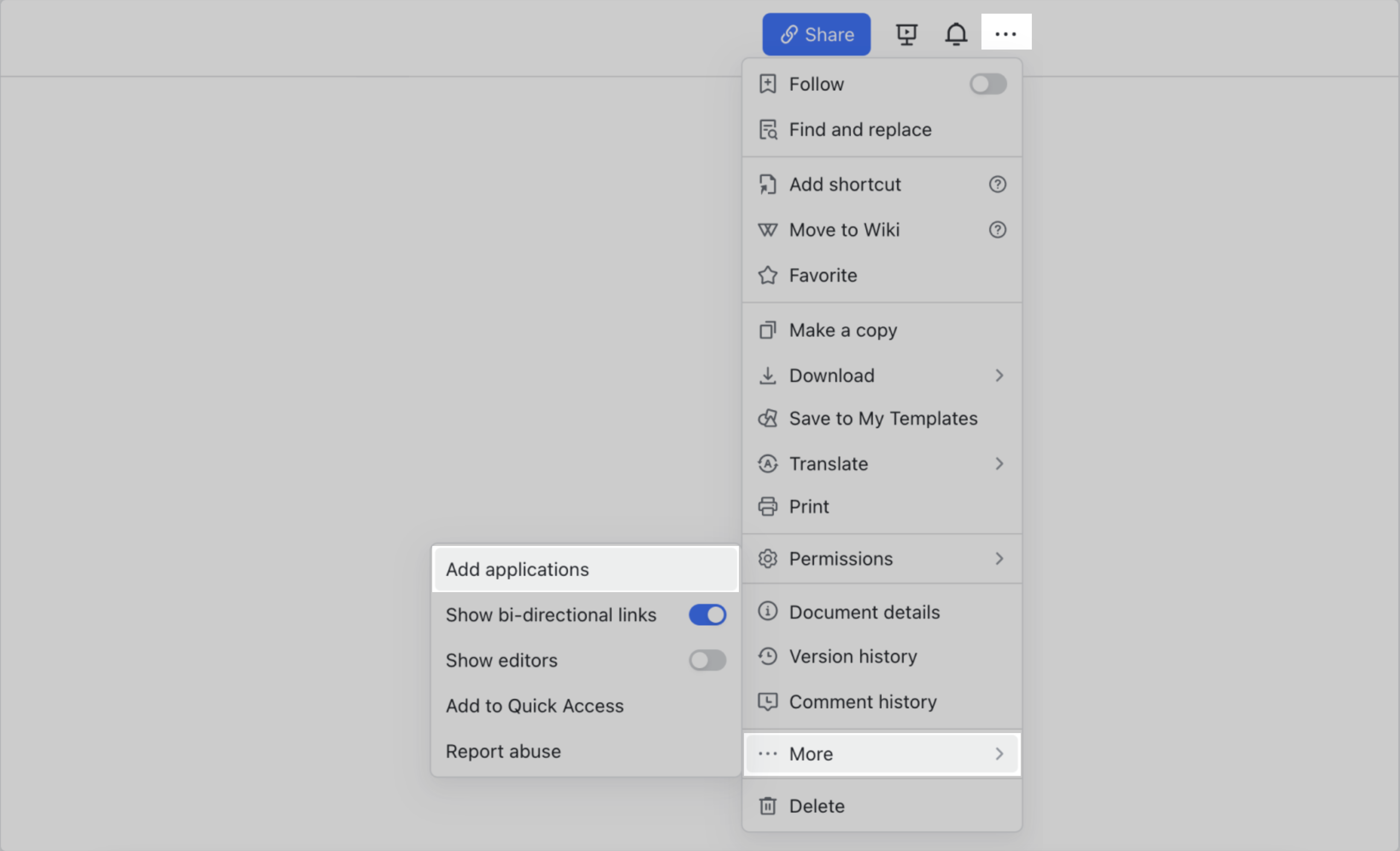
**Note**: Before adding a document application, you need to ensure that the target application has at least one cloud document [API permission](https://open.feishu.cn/document/ukTMukTMukTM/uYTM5UjL2ETO14iNxkTN/scope-list) enabled. Otherwise, you will not be able to search for the target application in the document application window.
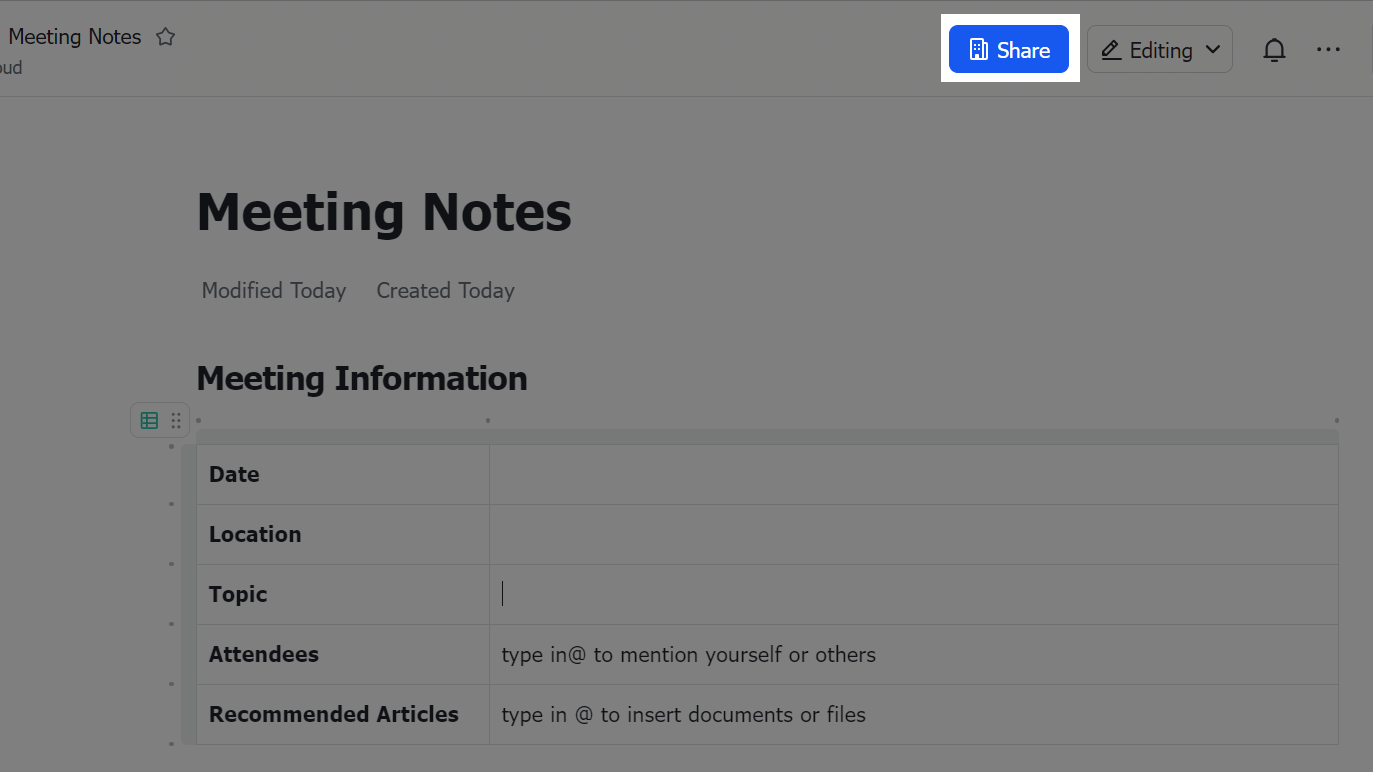
- If you are using a `user_access_token`, it means the current user does not have the manage permission. You need to add permissions for the current user through the **Share** entry in the top right corner of the cloud document webpage.
For more details on the specific steps or other methods to add permissions, refer to [Cloud Document FAQ 3](https://open.feishu.cn/document/ukTMukTMukTM/uczNzUjL3czM14yN3MTN#16c6475a).
404 | 1069604 | not found | The file corresponding to the `file_token` does not exist in the cloud space. Possible reasons and solutions are as follows:
- File does not exist or token is incorrect: Please check if the `file_token` is filled in correctly. The method for obtaining tokens for files placed in cloud space folders and files in the knowledge base is different. For details, refer to [File Overview - How to Obtain File Tokens](https://open.feishu.cn/document/uAjLw4CM/ukTMukTMukTM/reference/drive-v1/file/file-overview).
- File type mismatch: The `file_type` provided in the request does not match the actual type of the file corresponding to the `file_token`. Please check whether the `file_type` matches the actual type of the file.