# 云空间常见问题
## 1. 如何获取文件夹、文件以及各种类型的云文档的 token 信息?
### 文件夹 token 获取方式
你可通过以下两种方式获取文件夹的 token:
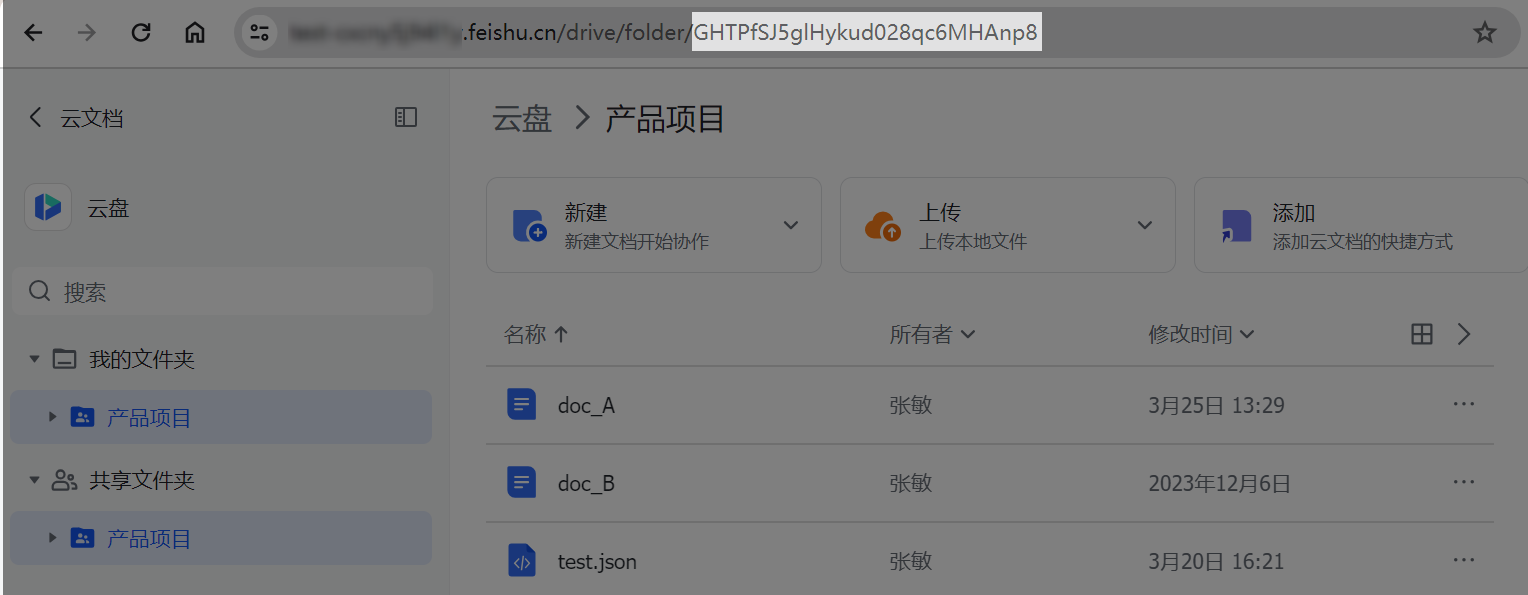
- 如下图,在浏览器中打开文件夹,在地址栏中获取文件夹的 token。
- 调用开放平台接口获取:
- 调用[获取我的空间(root folder)元数据](https://open.feishu.cn/document/ukTMukTMukTM/ugTNzUjL4UzM14CO1MTN/get-root-folder-meta)接口获取根目录(即根文件夹)的 token。
- 继续调用[获取文件夹中的文件清单](https://open.feishu.cn/document/uAjLw4CM/ukTMukTMukTM/reference/drive-v1/file/list)接口,获取根目录下文件夹的 token。
### 文件 token 获取方式
你可通过以下两种方式获取文件的 token:
- 如下图,在浏览器中打开文件,在地址栏中获取文件的 token。

- 调用开放平台接口获取:
- 调用[获取我的空间(root folder)元数据](https://open.feishu.cn/document/ukTMukTMukTM/ugTNzUjL4UzM14CO1MTN/get-root-folder-meta)接口获取根目录(即根文件夹)的 token。
- 继续调用[获取文件夹中的文件清单](https://open.feishu.cn/document/uAjLw4CM/ukTMukTMukTM/reference/drive-v1/file/list)接口,获取根目录下文件的 token。
### 素材 token 获取方式
飞书开放平台支持在在线文档、电子表格、多维表格中上传和下载素材。在不同的云文档中,素材 token 的获取方式不同。具体方式如下所示:
素材所在文档类型 | 素材 token 获取方式
---|---
在线文档 | 通过[获取文档所有块](https://open.feishu.cn/document/ukTMukTMukTM/uUDN04SN0QjL1QDN/document-docx/docx-v1/document-block/list)接口获取指定文件块(File Block)或图片块(Image Block)等块的信息,其中的 token 参数即为素材的 token。
电子表格 | 通过[读取多个范围](https://open.feishu.cn/document/ukTMukTMukTM/ukTMzUjL5EzM14SOxMTN)接口获取指定附件的 `fileToken` 参数,即为素材的 token。
多维表格 | 通过[查询记录](https://open.feishu.cn/document/uAjLw4CM/ukTMukTMukTM/reference/bitable-v1/app-table-record/search)接口获取指定附件的 `file_token`参数,即为素材的 token。
## 2. 如何为应用身份(tenant_access_token)开通个人云空间中文件夹的查看或编辑权限?
要允许应用访问个人云空间中的文件夹,参考以下步骤:
1. 访问[飞书开放平台开发者后台](https://open.feishu.cn/app),选择目标应用。
1. 在应用管理页面,点击**添加应用能力**,找到机器人卡片,点击 **+添加**。
1. 在飞书客户端,创建一个新的群组,将应用添加为群机器人。
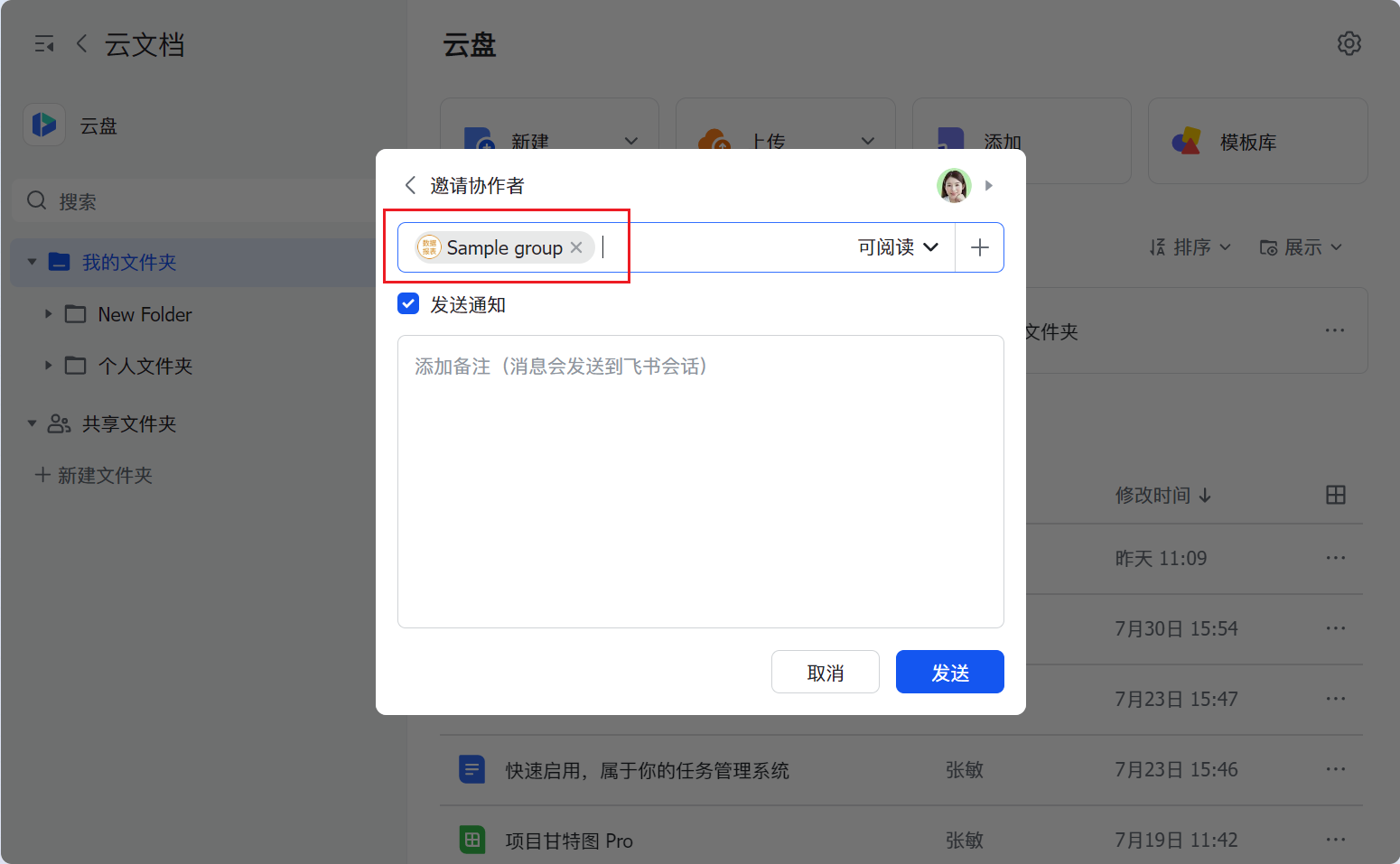
1. 在 **云文档** > **云盘**中找到对应的文件夹,将文件夹分享给刚刚新建的群组。
---
## 3. 如何为应用身份(tenant_access_token)开通文件、素材的下载权限?
要分享文件、素材的下载权限给应用,参考以下步骤:
1. 访问[开发者后台](https://open.feishu.cn/app),选择目标应用。
1. 在应用管理页面,点击**添加应用能力**,找到机器人卡片,点击 **+添加**。
1. 根据分享的文件是否位于文件夹中,选择不同的开通权限方式:
- 如果文件或素材不在文件夹中:
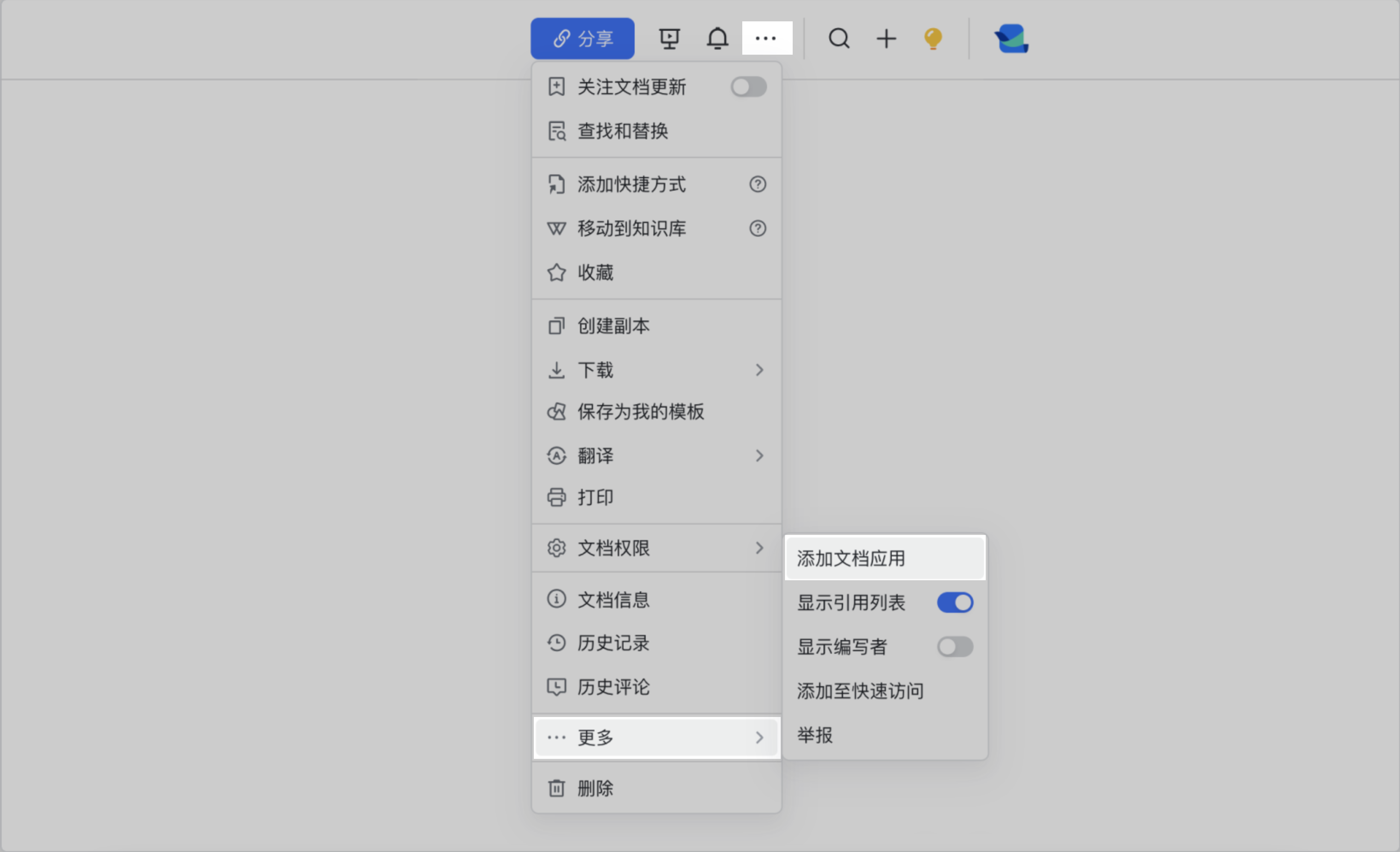
**文档所有者、知识库管理员 或 其他协作者** 将应用添加为文档协作者。
- 如果文件或素材位于**文件夹中:**
1. 在飞书客户端,创建一个新的群组,将应用添加为群机器人。
2. 在 **云文档** > **云盘**中找到对应的文件夹,将文件夹分享给刚刚新建的群组。默认情况下,可阅读用户拥有当前文件的下载权限。

4. 如果应用已经是文档协作者,但仍无文件、素材的下载权限,请进一步查看素材所在的云文档或文件的**权限设置面板**中关于**谁可以创建副本、打印和下载**的设置,确认应用已在允许的权限范围内。
---
## 4. 云文档支持一次性将文件夹、子文件夹、和子文件夹中的文件同时上传至云盘吗?
不支持。你可以调用[新建文件夹](https://open.feishu.cn/document/uAjLw4CM/ukTMukTMukTM/reference/drive-v1/file/create_folder)接口创建文件夹和子文件夹,再调用[上传文件](https://open.feishu.cn/document/uAjLw4CM/ukTMukTMukTM/reference/drive-v1/file/upload_all)接口将文件一个个上传至对应文件夹中。
---
## 5. 云文档是否支持批量指定文档的所有者?
不支持。你需要通过[转移所有者](https://open.feishu.cn/document/uAjLw4CM/ukTMukTMukTM/reference/drive-v1/permission-member/transfer_owner)接口一个个指定并转移所有者。
---