# 关联外部选项
配置审批定义表单时,单选、多选控件支持关联外部选项,将外部系统的数据传入表单控件,作为控件选项值。该方式可以让企业内的多个系统数据关联起来,当员工发起审批时,可以自动获取最新、最全面的数据。
## 功能介绍
审批定义的表单设计如果使用了 **单选**、**多选** 控件,则你可以根据实际情况,手动添加选项或者使用外部选项。
- **手动添加选项**:在表单设计中手动添加多个选项,选项值固定,如需调整必须更新审批定义的表单设计。
- **使用外部选项**:将外部系统的数据传入表单控件,自动生成相应的选项,通过该方式设计的单选、多选控件,可以根据外部系统的数据变化,动态更新选项,降低审批定义的维护成本。适用于企业同时维护了多个系统(飞书审批、人事系统、销售管理系统等),需要将系统关联,使数据可以同步到审批表单作为选项的场景。
例如,飞书审批发起一个涉及销售的审批,销售人员提交审批时需要填写外部客户名单,名单已经维护在销售管理系统中且经常变动,这时就可以通过配置外部数据为单选或多选的选项,销售人员在提交审批时只需要选择自己跟进的客户,且当销售管理系统中的数据更新时还能同步更新到审批系统中,无需反复维护。
在飞书审批中心设计审批定义表单的 **单选**、**多选** 控件时,**使用外部选项** 配置如下图所示。
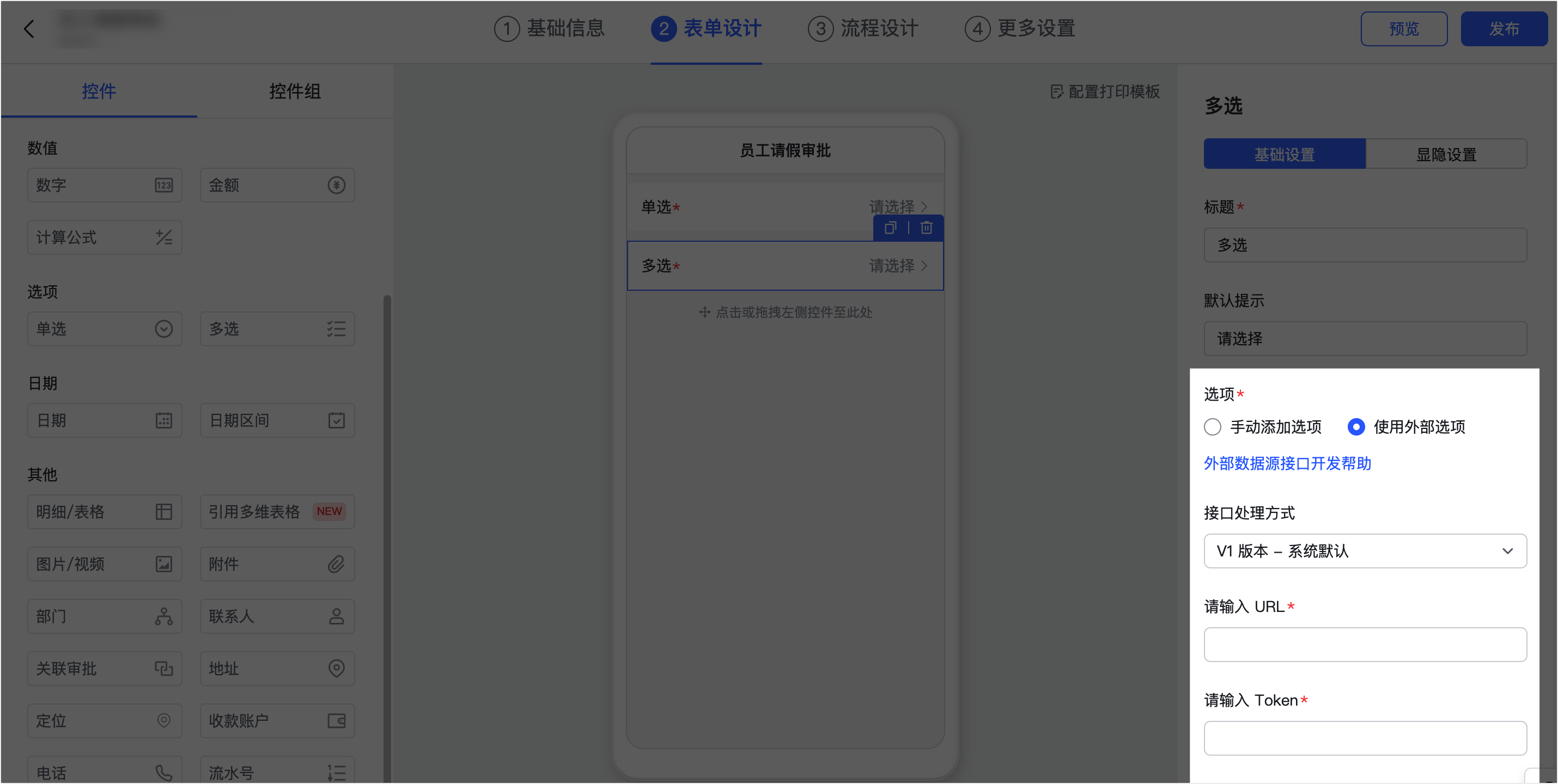
配置流程:
1. 企业开发人员根据本文提供的外部选项接口说明,开发相应的数据接口,并提供飞书审批中心能够访问的请求 URL。
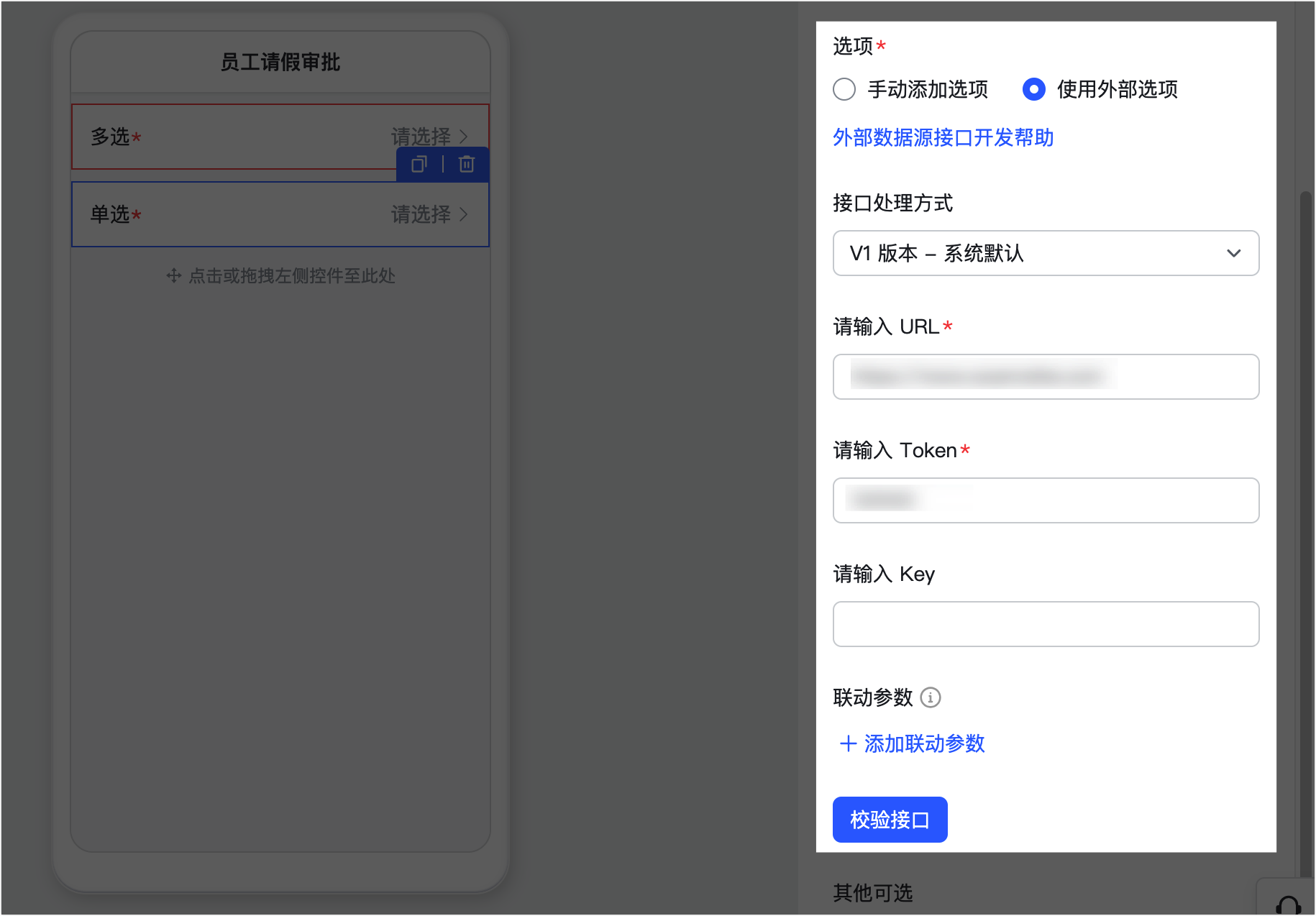
2. 企业审批管理员根据开发人员开发的数据接口,前往飞书审批管理后台,在指定审批定义的单选、多选控件内,填入关联外部选项接口的参数配置,并校验接口是否配置成功。warning
- 配置时必须填写外部选项数据接口的请求 URL,以及自定义的 Token(用于校验请求来源是否合法)。
- 可选填写 Key,如果填写 Key,则需要在传输数据时进行加密解密。如果未填写 Key,则明文传输数据,不加密。
## 功能优势
相比手动添加选项,使用外部选项的优势在于:
- 一份相同的数据不需要在多个系统重复进行更新、修改,降低维护成本。
- 无论选项的多与少,通过控件参数配置,接口开发后,可以让每个员工只选择与自己相关的选项。
## 外部选项接口
你需要根据本章节提供的接口说明,开发一个用于关联外部选项的 HTTP 或 HTTPS 接口。
- 该接口的实现不限制开发语言。
- 需要设置好 Token、Key 参数(参数格式不限,与飞书审批中心表单设计中填写的 Token、Key 一致即可)。
- Token 用于校验请求来源。
- Key 用于加密解密。Key 为可选参数,不填写则不进行加密。warning
- 数据源接口返回数据不满足要求或数据源接口不稳定、接口不可用等造成的问题,飞书审批不做单据正确性保证,不做数据订正等。
- 配置了联动参数(对应linkage_params参数)或 使用了V2版本(对应page_token,query参数),暂未对开放平台做完整支持。
### 接口调用方式
如果审批表单处于编辑状态,当数据源来自外部系统的控件时,点击校验数据或用户发起请求时,审批系统将对用户配置的外部数据源接口地址发起 **HTTP** 或 **HTTPS** 请求。需要配置公网可访问的接口地址,不能配置内网地址,并且接口需要高效,避免网络抖动导致的请求超时。
- **请求地址**:用户配置的请求地址
- **请求方式**:POST
- **请求超时时间**:3秒
- **请求 Header**:
key|value
--|--
Content-Type|application/json
### 请求参数
目前审批支持通过 `user_id`,`employee_id`以及表单中关联的 `extra` 字段(联动参数字段)来请求不同的数据到单选、多选控件(当 `user_id` 和 `employee_id` 均为空时,返回所有选项),`user_id` 和 `employee_id` 在发起审批时会设置为发起人的 ID。单选、多选控件的请求入参格式示例如下:
```json
{
"user_id": "123",
"employee_id": "abc",
"token":"1e8e999f580e7a202dbe1e5103c5e4c58ecc757e",
"linkage_params":{
"key1":"value1", // key1 为联动字段的字段代码,value1为被联动控件值
"key2":"value2" // key2 为联动字段的字段代码,value2为被联动控件值
},
"page_token":"xxxxx", // 不传或为空返回第一页数据
"query":"北京", // 搜索关键词
"locale":"zh_cn" // 用户当前的语言环境
}
```
各参数说明:
参数 | 类型 | 是否必须 | 描述
---|---|---|---
user_id | String | 否 | 该参数对应的是内部 ID,因此推荐使用 employee_id 参数传入用户 ID。
**注意**:如果不传 user_id 和 employee_id,表示期望返回所有的数据。
employee_id | String | 否 | employee_id 对应的是用户的 user_id,获取方式参考[如何获取用户的 User ID](https://open.feishu.cn/document/uAjLw4CM/ugTN1YjL4UTN24CO1UjN/trouble-shooting/how-to-obtain-user-id)。
- 发起审批时,传入发起人的 employee_id,可以根据此 id 决定返回的数据范围。
- 如果不传 user_id 和 employee_id,表示期望返回所有的数据。
token | String | 是 | 自定义取值,用于校验请求是否为合法来源。
linkage_params | Map | 否 | 联动选项参数(不带 linkage_params 时,请返回所有的 options)。设置了联动选项,选择选项时,会将联动参数放入 map 中发出请求,你需要根据该字段的内容决定所需返回的数据。
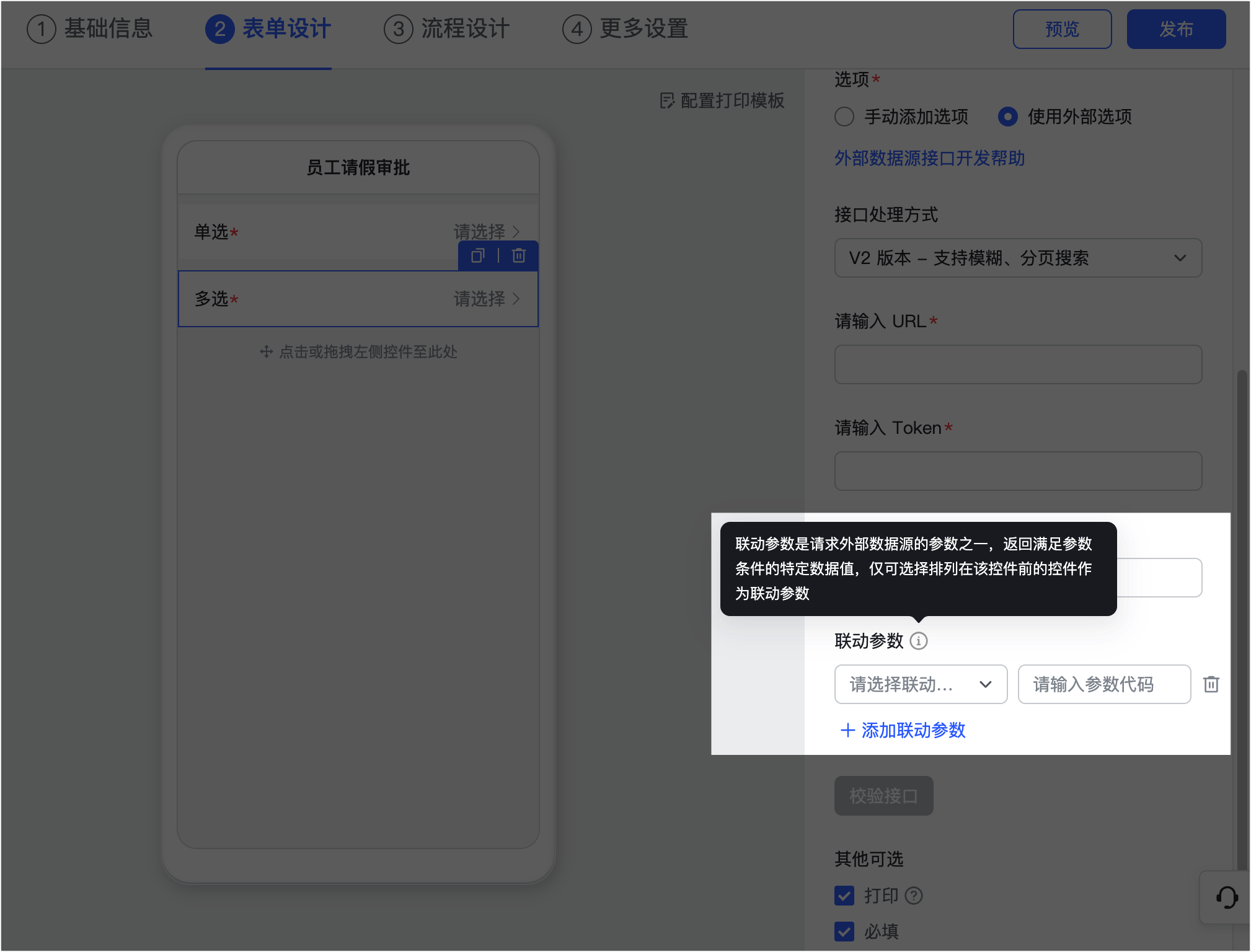
page_token | String | 否 | 分页标记,第一次请求不填,表示从头开始遍历。
- 分页查询结果还有更多项时,接口会返回新的 page_token,下次遍历可采用该 page_token 获取查询结果。
- 每次请求返回的数据量(page size)不小于 10。
- 只对设置了**支持模糊、分页搜索**的数据源有效。
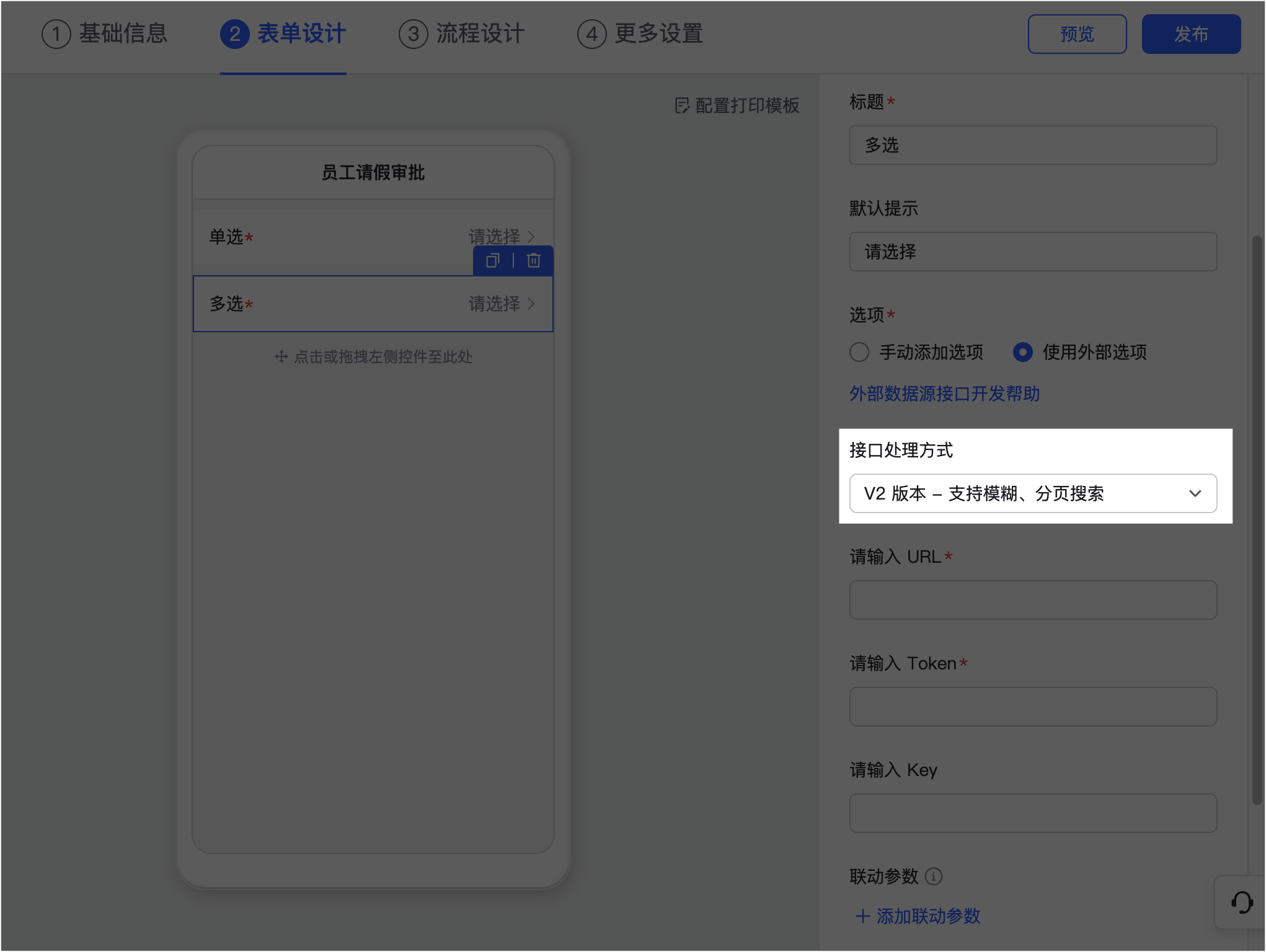
query | String | 否 | 搜索关键词,只对设置了**支持模糊、分页搜索**的数据源有效。
locale | String | 否 | 语言环境,只对设置了**支持模糊、分页搜索**的数据源有效。取值:
- zh_cn:中文
- en_us:英文
- ja_jp:日文
### 返回参数
加密前的返回参数示例如下:
```js
{
"code":0,
"msg":"success!",
"data":{
"result":{
"options":[
{
"id":"options_1_id_1",
"value":"@i18n@options_1_name_1",
"isDefault":true
},
{
"id":"options_1_id_2",
"value":"@i18n@options_1_name_2"
},
{
"id":"options_1_id_3",
"value":"@i18n@options_1_name_3"
}
],
"i18nResources":[
{
"locale":"zh_cn",
"isDefault":true,
"texts":{
"@i18n@options_1_name_1":"值1",
"@i18n@options_1_name_2":"值2",
"@i18n@options_1_name_3":"值3"
}
},
{
"locale":"en_us",
"isDefault":false,
"texts":{
"@i18n@options_1_name_1":"value1",
"@i18n@options_1_name_2":"value2",
"@i18n@options_1_name_3":"value3"
}
}
],
"hasMore":true,
"nextPageToken": "xxxx"
}
}
}
```
各参数说明:
|参数|类型|说明|
|-|-|-|
|code|int|错误码,非 0 表示失败。|
|msg|string|返回码的描述。|
|data|object|返回业务信息。|
| ∟result|object|请求结果的内容。|
| ∟options|list|选项列表。|
| ∟i18nResources|list|国际化文案。i18nResources 必须返回,返回空会导致显示是空的,请至少返回一种语言数据。|
| ∟hasMore|bool|是否有下一页数据。只对设置了**支持模糊、分页搜索**的数据源有效。|
| ∟nextPageToken|string|分页标记,当 hasMore 为 true 时,会同时返回新的 nextPageToken,否则不返回 nextPageToken。只对设置了**支持模糊、分页搜索**的数据源有效。|
以上参数中,**externalData** 结构说明:
|参数|类型|说明|
|-|-|-|
|id|string|选项唯一标识,全局唯一且固定。|
|value|string|选项显示的 Key(需保证全局唯一且固定),通过该 Key 和当前客户端的语言环境到 `i18nResources`的 `text` 中匹配显示的文案。|
|isDefault|bool|是否为默认选项。|
**i18nResource** 结构说明:
|参数|类型|说明|
|-|-|-|
|locale|string|语言。zh_cn 为中文、en_us 为英文、ja_jp为日文。
|isDefault|bool|是否为默认选项。
|texts|map[string]string|国际化文案 map,key-value 形式,key 为国际化选项的唯一值,不同语言环境下,此值是相同的值,value 为对应语言环境下的文案。
加密后的返回参数格式(将 result 内容加密并转为 base64 输出,未配置 Key 参数则直接明文返回):
```js
{
"code":0,
"msg":"success!",
"data":{
"result":"tKqgkBNFEzakJAeS/ySKS7j7YoX2rKVuzLJbG44xHsz0eHaqLx6ZLsAQ/ljfK9mDi0F/32UVXM3gUQaczHbR2upD/EStb+O26FApdvNKm0yvKG0WrhFIe7UCMkrxPnegBqqgqcMHLCZQZ2uh/2k5dDlhReT6fxm/bAR4ZwgyvvshqudakKigshSK0Aq25IQ0H65PS/5iRHgk2b06sahZuvH6b9yrfBXJqHdhztvPkPW2FkipbvLMrzQdXz+deBm2DTJ5W53f2QKOxk7szaXKOr1+u1MyCIkjldPcAHqPYRiOzx6iXQPJ6hMj7MHex08amm44d5T3Z2jzCoinkGSrhpusTcmhHmQnjDjl51a2LqBlty1L9yHuMaED+al2lTUhlzGHqhITCQBJLZraOkXYcR6oOXAV3gP4towZw5G/zeeEtXYZvWUvTZ9F3UAXM4jP"
}
}
```
各参数说明:
|参数|类型|说明|
|-|-|-|
|code|int|错误码,非 0 表示失败。|
|msg|string|返回码的描述。|
|data|string|返回业务信息。|
| ∟result|string|请求结果加密后转为 base64 的内容。|
### 加密解密方式
#### Golang
- 以下为 Golang 加密代码:
```go
//AES CBC 加密
func CBCEncrypter(buf []byte, keyStr string) ([]byte, error) {
key := sha256.Sum256([]byte(keyStr))
plaintext := standardizeDataEn(buf)
if len(plaintext)%aes.BlockSize != 0 {
return nil, errors.New("plaintext is not a multiple of the block size")
}
block, err := aes.NewCipher(key[:sha256.Size])
if err != nil {
return nil, err
}
ciphertext := make([]byte, aes.BlockSize+len(plaintext))
iv := ciphertext[:aes.BlockSize]
if _, err := io.ReadFull(rand.Reader, iv); err != nil {
return nil, err
}
mode := cipher.NewCBCEncrypter(block, iv)
mode.CryptBlocks(ciphertext[aes.BlockSize:], plaintext)
return ciphertext, nil
}
func standardizeDataEn(data []byte) []byte {
appendingLen := aes.BlockSize - (len(data) % aes.BlockSize)
sd := make([]byte, len(data)+appendingLen)
copy(sd, data)
for i := 0; i < appendingLen; i++ {
sd[i+len(data)] = byte(appendingLen)
}
return sd
}
```
- 以下为 Golang 解密代码:
```go
//AES CBC解密
func CBCDecrypter(buf []byte, keyStr string) ([]byte, error) {
key := sha256.Sum256([]byte(keyStr))
if len(buf)%aes.BlockSize != 0 {
return nil, errors.New("plaintext is not a multiple of the block size")
}
block, err := aes.NewCipher(key[:sha256.Size])
if err != nil {
return nil, err
}
ciphertext := make([]byte, aes.BlockSize+len(buf))
iv := ciphertext[:aes.BlockSize]
if _, err := io.ReadFull(rand.Reader, iv); err != nil {
return nil, err
}
mode := cipher.NewCBCDecrypter(block, iv)
mode.CryptBlocks(ciphertext[aes.BlockSize:], buf)
ciphertext = ciphertext[32:]
plain := standardizeDataDe(ciphertext)
return plain, nil
}
func standardizeDataDe(origData []byte) []byte {
length := len(origData)
unpadding := int(origData[length-1])
if unpadding > length {
return nil
}
return origData[:(length - unpadding)]
}
func RandKey256() (string, error) {
key := make([]byte, 32)
if _, err := rand.Read(key); err != nil {
return "", err
} else {
return string(key), nil
}
}
```
#### Java
- 以下为 Java 加密代码示例:
```java
public String CBCEncrypter(String key, String source){
try {
MessageDigest messageDigest = MessageDigest.getInstance("SHA-256");
messageDigest.reset();
messageDigest.update(key.getBytes());
SecretKeySpec skeySpec = new SecretKeySpec(messageDigest.digest(), "AES");
Cipher cipher = Cipher.getInstance("AES/CBC/PKCS5Padding");//"算法/模式/补码方式"
byte[] sSrcBytes = source.getBytes();
byte[] newSrc = new byte[sSrcBytes.length + 16];
byte[] cSrc = new byte[16];
System.arraycopy(cSrc, 0, newSrc, 0, cSrc.length);
System.arraycopy(sSrcBytes, 0, newSrc, 16, sSrcBytes.length);
IvParameterSpec iv = new IvParameterSpec(cSrc);//使用CBC模式,需要一个向量iv,可增加加密算法的强度
cipher.init(Cipher.ENCRYPT_MODE, skeySpec, iv);
byte[] encrypted = cipher.doFinal(newSrc);
return Base64.getEncoder().encodeToString(encrypted);//此处使用BASE64做转码功能,同时能起到2次加密的作用。
} catch (Exception e) {
//handle Exception
}
return null;
}
```
- 以下为 Java 解密代码:
```java
//java解密
/**
* 用随机生成的前16字节IV进行解密,更加具有普遍性
* @param key 密钥
* @param source 密文
* @return 明文
*/
public static String CBCDecrypter(String key, String source){
try {
byte[] ciphertext = Base64.getDecoder().decode(source); // BASE64解密
MessageDigest messageDigest = MessageDigest.getInstance("SHA-256");
messageDigest.reset();
messageDigest.update(key.getBytes());
SecretKeySpec skeySpec = new SecretKeySpec(messageDigest.digest(), "AES");
Cipher cipher = Cipher.getInstance("AES/CBC/PKCS5Padding"); // "算法/模式/补码方式"
// 从密文前 16 个字节提取出 IV
byte[] ivBytes = new byte[16];
System.arraycopy(ciphertext, 0, ivBytes, 0, ivBytes.length);
IvParameterSpec iv = new IvParameterSpec(ivBytes); //向量iv
// 提取出密文 16 个字节以后的内容,即去除 IV 后真正的密文
byte[] actualCiphertext = new byte[ciphertext.length - ivBytes.length];
System.arraycopy(ciphertext, ivBytes.length, actualCiphertext, 0, actualCiphertext.length);
cipher.init(Cipher.DECRYPT_MODE, skeySpec, iv);
byte[] decrypted = cipher.doFinal(actualCiphertext);
return new String(decrypted);
} catch (Exception e) {
}
return null;
}
```