# 配置卡片变量
使用搭建工具构建好卡片的样式内容后,你可为卡片添加卡片变量,根据实际业务场景,为变量赋值,让卡片灵活多变,实现多场景复用。本文档介绍卡片变量的类型和配置卡片变量的步骤。
## 场景示例
如下图,企业季度数据报表在样式上可以保持统一,但各季度的数据是动态变化的。你可以将卡片变量理解为卡片内容的占位符,添加卡片变量后,你只需要将各季度的实际数据赋值给模板内相应的变量,即可快速推送当前季度的数据报表卡片。

## 参考案例
不同组件支持的变量类型不同。飞书卡片搭建工具提供了以下组件绑定变量的卡片案例,你可直接点击链接前往搭建工具试一试:
- [富文本组件使用变量案例](https://open.feishu.cn/cardkit?catalogId=10015&templateId=AAqB4FaJYbCnY)
- [图表组件使用变量案例](https://open.feishu.cn/cardkit?catalogId=10015&templateId=AAqBEedi2vzUM)
- [循环容器使用对象数组变量案例](https://open.feishu.cn/cardkit?catalogId=10015&templateId=AAqIDyz6qpMTB)
- [表单容器内嵌循环容器案例](https://open.feishu.cn/cardkit?catalogId=10015&templateId=AAqBZKqVZHLLe)
## 使用限制
卡片变量仅支持在搭建工具上使用,不支持在卡片 JSON 代码中使用。
## 操作步骤
本小节介绍如何配置卡片变量、管理卡片变量,并在发送卡片时为卡片变量赋值。
### 配置卡片变量
本小节以循环容器为例,介绍使用循环容器配置对象数组变量的步骤。建议直接前往卡片搭建工具参考[循环容器使用对象数组变量案例](https://open.feishu.cn/cardkit?catalogId=10015&templateId=AAqIDyz6qpMTB)。
**注意事项**:循环容器是一个抽象的空容器,可实现一系列排版类似、数据不同的内容。了解更多,参考[循环容器](https://open.feishu.cn/document/uAjLw4CM/ukzMukzMukzM/feishu-cards/card-components/containers/recycling-container)。
1. 登录 [飞书卡片搭建工具](https://open.feishu.cn/cardkit?from=open_docs_configure_card_variables)。
1. 在指定的飞书卡片内,添加一个 **循环容器** 组件。
添加后系统会默认创建并绑定一个 **对象数组** 变量,你可在编辑页右侧点击该变量编辑变量名称和描述。

1. 根据实际需求,添加任意组件至循环容器中。以下示例添加 **文本+图片** 复合组件至循环容器中。

1. 确定样式后,在循环容器绑定的对象数组变量内,设置子变量,绑定容器中变的数据部分。
**注意**:绑定的变量必须是对象数组的子变量,否则无法随数组的子对象复用。

1. 选中循环容器中的富文本组件,在右侧 **属性** 页签下,点击变量图标,绑定文本变量。
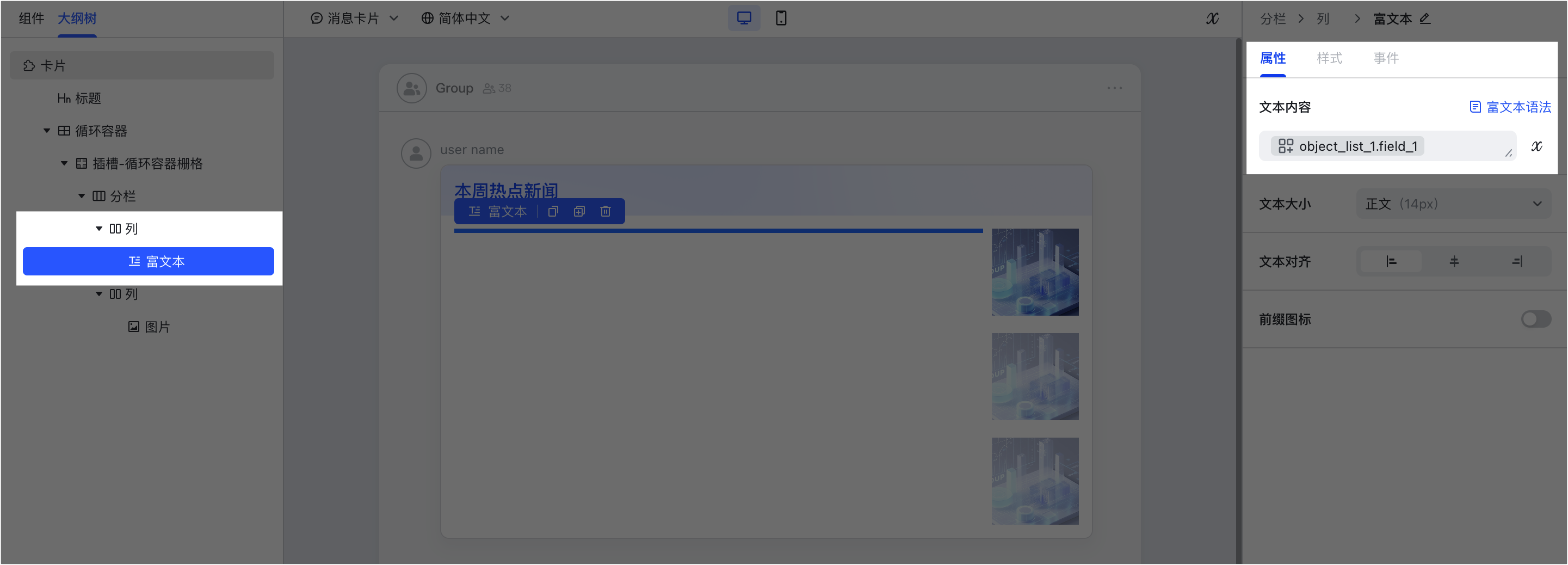
1. 选中循环容器中的图片组件,在右侧 **属性** 页签下,点击 **绑定变量**,选择图片变量。

1. 设置对象数组变量的模拟数据,预览生效效果。

### 管理卡片变量
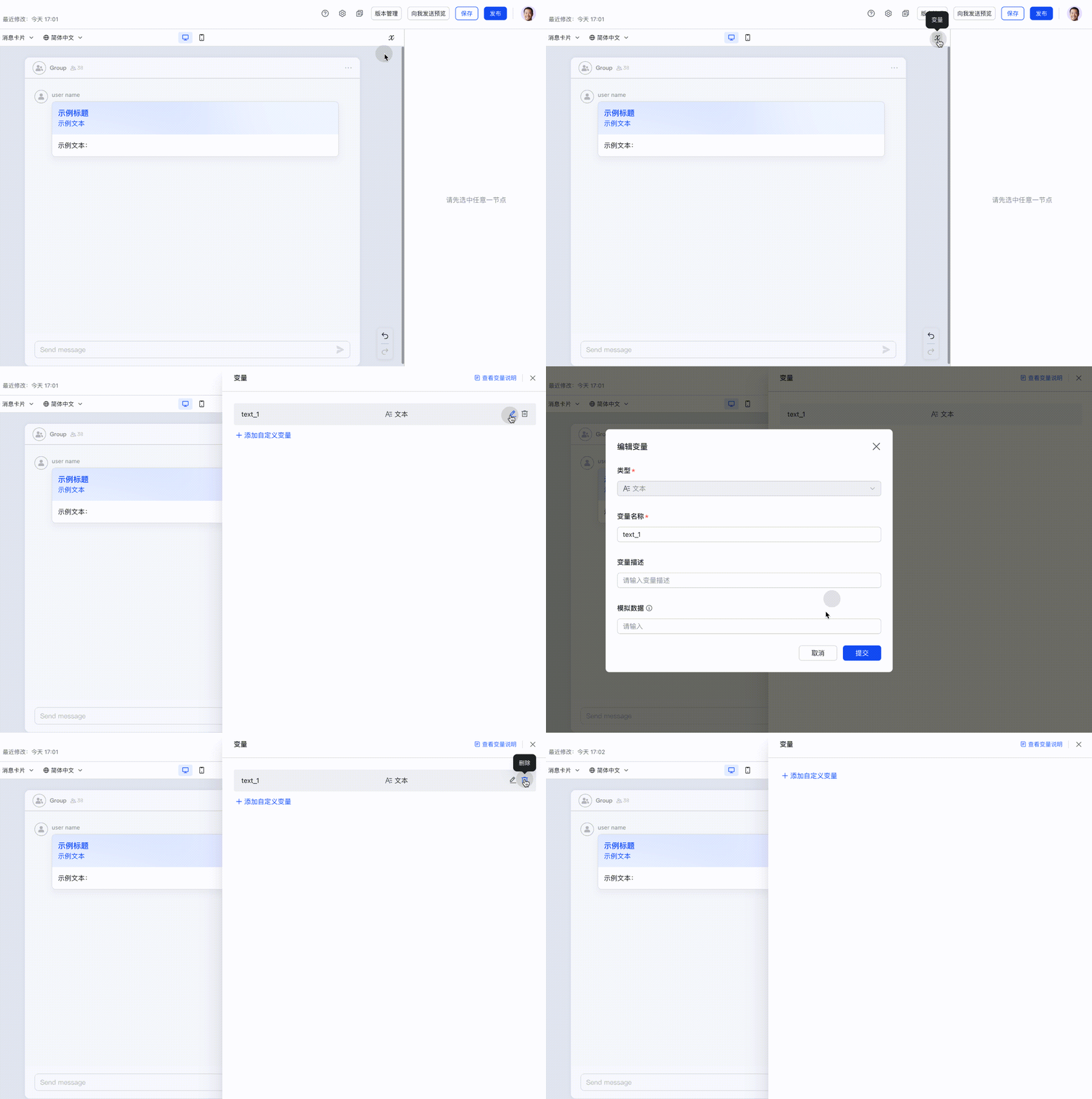
要管理当前卡片的所有变量,你可在搭建工具中间的画布区域右上角,点击变量图标弹出 **变量** 页面,查看和管理当前卡片添加的所有变量。


#### **添加自定义变量**
你可以在变量界面添加自定义变量,用于绑定目标组件。
1. 登录 [飞书卡片搭建工具](https://open.feishu.cn/cardkit)。
1. 在卡片编辑页面,点击变量图标。

1. 在 **变量** 界面,点击 **添加自定义变量**。

1. 在 **添加变量** 对话框,参考以下说明完成自定义配置,并点击 **提交**。
配置项 | 是否必填 | 说明
---|---|---
类型 | 是 | 选择当前变量的类型。不同组件和属性支持的变量类型不同。具体可参见下文。
变量名称 | 是 | 用于标识当前变量,后续可以在指定位置通过变量名称引用该变量。名称以字母开头,仅支持字母、数字或下划线。
变量描述 | 否 | 用于记录该变量的应用场景、注意事项等信息。
模拟数据 | 否 | 你可以为变量设置默认的模拟数据,后续在添加变量时,画布内默认会展示变量的模拟数据。
变量结构 | 否 | **变量类型** 选择 **对象数组** 时才会出现的配置项。**对象数组** 变量用于 **循环容器** 组件,该组件中可添加多种其他卡片组件,因此你可以在 **变量结构** 配置项中,为其他卡片组件添加子变量。
下图为添加文本变量示例。

3. 在指定组件内绑定你添加的卡片变量,并预览效果。不同的组件和属性支持的变量类型不同。具体可参见下文。

#### **编辑或删除卡片变量**
对于已创建的卡片变量,你可在 **变量** 界面,编辑或删除该变量。
- 变量的类型一经创建,不支持修改。
- 如果删除的变量已添加在其他组件内,则对应组件内的变量也会同步被删除。
- 已发布并被已用于发送消息的飞书卡片不支持删除。
-
### 为卡片变量赋值
在搭建工具中添加好变量并发布卡片后,你需在[发送卡片](https://open.feishu.cn/document/uAjLw4CM/ukzMukzMukzM/feishu-cards/send-feishu-card)时,通过 `template_variable` 字段为变量赋值。
`template_variable` 字段是卡片绑定的变量列表,格式为 `{key:value}`。其中 `key` 为变量名称,`value` 为变量的值,对应搭建工具中的模拟数据。建议你在搭建工具中通过模拟数据验证数据无误后再传值。以下为基于数据报表卡片案例添加的变量示例。
**注意事项**:为卡片变量赋值时,你需先确认变量的类型,再确认要传入数据的数据类型。详情参考下文。
```json
{
"type": "template",
"data":{
"template_id":"AAqi6xJ8rabcd",
"template_version_name":"1.0.0",
"template_variable":{ // 数据报表卡片案例中的变量,对应搭建工具中的模拟数据。你可在此自定义这些变量的值。
"summary_ticket":"10",
"summary_hours":"10",
"summary_pending":"20%",
"object_list_1":[
{
"name": "王冰",
"duration": "小于1小时",
"diff": "↓12%",
"diff_color": "green"
},
{
"name": "王芳",
"duration": "2小时",
"diff": "↑5%",
"diff_color": "red"
},
{
"name": "张敏",
"duration": "3小时",
"diff": "↓25%",
"diff_color": "green"
}
]
}
}
}
```
## 新版卡片支持的变量
为卡片变量赋值时,你需先确认变量的类型,再确认要传入数据的数据类型。本小节介绍新版卡片中所有的变量类型及其对应需传入数据的类型和示例。
**注意事项**:新版卡片与旧版卡片支持的变量有所区别。本小节介绍新版卡片(JSON 2.0 结构)支持的变量类型。了解新旧版本卡片中变量的详细变更,参考[搭建工具新版卡片变更说明-变量不兼容变更](https://open.feishu.cn/document/uAjLw4CM/ukzMukzMukzM/feishu-cards/feishu-card-cardkit/cardkit-upgraded-version-card-release-notes)。
### 普通文本(Text)
一段字符串变量,赋值时可以输入任意文本。
#### **适用组件**
文本、富文本内容;按钮、图片、选项等组件的文本属性;标题组件的[主题样式](https://open.feishu.cn/document/uAjLw4CM/ukzMukzMukzM/feishu-cards/card-components/content-components/title#6056191b)属性
#### **Schema 结构**
```json
{
"type": "string"
}
```
#### **支持参数**
无
#### **变量示例**
```json
"示例文本"
```
### 整数(Integer)
整数变量,赋值时仅可输入整数数值。
#### **适用组件**
组件内数值类型的属性。
#### **Schema 结构**
```json
{
"anyOf": [
{
"type": "number"
},
{
"type": "string",
"pattern": "^-?\d+$"
}
]
}
```
#### **支持参数**
无
#### **变量示例**
```json
1
```
### 图片(Image)
图片变量,赋值时需要输入图片的 image_key。
#### **适用组件**
图片组件。
#### **Schema 结构**
```json
{
"type": "object",
"properties": {
"img_key": {
"type": "string"
}
},
"required": ["img_key"],
}
```
#### **支持参数**
| **名称** | **类型** | **必填** | **描述** |
| ------- | ------ | ------ | ------------------------------------------------------------------------------------------------------------------------------------------------------------------------------------------------------------ |
| img_key | string | 是 | 图片的 image_key。为确保安全合规,飞书卡片内的图片必须先上传到飞书服务,获取到 image_key 后再使用。你可以调用[上传图片](https://open.feishu.cn/document/uAjLw4CM/ukTMukTMukTM/reference/im-v1/image/create)接口,将用于发送消息的图片上传到飞书服务,并在返回结果中获取图片的 image_key。 |
#### **变量示例**
```json
{
"img_key": "img_v3_02er_196d133d-aa22-4021-9b79-c11105223e4j",
"i18n_img_key": {
"zh_cn": "img_v3_02er_196d133d-aa22-4021-9b79-c11105223e4j"
}
}
```
### 日期(Date)
日期变量,赋值格式为 yyyy-MM-dd。
#### **适用组件**
[日期选择器](https://open.feishu.cn/document/uAjLw4CM/ukzMukzMukzM/feishu-cards/card-json-v2-components/interactive-components/date-picker)的 **默认选项配置** 属性
#### **Schema 结构**
```json
{
"type": "string",
"pattern": "^(\d{4})-(\d{2})-(\d{2})$"
}
```
#### **支持参数**
无
#### **变量示例**
```
2024-11-06
```
### 时间(Time)
时间变量,赋值格式 hh:mm。
#### **适用组件**
[时间选择器](https://open.feishu.cn/document/uAjLw4CM/ukzMukzMukzM/feishu-cards/card-json-v2-components/interactive-components/time-selector)的 **默认选项配置** 属性
#### **Schema 结构**
```json
{
"type": "string",
"pattern": "^((20|21|22|23|[0-1]\d):[0-5][0-9])$"
}
```
#### **支持参数**
无
#### **变量示例**
```
10:16
```
### 日期时间(Datetime)
日期时间变量,赋值格式 yyyy-MM-dd hh:mm。
#### **适用组件**
[日期时间选择器](https://open.feishu.cn/document/uAjLw4CM/ukzMukzMukzM/feishu-cards/card-json-v2-components/interactive-components/date-time-picker)的 **默认选项配置** 属性
#### **Schema 结构**
```json
{
"type": "string",
"pattern": "^(\d{4})-(\d{2})-(\d{2}) ((20|21|22|23|[0-1]\d):[0-5][0-9])$"
}
```
#### **支持参数**
无
#### **变量示例**
```
2024-11-06 10:16
```
### 分端差异化链接(URL)
链接变量,用于设置跳转交互的跳转地址。支持配置差异化跳转,即分别为桌面端、安卓端、iOS 端配置不同的跳转链接。
#### **适用组件**
支持跳转交互的组件
#### **Schema 结构**
```json
{
"type": "object",
"properties": {
"pc_url": {
"type": ["string", "null"],
"description": "PC端链接。如果提供,必须是字符串。允许为空字符串或null。"
},
"android_url": {
"type": ["string", "null"],
"description": "Android端链接。如果提供,必须是字符串。允许为空字符串或null。"
},
"ios_url": {
"type": ["string", "null"],
"description": "iOS端链接。如果提供,必须是字符串。允许为空字符串或null。"
},
"url": {
"type": ["string", "null"],
"description": "默认链接。如果提供,必须是字符串。允许为空字符串或null。"
}
},
"additionalProperties": true,
"description": "表示一个多端链接对象。对象本身可以为空,但如果提供了任何 *_url 字段,其值必须是字符串或者是null。"
}
```
#### **支持参数**
| **名称** | **类型** | **必填** | **描述** |
| ------------- | ------------ | ------ | ------------------------ |
| pc_url | string, null | 否 | PC 端链接。如果提供,必须是字符串。 |
| android_url | string, null | 否 | Android 端链接。如果提供,必须是字符串。 |
| ios_url | string, null | 否 | iOS 端链接。如果提供,必须是字符串。 |
| url | string, null | 否 | 默认链接。如果提供,必须是字符串。 |
| 任何 *_url 字段 | string, null | 否 | 其它端链接。如果提供,必须是字符串。 |
#### **变量示例**
```json
{
"pc_url": "",
"android_url": "",
"ios_url": "",
"url": "https://open.feishu.cn" // URL 必须包含 schema 才能生效,目前支持 HTTP 和 HTTPS。
}
```
### 按钮组(Button)
数组型变量,用于描述一组按钮属性。每项子属性包含以下配置:
- 按钮文案
- 按钮交互属性配置:链接跳转、交互事件
#### **适用组件**
[折叠按钮组](https://open.feishu.cn/document/uAjLw4CM/ukzMukzMukzM/feishu-cards/card-json-v2-components/interactive-components/overflow)
#### **Schema 结构**
```json
{
"type": "array",
"items": {
"type": "object",
"required": [
"text"
],
"properties": {
"text": {
"type": "string"
},
"type": {
"type": "string",
"enum": [
"default",
"primary",
"danger",
"text",
"primary_text",
"danger_text",
"primary_filled",
"danger_filled",
"laser"
],
"nullable": true
},
"value": {
"type": "string",
"nullable": true
},
"multi_url": {
"type": "object",
"properties": {
"pc_url": {
"type": [
"string",
"null"
],
"description": "PC端链接。如果提供,必须是字符串。允许为空字符串或null。"
},
"android_url": {
"type": [
"string",
"null"
],
"description": "Android端链接。如果提供,必须是字符串。允许为空字符串或null。"
},
"ios_url": {
"type": [
"string",
"null"
],
"description": "iOS端链接。如果提供,必须是字符串。允许为空字符串或null。"
},
"url": {
"type": [
"string",
"null"
],
"description": "默认链接。如果提供,必须是字符串。允许为空字符串或null。"
}
},
"additionalProperties": true,
"description": "表示一个多端链接对象。对象本身可以为空,但如果提供了任何 *_url 字段,其值必须是字符串或者是null。"
}
}
}
}
```
#### **支持参数**
名称 | 类型 | 必填 | 描述
---|---|---|---
text | string | 是 | 按钮上的文本。
type | string | 否 | 按钮的类型。可选值:
- default:黑色字体按钮,有边框
- primary:蓝色字体按钮,有边框
- danger:红色字体按钮,有边框
- text:黑色字体按钮,无边框
- primary_text:蓝色字体按钮,无边框
- danger_text:红色字体按钮,无边框
- primary_filled:蓝底白字按钮
- danger_filled:红底白字按钮
- laser:镭射按钮
value | string | 是 | 用户点击按钮对应回传的值。
multi_url | object | 否 | 多端链接对象。
pc_url | string, null | 否 | PC 端链接。如果提供,必须是字符串。
android_url | string, null | 否 | Android 端链接。如果提供,必须是字符串。
ios_url | string, null | 否 | iOS 端链接。如果提供,必须是字符串。
url | string, null | 否 | 默认链接。如果提供,必须是字符串。
任何 *_url 字段 | string, null | 否 | 其它端链接。如果提供,必须是字符串。
#### **变量示例**
```json
[
{
"text": "button1", //按钮文本
"type": "default", //按钮样式
"multi_url": { //跳转交互的参数配置
"url": "https://open.feishu.cn",
"pc_url": "",
"android_url": "",
"ios_url": ""
},
"value": "callback1"//回传交互的回传参数配置
},
{
"text": "button2",
"type": "default",
"multi_url": {
"url": "https://open.feishu.cn",
"pc_url": "",
"android_url": "",
"ios_url": ""
},
"value": "callback2"
}
]
```
### 选项数组(OptionArray)
绑定在下拉选择组件上的特有变量,用于定义每次发送卡片时可变的选项内容。
#### **适用组件**
- [下拉选择-单选](https://open.feishu.cn/document/uAjLw4CM/ukzMukzMukzM/feishu-cards/card-json-v2-components/interactive-components/single-select-dropdown-menu)
- [下拉选择-多选](https://open.feishu.cn/document/uAjLw4CM/ukzMukzMukzM/feishu-cards/card-json-v2-components/interactive-components/multi-select-dropdown-menu)
#### **Schema 结构**
```json
{
"type": "array",
"items": {
"type": "object",
"properties": {
"text": {
"type": "string"
},
"value": {
"type": "string"
},
"icon": {
"type": "object",
"nullable": true,
"properties": {
"tag": {
"type": "string",
"enum": [
"custom_icon",
"standard_icon"
]
},
"token": {
"type": "string",
"nullable": true
},
"img_key": {
"type": "string",
"nullable": true
}
},
"required": [
"tag"
]
},
"selected": {
"type": "boolean",
"nullable": true
}
},
"required": [
"text",
"value"
],
"additionalProperties": false
}
}
```
#### **支持参数**
名称 | 类型 | 必填 | 描述
---|---|---|---
text | string | 是 | 选项文本。
value | string | 是 | 用户点击该选项对应回传的值。
icon | object | 否 | 选项前缀图标。
tag | string | 是 | 图标类型的标签。可取值:
- `standard_icon`:使用图标库中的图标。
- `custom_icon`:使用用自定义图片作为图标。
token | string | 否 | 图标库中图标的 token。当 `tag` 为 `standard_icon` 时生效。枚举值参见[图标库](https://open.feishu.cn/document/uAjLw4CM/ukzMukzMukzM/feishu-cards/enumerations-for-icons)。
img_key | string | 否 | 自定义前缀图标的图片 key。当 `tag` 为 `custom_icon` 时生效。图标 key 的获取方式:调用[上传图片](https://open.feishu.cn/document/uAjLw4CM/ukTMukTMukTM/reference/im-v1/image/create)接口,上传用于发送消息的图片,并在返回值中获取图片的 image_key。
selected | boolean | 否 | 选择组件是否默认选中该选项:
- `true` :选择组件默认选中该选项
- `false` :选择组件默认不选中该选项
**注意**:对于单选组件,如果对多个选项配置了 `"selected": true`,仅有第一个选项的配置生效。
#### **变量示例**
```json
[
{
"text": "选项 1",
"value": "1",
"selected": true,
"icon": {
"tag": "standard_icon",
"token": "chat-forbidden_outlined"
},
"i18n_text": {
"zh_cn": "选项 1"
}
},
{
"text": "选项 2",
"value": "2",
"icon": {
"tag": "custom_icon",
"img_key": "img_v3_02er_196d133d-aa22-4021-9b79-c11105223e4j"
},
"i18n_text": {
"zh_cn": "选项 2"
}
},
{
"text": "选项 3",
"value": "3",
"i18n_text": {
"zh_cn": "选项 3"
}
}
]
```
### 对象数组(ObjectArray)
数组类型的抽象变量,变量支持添加多个子变量。
#### **适用组件**
[循环容器](https://open.feishu.cn/document/uAjLw4CM/ukzMukzMukzM/feishu-cards/card-components/containers/recycling-container)
#### **变量示例**
```json
[
{
"name": "xxx"
}
]
```
### 图片数组(ImageArray)
由图片组成的数组型变量,每个图片在赋值时需要输入图片的 image_key。
#### **适用组件**
[多图混排](https://open.feishu.cn/document/uAjLw4CM/ukzMukzMukzM/feishu-cards/card-json-v2-components/content-components/multi-image-laylout)
#### **Schema 结构**
```json
{
"type": "array",
"items": {
"type": "object",
"properties": {
"img_key": {
"type": "string",
"description": "图像资源的标识符"
}
},
"required": ["img_key"],
"description": "数组中的每个元素代表一个图像对象"
},
}
```
#### **支持参数**
| **名称** | **类型** | **必填** | **描述** |
| ------- | ------ | ------ | ------------------------------------------------------------------------------------------------------------------------------------------------------------------------------------------------------------ |
| img_key | string | 是 | 图片的 image_key。为确保安全合规,飞书卡片内的图片必须先上传到飞书服务,获取到 image_key 后再使用。你可以调用[上传图片](https://open.feishu.cn/document/uAjLw4CM/ukTMukTMukTM/reference/im-v1/image/create)接口,将用于发送消息的图片上传到飞书服务,并在返回结果中获取图片的 image_key。 |
#### **变量示例**
```json
[
{
"img_key": "img_v3_02er_196d133d-aa22-4021-9b79-c11105223e4j",
"i18n_img_key": {
"zh_cn": "img_v3_02er_196d133d-aa22-4021-9b79-c11105223e4j"
}
},
{
"img_key": "img_v3_02er_196d133d-aa22-4021-9b79-c11105223e4j",
"i18n_img_key": {
"zh_cn": "img_v3_02er_196d133d-aa22-4021-9b79-c11105223e4j"
}
}
]
```
### 对象(Object)
对象类型的抽象变量。
#### **适用组件**
回传交互的回传值中,允许绑定对象变量,回传一段数据结构给开发者的服务器。
#### **Schema 结构**
```json
{
"type": "object"
}
```
#### **支持参数**
无
#### **变量示例**
```json
{
"name": "xxx"
}
```
### 人员(Person)
人员变量。
#### **适用组件**
[人员](https://open.feishu.cn/document/uAjLw4CM/ukzMukzMukzM/feishu-cards/card-json-v2-components/content-components/user-profile)组件
#### **Schema 结构**
```json
{
"type": "object",
"properties": {
"id": {
"type": "string",
"minLength": 1 // 确保 id 不是空字符串
}
},
"required": ["id"], // id 字段是必需的
}
```
#### **支持参数**
| **名称** | **类型** | **必填** | **描述** |
| ------ | ------ | ------ | --------------------------------------------------------------------------------------------------------------------------------------------- |
| id | string | 是 | 用户 ID,支持 Open ID、Union ID 和 User ID。了解如何获取 ID,参考[如何获取不同的用户 ID](https://open.feishu.cn/document/home/user-identity-introduction/open-id)。 |
#### **变量示例**
```json
{
"id": "ou_c99c5f35d542efc7ee492afe11af19ef"
}
```
### 人员数组(PersonArray)
人员数组变量。
#### **适用组件**
- [人员列表](https://open.feishu.cn/document/uAjLw4CM/ukzMukzMukzM/feishu-cards/card-json-v2-components/content-components/user-list)
- [人员选择-单选](https://open.feishu.cn/document/uAjLw4CM/ukzMukzMukzM/feishu-cards/card-json-v2-components/interactive-components/single-select-user-picker)组件的选项列表属性
- [人员选择-多选](https://open.feishu.cn/document/uAjLw4CM/ukzMukzMukzM/feishu-cards/card-json-v2-components/interactive-components/multi-select-user-picker)组件的选项列表属性
#### **Schema 结构**
```json
{
"type": "array",
"items": {
"type": "object",
"properties": {
"id": {
"type": "string",
"minLength": 1 // 确保 id 不是空字符串
},
"selected": {
"type": "boolean",
"description": "表示选择组件是否默认选中该选项",
"nullable": true
}
},
"required": ["id"], // id 字段是必需的
}
}
```
#### **支持参数**
名称 | 类型 | 必填 | 描述
---|---|---|---
id | string | 是 | 可传入多个用户 ID,支持 Open ID、Union ID 和 User ID。了解如何获取 ID,参考[如何获取不同的用户 ID](https://open.feishu.cn/document/home/user-identity-introduction/open-id)。
selected | boolean | 否 | 选择组件是否默认选中该选项:
- `true` :选择组件默认选中该选项
- `false` :选择组件默认不选中该选项
**注意**:对于单选组件,如果对多个选项配置了 `"selected": true`,仅有第一个选项的配置生效。
#### **变量示例**
```json
[
{
"id": "ou_c99c5f35d542efc7ee492afe11af19ef",
"selected": true
},
{
"id": "ou_c99c5f35d542efc7ee492afe11af19ef"
}
]
```
### 表格行数据(tableRowArray)
绑定在表格组件上的特有变量,用于定义多行每次发送卡片时可变的表格数据。仅支持表格自动生成。
#### **适用组件**
[表格](https://open.feishu.cn/document/uAjLw4CM/ukzMukzMukzM/feishu-cards/feishu-card-cardkit/components/table)组件
#### **变量示例**
```json
[
{
"customer_name": "飞书科技有限公司",
"customer_scale": [
{
"text": "S2",
"color": "blue"
}
],
"customer_arr": 16800
},
{
"customer_name": "飞书科技有限公司",
"customer_scale": [
{
"text": "S2",
"color": "green"
}
],
"customer_arr": 168.23
}
]
```
### 布尔(Boolean)
布尔变量。
#### **适用组件**
所有交互类组件中,禁用设置的变量。
#### **Schema 结构**
```json
{
"type": "boolean"
}
```
#### **支持参数**
无
#### **变量示例**
```
false
```
### 图表(Chart)
绑定在图表组件上的特有变量,对应图表定义(`chart_spec` 参数)的数据。
#### **适用组件**
[图表](https://open.feishu.cn/document/uAjLw4CM/ukzMukzMukzM/feishu-cards/feishu-card-cardkit/components/chart)组件
#### **变量示例**
```json
{
"type": "bar",
"title": {
"text": "柱状图"
},
"data": {
"values": [
{
"type": "foo",
"year": "1930",
"value": 129
},
{
"type": "foo",
"year": "1940",
"value": 133
},
{
"type": "foo",
"year": "1950",
"value": 130
},
{
"type": "foo",
"year": "1960",
"value": 126
},
{
"type": "foo",
"year": "1970",
"value": 117
},
{
"type": "foo",
"year": "1980",
"value": 114
},
{
"type": "bar",
"year": "1930",
"value": 22
},
{
"type": "bar",
"year": "1940",
"value": 13
},
{
"type": "bar",
"year": "1950",
"value": 25
},
{
"type": "bar",
"year": "1960",
"value": 29
},
{
"type": "bar",
"year": "1970",
"value": 38
},
{
"type": "bar",
"year": "1980",
"value": 41
},
{
"type": "baz",
"year": "1930",
"value": 73
},
{
"type": "baz",
"year": "1940",
"value": 84
},
{
"type": "baz",
"year": "1950",
"value": 100
},
{
"type": "baz",
"year": "1960",
"value": 85
},
{
"type": "baz",
"year": "1970",
"value": 92
},
{
"type": "baz",
"year": "1980",
"value": 123
}
]
},
"xField": [
"year",
"type"
],
"yField": "value",
"seriesField": "type",
"legends": {
"visible": true,
"orient": "bottom"
}
}
```
## 旧版卡片支持的变量
变量类型 | 描述 | 适用组件和属性
---|---|---
文本 | 一段字符串变量,赋值时可以输入任意文本。 | 文本、富文本内容;按钮、图片、选项等组件的文本属性;标题组件的[主题样式](https://open.feishu.cn/document/uAjLw4CM/ukzMukzMukzM/feishu-cards/card-components/content-components/title#6056191b)属性。
富文本 | Markdown 格式的字符串变量,赋值时可以输入 Markdown 标签文本,渲染时按对应的富文本样式渲染。支持的 Markdown 语法可参考[富文本组件](https://open.feishu.cn/document/uAjLw4CM/ukzMukzMukzM/feishu-cards/card-components/content-components/rich-text)。 | 文本、富文本内容;按钮、图片、选项等组件的文本属性
整数 | 整数变量,赋值时仅可输入整数数值。 | 组件内数值类型的属性
图片 | 图片变量,赋值时需要输入图片的 image_key。为确保安全合规,飞书卡片内的图片必须先上传到飞书服务,获取到 image_key 后再使用。
你可以调用[上传图片](https://open.feishu.cn/document/uAjLw4CM/ukTMukTMukTM/reference/im-v1/image/create)接口,将用于发送消息的图片上传到飞书服务,并在返回结果中获取图片的 image_key。 | 图片类型组件
分端差异化链接 | 链接变量,用于设置跳转交互的跳转地址。支持配置差异化跳转,即分别为桌面端、安卓端、iOS 端配置不同的跳转链接。 | 支持跳转交互的属性
日期 | 日期变量,赋值格式 yyyy-MM-dd。 | [日期选择器组件](https://open.feishu.cn/document/uAjLw4CM/ukzMukzMukzM/feishu-cards/card-components/interactive-components/date-picker)的 **默认选项配置** 属性
时间 | 时间变量,赋值格式 hh:mm。 | [时间选择器组件](https://open.feishu.cn/document/uAjLw4CM/ukzMukzMukzM/feishu-cards/card-components/interactive-components/time-selector)的 **默认选项配置** 属性
日期时间 | 日期时间变量,赋值格式 yyyy-MM-dd hh:mm。 | [日期时间选择器组件](https://open.feishu.cn/document/uAjLw4CM/ukzMukzMukzM/feishu-cards/card-components/interactive-components/date-time-picker)的 **默认选项配置** 属性
按钮组 | 数组型变量,用于描述一组按钮属性。每项子属性包含以下配置:
- 按钮文案
- 按钮交互属性配置:链接跳转、交互事件。
数组子项内容要严格按以下格式声明:
```json
[
{
"text": "button1", //按钮文本
"type": "default", //按钮样式
"multi_url": { //跳转交互的参数配置
"url": "https://open.feishu.cn",
"pc_url": "",
"android_url": "",
"ios_url": ""
},
"value": "callback1"//回传交互的回传参数配置
},
{
"text": "button2",
"type": "default",
"multi_url": {
"url": "https://open.feishu.cn",
"pc_url": "",
"android_url": "",
"ios_url": ""
},
"value": "callback2"
}
]
``` | [折叠按钮组组件](https://open.feishu.cn/document/uAjLw4CM/ukzMukzMukzM/feishu-cards/card-components/interactive-components/overflow)
文本数组 | 由字符串组成的数组型变量,数组每一项为一个字符串。 | [人员选择-单选组件](https://open.feishu.cn/document/uAjLw4CM/ukzMukzMukzM/feishu-cards/card-components/interactive-components/single-select-user-picker)和[人员选择-多选组件](https://open.feishu.cn/document/uAjLw4CM/ukzMukzMukzM/feishu-cards/card-components/interactive-components/multi-select-user-picker)
选项数组 | 绑定在下拉选择组件上的特有变量,用于定义每次发送卡片时可变的选项内容。
数组子项内容要严格按以下格式声明:
```json
[
{
"text": "option1", //选项文本
"value": "callback1" //选项的回传参数值
},
{
"text": "option2",
"value": "callback2"
}
]
``` | [下拉选择-单选组件](https://open.feishu.cn/document/uAjLw4CM/ukzMukzMukzM/feishu-cards/card-components/interactive-components/single-select-dropdown-menu)和[下拉选择-多选组件](https://open.feishu.cn/document/uAjLw4CM/ukzMukzMukzM/feishu-cards/card-components/interactive-components/multi-select-dropdown-menu)
对象数组 | 数组类型的抽象变量,变量支持添加多个子变量。 | [循环容器](https://open.feishu.cn/document/uAjLw4CM/ukzMukzMukzM/feishu-cards/card-components/containers/recycling-container)
图片数组 | 由图片组成的数组型变量,每个图片在赋值时需要输入图片的 image_key。 | [多图混排组件](https://open.feishu.cn/document/uAjLw4CM/ukzMukzMukzM/feishu-cards/card-components/content-components/multi-image-laylout)
对象 | 对象类型的抽象变量。 | 回传交互的回传值中,允许绑定对象变量,回传一段数据结构给开发者的服务器。
图表 | 绑定在图表组件上的特有变量,对应图表定义(`chart_spec` 参数)的数据。
```json
{
"type": "bar",
"title": {
"text": "柱状图"
},
"data": {
"values": [
{
"type": "foo",
"year": "1930",
"value": 129
},
{
"type": "foo",
"year": "1940",
"value": 133
},
{
"type": "foo",
"year": "1950",
"value": 130
},
{
"type": "foo",
"year": "1960",
"value": 126
},
{
"type": "foo",
"year": "1970",
"value": 117
},
{
"type": "foo",
"year": "1980",
"value": 114
},
{
"type": "bar",
"year": "1930",
"value": 22
},
{
"type": "bar",
"year": "1940",
"value": 13
},
{
"type": "bar",
"year": "1950",
"value": 25
},
{
"type": "bar",
"year": "1960",
"value": 29
},
{
"type": "bar",
"year": "1970",
"value": 38
},
{
"type": "bar",
"year": "1980",
"value": 41
},
{
"type": "baz",
"year": "1930",
"value": 73
},
{
"type": "baz",
"year": "1940",
"value": 84
},
{
"type": "baz",
"year": "1950",
"value": 100
},
{
"type": "baz",
"year": "1960",
"value": 85
},
{
"type": "baz",
"year": "1970",
"value": 92
},
{
"type": "baz",
"year": "1980",
"value": 123
}
]
},
"xField": [
"year",
"type"
],
"yField": "value",
"seriesField": "type",
"legends": {
"visible": true,
"orient": "bottom"
}
}
``` | 图表组件
## 常见问题
### 如何确认组件或属性支持绑定的变量类型?
不同变量类型可绑定的卡片组件不同,除了一些特定变量仅适用于一种组件之外(例如,**对象数组** 变量仅适用于 **循环容器**),其他多数变量可应用于多种组件内,你在使用过程中,可通过以下两种方式在组件内正确绑定变量。
- 方式一:在组件内绑定变量时,工具仅会展示当前组件可用的变量。

- 方式二:在组件内需要添加变量的位置,直接新建变量。该新建方式仅允许选择当前组件可用的变量类型。

### 变量是否支持多语言配置?
不支持。在其它语言环境中,你需创建一个新的变量,并在发送卡片时分别给两个变量赋值,实现不同语言下的不同内容。
### 如何控制卡片中组件或元素的显示或隐藏?卡片中的部分内容可否通过变量来控制显示与隐藏?
目前不支持通过变量来控制卡片组件的显示或隐藏。你可通过创建多个不同卡片、再更新卡片的方式,来控制展示内容的显隐。
对于富文本内容,你可在[富文本](https://open.feishu.cn/document/uAjLw4CM/ukzMukzMukzM/feishu-cards/feishu-card-cardkit/components/markdown)组件中绑定变量,选择是否传入数据,来控制是否展示对应富文本内容。
### 富文本组件中添加变量,无法显示富文本效果?
如下图,富文本组件中,添加变量后,显示为纯文本效果,而不是富文本效果。

这是因为在旧版卡片中,变量区分了 **文本** 类型和 **富文本** 类型:
- 在文本类型变量中,数据将展示纯文本效果;
- 在富文本类型中,数据将展示富文本效果。
你可参考以下步骤解决:
1. 创建一个新变量,并将变量类型设置为 **富文本** 类型。

2. 将原变量中的模拟数据复制粘贴至新场景的富文本类型变量中。

3. 在文本内容框中,添加新的富文本类型的变量。
你将发现新的富文本类型变量中的模拟数据,已被渲染为富文本效果。

你可进一步删除原来文本类型变量。推荐你使用[新版卡片](https://open.feishu.cn/document/uAjLw4CM/ukzMukzMukzM/feishu-cards/feishu-card-cardkit/cardkit-upgraded-version-card-release-notes),新版卡片的 **普通文本** 变量可直接渲染富文本样式,开发者无需再创建富文本变量。