# Rich Text Component
The rich text (Markdown) component of the card supports rendering text, images, split lines, and other elements.
This document introduces the JSON 2.0 structure of the rich text component. To view the historical JSON 1.0 structure, refer to [Rich Text (Markdown)](https://open.feishu.cn/document/uAjLw4CM/ukzMukzMukzM/feishu-cards/card-components/content-components/rich-text).
## Notes
The rich text JSON 2.0 structure no longer supports the following differentiated jump syntax. You can use the link syntax with an icon (``) as a replacement, such as:
`Strategy Seminar`.
```json
{
"tag": "markdown",
"href": {
"urlVal": {
"url": "xxx",
"pc_url":"xxx",
"ios_url": "xxx",
"android_url": "xxx"
}
},
"content":
"[Differentiated Jump]($urlVal)"
}
```
## Component properties
### JSON structure
The complete JSON 2.0 structure of the rich text component is as follows:
```json
{
"schema": "2.0", // The version of the card JSON structure. Default is 1.0. To use the JSON 2.0 structure, you must explicitly declare 2.0.
"body": {
"elements": [
{
"tag": "markdown",
"element_id": "custom_id", // The unique identifier for the operation component. New attribute in JSON 2.0. Used to specify the component in the related interface call. Customizable by the developer.
"margin": "0px 0px 0px 0px", // The margin of the component, new attribute in JSON 2.0. Default value is "0", supported range is [-99,99]px.
"content": "Personnel", // Content written in markdown syntax. The 2.0 structure no longer supports the "[Differentiated Jump]($urlVal)" syntax.
"text_size": "normal", // Text size. Default value is normal. Supports customization of different font sizes on mobile and desktop.
"text_align": "left", // Text alignment. Default value is left.
"icon": {
// Prefix icon.
"tag": "standard_icon", // Icon type.
"token": "chat-forbidden_outlined", // The token of the icon. Only effective when the tag is standard_icon.
"color": "orange", // Icon color. Only effective when the tag is standard_icon.
"img_key": "img_v2_38811724" // The key of the image. Only effective when the tag is custom_icon.
}
}
]
}
}
```
### Field descriptions
The parameter descriptions contained in the rich text component are shown in the following table.
Field Name | Required | Type | Default Value | Description
---|---|---|---|---
tag | Yes | String | / | The tag of the component. For the rich text component, it is fixed to `markdown`.
element_id | No | String | Empty | The unique identifier for the operation component. New attribute in JSON 2.0. Used to specify the component in the [component-related interface](https://open.feishu.cn/document/uAjLw4CM/ukTMukTMukTM/cardkit-v1/card-element/create) call. The value of this field must be globally unique within the same card. Only letters, numbers, and underscores are allowed, must start with a letter, and cannot exceed 20 characters.
margin | No | String | 0 | The margin of the component. New attribute in JSON 2.0. The value range is [-99,99]px. Optional values: - Single value, such as "10px", indicates that all four margins of the component are 10px. - Double value, such as "4px 0", indicates that the top and bottom margins of the component are 4px, and the left and right margins are 0px. Separated by space (unit can be omitted when margin is 0). - Multiple values, such as "4px 0 4px 0", indicate that the top, right, bottom, and left margins of the component are 4px, 12px, 4px, and 12px respectively. Separated by space.
text_align | No | String | left | Sets the text alignment. Possible values are: * left: left-aligned * center: center-aligned * right: right-aligned
text_size | No | String | normal | Text size. Available values are as follows. If you enter other values, the card will display the font size corresponding to the `normal` field. - heading-0: Extra large title (30px) - heading-1: First level title (24px) - heading-2: Second level title (20px) - heading-3: Third level title (18px) - heading-4: Fourth level title (16px) - heading: Title (16px) - normal: Body text (14px) - notation: Auxiliary information (12px) - xxxx-large: 30px - xxx-large: 24px - xx-large: 20px - x-large: 18px - large: 16px - medium: 14px - small: 12px - x-small: 10px
icon | No | Object | / | Add an icon as a text prefix. Supports custom or icon library usage.
└ tag | No | String | / | Icon type label. Possible values: - `standard_icon`: Use an icon from the icon library. - `custom_icon`: Use a custom image as the icon.
└ token | No | String | / | The token of the icon from the icon library. Effective when `tag` is `standard_icon`. See enumeration values in [Icon Library](https://open.feishu.cn/document/uAjLw4CM/ukzMukzMukzM/feishu-cards/enumerations-for-icons).
└ color | No | String | / | The color of the icon. Supports setting colors for line and surface icons (i.e., tokens ending in `outlined` or `filled`). Effective when `tag` is `standard_icon`. See enumeration values in [Color Enumeration](https://open.feishu.cn/document/uAjLw4CM/ukzMukzMukzM/feishu-cards/enumerations-for-fields-related-to-color).
└ img_key | No | String | / | The image key for a custom prefix icon. Effective when `tag` is `custom_icon`. To obtain the icon key: Call the [Upload Image](https://open.feishu.cn/document/uAjLw4CM/ukTMukTMukTM/reference/im-v1/image/create) API, upload an image for messaging, and retrieve the image key from the response.
content | Yes | String | / | Markdown text content. For supported syntax, refer to the section below.
### Demo example
The following example code of the JSON 2.0 structure can achieve the card effect as shown in the figure below:
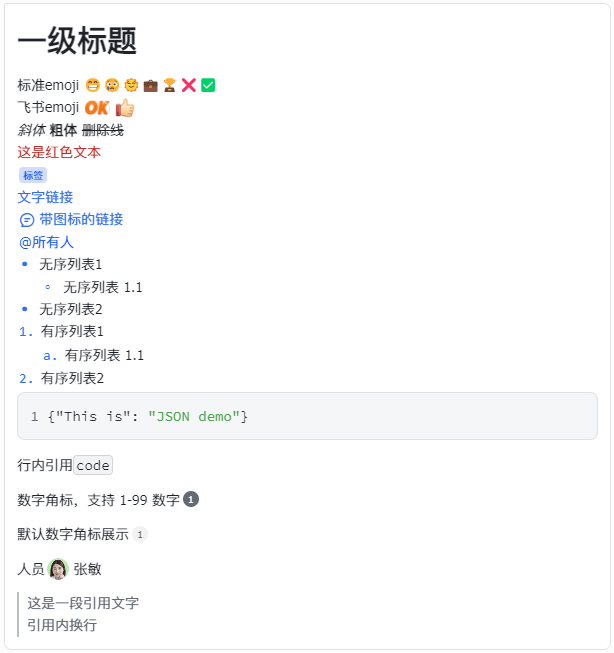
```json
{
"schema": "2.0",
"body": {
"elements": [
{
"tag": "markdown",
"content": "# 一级标题",
"margin": "0px 0px 0px 0px",
"text_align": "left",
"text_size": "normal"
},
{
"tag": "markdown",
"content": "标准emoji 😁😢🌞💼🏆❌✅\n飞书emoji :OK::THUMBSUP:\n*斜体* **粗体** ~~删除线~~ \n这是红色文本<\/font>\n标签<\/text_tag>\n[文字链接](https:\/\/open.feishu.cn\/document\/server-docs\/im-v1\/message-reaction\/emojis-introduce)\n带图标的链接<\/link>\n<\/at>\n- 无序列表1\n - 无序列表 1.1\n- 无序列表2\n1. 有序列表1\n 1. 有序列表 1.1\n2. 有序列表2\n```JSON\n{\"This is\": \"JSON demo\"}\n```"
},
{
"tag": "markdown",
"content": "行内引用`code`"
},
{
"tag": "markdown",
"content": "数字角标,支持 1-99 数字1"
},
{
"tag": "markdown",
"content": "默认数字角标展示1"
},
{
"tag": "markdown",
"content": "人员"
},
{
"tag": "markdown",
"content": "> 这是一段引用文字\n引用内换行 \n"
}
]
}
}
```
## Supported Markdown syntax
[Card JSON 2.0 structure](https://open.feishu.cn/document/uAjLw4CM/ukzMukzMukzM/feishu-cards/card-json-v2-structure) supports all standard Markdown syntax and some HTML syntax except for `HTMLBlock`. To learn about the standard Markdown syntax, please refer to the [CommonMark Spec official documentation](https://spec.commonmark.org/0.31.2/). You can also use the [CommonMark playground](https://spec.commonmark.org/dingus/) to preview Markdown effects.
Note that in the rich text component of the card, the rendering effects of the following syntax differ from CommonMark:
- The rich text component supports using one Enter key as a soft break; two Enter keys as a hard break. Soft breaks may be ignored during rendering, depending on how the renderer handles them; hard breaks will always render as a new line.
- The 2.0 structure supports the following HTML syntax:
- Opening tag ` `
- Self-closing tag ` `
- Opening tag ``
- Self-closing tag ``
- Closing tag ``
- Closing tag ``
- Closing tag ``
- Closing tag ``
- Closing tag ``
- Closing tag ``
- Closing tag ``
- Closing tag ``, supports nesting other tags, such as `redgreenagain`. Other tags include:
- Closing tag ``
- Closing tag ``
- Closing tag ``
- Closing tag ``
- Closing tag ``
Below are some common rendering effects and their corresponding Markdown or HTML syntax.
Name | Syntax | Effect | Notes
---|---|---|---
Line Break | ``` Row 1 Row 2 Row 1 Row 2 ``` | Row 1 Row 2 | - If you are building cards using Card JSON, you can also use the string newline syntax `\n` line breaks. - If you are building cards with the Card Builder, you can also use the carriage return key to break lines.
Italic | ``` *Italic* ``` | *Italic* | None
Bold | ``` __Bold__ or **Bold** ``` | __Bold__ | - Do not use 4 consecutive `*` or `_` bolds. This syntax is not standardized and may result in incorrect rendering. - If the bold effect is not displayed, ensure that there is a space before and after the bold syntax.
Strikethrough | ``` Strikethrough ``` | ~~Strikethrough~~ | None
Mention Specific Person | ``` ``` | @Username | - This syntax is used to achieve the effect of @ mentioning a person in the card, and the mentioned user will receive a mention notification. However, for forwarded cards, the user will no longer receive the mention notification. - To display the username, avatar, and personal card of a person in the card, you can use the [User Profile](https://open.feishu.cn/document/uAjLw4CM/ukzMukzMukzM/feishu-cards/card-json-v2-components/content-components/user-profile) or [User List](https://open.feishu.cn/document/uAjLw4CM/ukzMukzMukzM/feishu-cards/card-json-v2-components/content-components/user-list) component. However, the person and person list components are for display only, and users will not receive mention notifications. - [Custom robots](https://open.feishu.cn/document/ukTMukTMukTM/ucTM5YjL3ETO24yNxkjN) only support using `open_id`, `user_id` to mention specific people. - You can use the `` syntax to pass multiple IDs here.
Mention Everyone | ``` ``` | @everyone | Mentioning everyone requires group owner permission. If not enabled, the card will fail to send.
Hyperlink | ```
``` | [https://open.feishu.cn](https://open.feishu.cn) | - Hyperlinks must include a schema to be effective; currently, only HTTP and HTTPS are supported. - The color of hyperlink text does not support customization.
Colored Text Style | ``` This is green text This is red text This is grey text ``` |  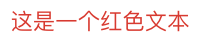  | * Colored text styles do not apply to text in links * Color values: - **default**: Default style with white background and black text - Supported color enumerations and RGBA syntax for custom colors. Refer to [Color Enumeration](https://open.feishu.cn/document/uAjLw4CM/ukzMukzMukzM/feishu-cards/enumerations-for-fields-related-to-color)
Clickable Phone Number | ``` [Display text for phone number or other content](tel://phone_number_to_popup_on_mobile) ``` |  | This syntax is effective only on mobile devices.
Text Link | ``` [Open Platform](https://open.feishu.cn/) ``` | [Open Platform](https://open.feishu.cn/) | Hyperlinks must include a schema to be effective; currently, only HTTP and HTTPS are supported.
Differential Redirection Link | ``` { "tag": "markdown", "href": { "urlVal": { "url": "xxx", "pc_url":"xxx", "ios_url": "xxx", "android_url": "xxx" } }, "content": "[Differential Redirection]($urlVal)" } ``` | \- | * Hyperlinks must include a schema to be effective, currently only HTTP and HTTPS. - Use only when different links are needed for PC and mobile platforms.
Image | ```  ``` | | * `hover_text` refers to the text displayed when the cursor hovers over the image on the PC. * **image_key** can be obtained by calling the [Upload Image](https://open.feishu.cn/document/uAjLw4CM/ukTMukTMukTM/reference/im-v1/image/create) API.
Divider | ``` --- ``` |  | The `---` symbol must be used on a separate line. That is, if there is text before and after the `---` symbol, you must add line breaks before and after the split line.
Feishu Emoji | ``` :DONE: ``` |  | Supported Emoji Key list can be found in [Emoji Text Description](https://open.feishu.cn/document/uAjLw4CM/ukTMukTMukTM/reference/im-v1/message-reaction/emojis-introduce).
Tag | ``` Tag text ``` | | Supported `color` enumeration range includes: - `neutral`: Neutral color - `blue`: Blue - `turquoise`: Turquoise - `lime`: Lime - `orange`: Orange - `violet`: Violet - `indigo`: Indigo - `wathet`: Sky blue - `green`: Green - `yellow`: Yellow - `red`: Red - `purple`: Purple - `carmine`: Carmine
Ordered List | ``` 1. Ordered item 1 1. Sub-item 1.1 2. Ordered item 2 ``` | 1. Ordered item 1 1. Sub-item 1.1 2. Ordered item 2 | * Numbers must be used at the start of the line * 4 spaces represent one level of indentation **Notice**:Only effective in Feishu version 7.6 and above. In older versions of the Feishu client, components containing this syntax will display an upgrade placeholder image.
Unordered List | ``` - Unordered item 1 - Sub-item 1.1 - Unordered item 2 ``` | - Unordered item 1 - Sub-item 1.1 - Unordered item 2 | * Marks must be used at the start of the line * 4 spaces represent one level of indentation - In the card JSON, you need to add `\n` for line breaks: ```json \n- Unordered list 1\n - Unordered list 1.1\n- Unordered list 2\n1. Ordered list 1\n ``` **Notice**:Only effective in Feishu version 7.6 and above. In older versions of the Feishu client, components containing this syntax will display an upgrade placeholder image.
Code Block | `````markdown ```JSON {"This is": "JSON demo"} ``` ````` | ```JSON {"This is": "JSON demo"} ``` | * Code block syntax and content must be used at the start of the line * Supports specifying programming languages for parsing. If not specified, defaults to Plain Text - Four or more spaces ([indented code blocks](https://spec.commonmark.org/0.30/#indented-code-blocks)) will also trigger the code block effect.
Link with Icon | ``` Strategic Discussion ``` |  | Field descriptions in this syntax are as follows: - `icon`: Icon preceding the link. Only icons from the icon library are supported, see [Icon Library](https://open.feishu.cn/document/uAjLw4CM/ukzMukzMukzM/feishu-cards/enumerations-for-icons) for enumeration values. The icon color is fixed as blue. Optional. - `url`: The default link address, effective when no device-specific fields are configured. Required. - `pc_url`: PC link address, higher priority than `url`. Optional. - `ios_url`: iOS link address, higher priority than `url`. Optional. - `android_url`: Android link address, higher priority than `url`. Optional.
Personnel | ``````markdown `````` |  | The field descriptions for this syntax are as follows: - `id`: The user's ID, which supports open_id, union_id, and user_id. If left empty, incorrect, or omitted, it will display the fallback "Unknown User" style. For more information, refer to [How to Obtain Different User IDs](https://open.feishu.cn/document/home/user-identity-introduction/open-id). - `show_name`: Whether to display the username. Defaults to true. - `show_avatar`: Whether to display the user's avatar. Defaults to true. - `style`: The display style of the personnel component. Available options are: - normal: Standard style (default) - capsule: Capsule style **Notice**:Personnel syntax does not currently support previewing actual user avatars and names in the building tool. You can preview the actual effect by clicking **Send Me a Preview**.
Heading | ``` # Heading Level 1 ## Heading Level 2 ###### Heading Level 6 ``` |  | Supports heading levels from 1 to 6. The font sizes from level 1 to 6 are 26, 22, 20, 18, 17, and 14px. **Notice**:Heading syntax can only be used in the [Card JSON 2.0 Structure](https://open.feishu.cn/document/uAjLw4CM/ukzMukzMukzM/feishu-cards/card-json-v2-structure).
Blockquote | ``` >[Space] This is a blockquote text\nNew line in blockquote ``` | 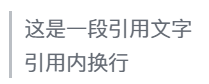 | **Notice**:Blockquote syntax can only be used in the [Card JSON 2.0 Structure](https://open.feishu.cn/document/uAjLw4CM/ukzMukzMukzM/feishu-cards/card-json-v2-structure).
Inline Code | ``` `code` ``` |  | **Notice**:Inline code syntax can only be used in the [Card JSON 2.0 Structure](https://open.feishu.cn/document/uAjLw4CM/ukzMukzMukzM/feishu-cards/card-json-v2-structure).
Number Badge | `````markdown 1 ````` `````markdown 1 ````` |  | Circular number badges that support adding numbers from 0 to 99. The field descriptions for this syntax are as follows: - `background_color`: Background color inside the circle. Optional. - `font_color`: Font color of the number. Optional. - `url`: Default link when clicking the badge. This configuration takes effect if the following device-specific fields are not configured. Optional. - `pc_url`: Link when clicking the badge on the PC, with a higher priority than `url`. Optional. - `ios_url`: Link when clicking the badge on iOS, with a higher priority than `url`. Optional. - `android_url`: Link when clicking the badge on Android, with a higher priority than `url`. Optional. **Notice**:Number badge syntax can only be used in the [Card JSON 2.0 Structure](https://open.feishu.cn/document/uAjLw4CM/ukzMukzMukzM/feishu-cards/card-json-v2-structure).
Table | ``` | Syntax | Description | | -------- | -------- | | Paragraph | Text | | Paragraph | Text | | Paragraph | Text | | Paragraph | Text | | Paragraph | Text | | Paragraph | Text | ``` |  | - Except for the header row, up to five rows of data is shown. Any data exceeding five rows will be paginated. - A maximum of four tables can be placed in a single rich text component. - The rich text syntax for tables does not support setting column width, etc. To set column width, data alignment, etc., you can use the [Table](https://open.feishu.cn/document/uAjLw4CM/ukzMukzMukzM/feishu-cards/card-json-v2-components/content-components/table) component.
Internationalization time | <local_datetime millisecond='' format_type='date_num' link='https://www.feishu.com'></local_datetime> |  | Internationalization time tag. Supports automatic display of time in the user's local timezone. The fields in this syntax are described as follows: - **`millisecond`**: The Unix millisecond timestamp of the time to be displayed. If not provided: - For cards sent using card JSON, the default is the time when the card was sent. - For cards built using the builder tool, the default is the time when the card was published. - **`format_type`**: Defines the format of the time display. By default, it uses a numeric display, e.g., `2019-03-15`. The enumeration values are as follows: - `date_num`: Date represented by numbers, e.g., `2019-03-15`. - `date_short`: Abbreviated date without the year, supports automatic multilingual adaptation, e.g., `3月15日`, `Mar 15`. - `date`: Complete internationalized date text, supports automatic multilingual adaptation, e.g., `2019年3月15日`, `Mar 15, 2019`. - `week`: Complete week text, supports automatic multilingual adaptation, e.g., `星期二`, `Tuesday`. - `week_short`: Abbreviated week text, supports automatic multilingual adaptation, e.g., `周二`, `Tue`. - `time`: Time (hour:minute) text, e.g., `13:42`. - `time_sec`: Time (hour:minute:second) text, e.g., `13:42:53`. - `timezone`: Timezone of the device, formatted as `GMT±hh:mm`, e.g., `GMT+8:00`. - **`link`**: The URL to redirect to when the time is clicked.
Audio | ``` | ``` Refer to the end of this article for examples of audio syntax usage. - When style is normal:  - When style is speak: 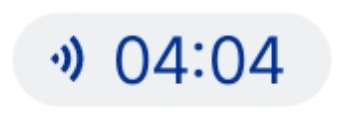 | Rich text embedded audio player. The fields in this syntax are described as follows: - `file_key`: The key of the audio file, obtained through the [Upload File](https://open.feishu.cn/document/uAjLw4CM/ukTMukTMukTM/reference/im-v1/file/create) API. For details, refer to the [Audio](https://open.feishu.cn/document/uAjLw4CM/ukzMukzMukzM/feishu-cards/card-json-v2-components/content-components/audio) component. Required. - `audio_id`: The unique identifier of the audio instance, used in the same way as the [Audio](https://open.feishu.cn/document/uAjLw4CM/ukzMukzMukzM/feishu-cards/card-json-v2-components/content-components/audio) component. Optional. - `show_time`: Whether to display the duration. Optional, default is false. - `style`: The style of the audio. Optional, supports the following values: - `normal`: Default value, triangle play button style - `speak`: Speech style - `background_color`: The background color of the component. Optional. Supports default, [color enumeration values](https://open.feishu.cn/document/uAjLw4CM/ukzMukzMukzM/feishu-cards/enumerations-for-fields-related-to-color), and RGBA syntax for custom colors. - `fill_color`: The color of the icon and time. Optional. Supports color enumeration values and RGBA syntax for custom colors. - `fallback_text`: In Feishu clients below version V7.49.0, the audio player will be displayed as a text link. You can set the text and URL to guide users to click the link to access the audio. This field specifies the display text. Optional. If not specified, the component will be discarded in lower version clients. - `fallback_url`: In Feishu clients below version V7.49.0, the audio player will be displayed as a text link. You can set the text and URL to guide users to click the link to access the audio. This field specifies the fallback URL for the text link. If `fallback_text` is specified, `fallback_url` must also be specified. - `fallback_pc_url`: Specifies an additional URL for the audio player in lower version PC clients. Optional. Takes precedence over the fallback `fallback_url`. - `fallback_ios_url`: Specifies an additional URL for the audio player in lower version iOS clients. Optional. Takes precedence over the fallback `fallback_url`. - `fallback_android_url`: Specifies an additional URL for the audio player in lower version Android clients. Optional. Takes precedence over the fallback `fallback_url`. - `fallback_harmony_url`: Specifies an additional URL for the audio player in lower version native Harmony clients. Optional. Takes precedence over the fallback `fallback_url`.
### Explanation of special character escaping
If the characters you want to display hit the special characters used in markdown syntax (such as *, ~, >, <), you need to HTML escape these special characters to display them normally. The escape character comparison table is as follows:
| **Special Character** | **Escape Sequence** | **Description** |
| --- | --- | --- |
| ` ` | ` ` | Non-break space |
| ` ` | ` ` | Half-width space |
| ` ` | ` ` | Full-width space |
| `>` | `>` | Greater than symbol |
| `<` | `<` | Less than symbol |
| `~` | `∼` | Tilde |
| `-` | `-` | Hyphen |
| `!` | `!` | Exclamation mark |
| `*` | `*` | Asterisk |
| `/` | `/` | Forward slash |
| `\` | `\` | Backslash |
| `[` | `[` | Left square bracket |
| `]` | `]` | Right square bracket |
| `(` | `(` | Left parenthesis |
| `)` | `)` | Right parenthesis |
| `#` | `#` | Hash symbol |
| `:` | `:` | Colon |
| `+` | `+` | Plus sign |
| `"` | `"` | Double quotation mark |
| `'` | `'` | Single quotation mark |
| \` | ``` | Backtick |
| `$` | `$` | Dollar sign |
| `_` | `_` | Underscore |
| `-` | `-` | Unordered list mark |
For more escape characters, refer to the [HTML Escape Universal Standard](https://www.w3school.com.cn/charsets/ref_html_8859.asp) to implement them. The escaped format is `&#entity number;`.
### Programming languages supported by code blocks
The rich text component supports rendering code using code block syntax. The supported programming languages are listed below and are case-insensitive.
`````markdown
```JSON
{"This is": "JSON demo"}
```
`````
- plain_text
- abap
- ada
- apache
- apex
- assembly
- bash
- c_sharp
- cpp
- c
- cmake
- cobol
- css
- coffee_script
- d
- dart
- delphi
- diff
- django
- docker_file
- erlang
- fortran
- gherkin
- go
- graphql
- groovy
- html
- htmlbars
- http
- haskell
- json
- java
- javascript
- julia
- kotlin
- latex
- lisp
- lua
- matlab
- makefile
- markdown
- nginx
- objective_c
- opengl_shading_language
- php
- perl
- powershell
- prolog
- properties
- protobuf
- python
- r
- ruby
- rust
- sas
- scss
- sql
- scala
- scheme
- shell
- solidity
- swift
- toml
- thrift
- typescript
- vbscript
- visual_basic
- xml
- yaml
## Defining Different Font Sizes for Mobile and Desktop
In the plain text and rich text components, you can define different font sizes for the same text on mobile and desktop platforms. The related field descriptions are as shown in the following table.
Field | Required | Type | Default Value | Description
---|---|---|---|---
text_size | No | Object | / | Font size. You can customize different font sizes for mobile and desktop here.
└ custom_text_size_name | No | Object | / | Custom font size. You need to define the name of this field, such as `cus-0`, `cus-1`, etc.
└└ default | No | String | / | The font size property that is effective on old versions of Feishu clients that cannot differentiate configurations. Recommended to fill in this field. Available values are as follows. - heading-0: Extra large title (30px) - heading-1: First level title (24px) - heading-2: Second level title (20 px) - heading-3: Third level title (18px) - heading-4: Fourth level title (16px) - heading: Title (16px) - normal: Text (14px) - notation: Auxiliary information (12px) - xxxx-large: 30px - xxx-large: 24px - xx-large: 20px - x-large: 18px - large: 16px - medium: 14px - small: 12px - x-small: 10px
└└ pc | No | String | / | Desktop font size. Available values are as follows. - heading-0: Extra large title (30px) - heading-1: First level title (24px) - heading-2: Second level title (20 px) - heading-3: Third level title (18px) - heading-4: Fourth level title (16px) - heading: Title (16px) - normal: Text (14px) - notation: Auxiliary information (12px) - xxxx-large: 30px - xxx-large: 24px - xx-large: 20px - x-large: 18px - large: 16px - medium: 14px - small: 12px - x-small: 10px
└└ mobile | No | String | / | Mobile text font size. Available values are as follows. **Note**: Some mobile font size enumeration values may differ from the PC version, so please use accordingly. - heading-0: Extra large title (26px) - heading-1: First level title (24px) - heading-2: Second level title (20 px) - heading-3: Third level title (17px) - heading-4: Fourth level title (16px) - heading: Title (16px) - normal: Text (14px) - notation: Auxiliary information (12px) - xxxx-large: 26px - xxx-large: 24px - xx-large: 20px - x-large: 18px - large: 17px - medium: 14px - small: 12px - x-small: 10px
The specific steps are as follows.
1. In the global behavior settings of the card JSON code, configure the `style` field in the `config` section, and add custom font sizes:
```json
{
"config": {
"style": { // Add and configure the style field here.
"text_size": { // Add custom font sizes for mobile and desktop, also include a fallback font size. Used to set the font size property in the component JSON. Supports adding multiple custom font size objects.
"cus-0": {
"default": "medium", // The font size property that takes effect on old versions of Feishu clients that cannot differentiate configurations. Optional.
"pc": "medium", // Desktop font size.
"mobile": "large" // Mobile font size.
},
"cus-1": {
"default": "medium", // The font size property that takes effect on old versions of Feishu clients that cannot differentiate configurations. Optional.
"pc": "normal", // Desktop font size.
"mobile": "x-large" // Mobile font size.
}
}
}
}
}
```
2. Apply the custom font size in the `text_size` property of the plain text or rich text component. Below is an example of applying a custom font size in a rich text component:
```json
{
"elements": [
{
"tag": "markdown",
"text_size": "cus-0", // Apply the custom font size here.
"href": {
"urlVal": {
"url": "xxx1",
"pc_url": "xxx2",
"ios_url": "xxx3",
"android_url": "xxx4"
}
},
"content": "Plain text\nStandard emoji😁😢🌞💼🏆❌✅\n*Italic*\n**Bold**\n~~Strikethrough~~\nText link\nDifferentiated redirection\n"
},
{
"tag": "hr"
},
{
"tag": "markdown",
"content": "The line above is a divider\n!hover_text\nThe line above is an image tag"
}
],
"header": {
"template": "blue",
"title": {
"content": "This is the card title bar",
"tag": "plain_text"
}
}
}
```
## Rich text syntax usage example
### Audio
The following rich text syntax example code can achieve the card effect as shown in the image below. Please replace `file_key` with the actual value before viewing the effect. When obtaining the audio file `file_key`, ensure that the application calling the [Upload File](https://open.feishu.cn/document/uAjLw4CM/ukTMukTMukTM/reference/im-v1/file/create) interface is the same as the application sending the card.

```json
{
"schema": "2.0",
"config": {
"wide_screen_mode": true,
"enable_forward": false,
"update_multi": true,
"enable_forward_interaction": true,
"style": {
"color": {
"color_0": {
"light_mode": "rgba(20,86,240,1.000000)",
"dark_mode": "rgba(20,86,240,1.000000)"
},
"color_1": {
"light_mode": "rgba(149,229,153,1.000000)",
"dark_mode": "rgba(149,229,153,1.000000)"
},
"color_2": {
"light_mode": "rgba(253,198,196,1.000000)",
"dark_mode": "rgba(253,198,196,1.000000)"
}
}
}
},
"body": {
"direction": "vertical",
"padding": "12px 12px 12px 12px",
"elements": [
{
"tag": "markdown",
"content": "Parameter default effect example:\n",
"text_align": "left"
},
{
"tag": "markdown",
"content": "Display time example:\n",
"text_align": "left"
},
{
"tag": "markdown",
"content": "Custom color background_color='rgba(20,86,240,1.000000)' fill_color='rgba(253,198,196,1.000000)' example:\n",
"text_align": "left"
},
{
"tag": "markdown",
"content": "Use color enumeration value background_color='grey-200' fill_color='blue-800' example:\n",
"text_align": "left"
},
{
"tag": "markdown",
"content": "Player button voice style (style=speak) example:\n",
"text_align": "left"
},
{
"tag": "markdown",
"content": "For Feishu versions below V7.49, set fallback text and link example:\n",
"text_align": "left"
},
{
"tag": "markdown",
"content": "#### Audio player size example under different fonts:",
"text_align": "left"
},
{
"tag": "markdown",
"content": "heading-0",
"text_align": "left",
"text_size": "heading-0"
},
{
"tag": "markdown",
"content": "heading-1",
"text_align": "left",
"text_size": "heading-1"
},
{
"tag": "markdown",
"content": "heading-2",
"text_align": "left",
"text_size": "heading-2"
},
{
"tag": "markdown",
"content": "heading-3",
"text_align": "left",
"text_size": "heading-3"
},
{
"tag": "markdown",
"content": "heading",
"text_align": "left",
"text_size": "heading"
},
{
"tag": "markdown",
"content": "normal",
"text_align": "left",
"text_size": "normal"
},
{
"tag": "markdown",
"content": "notation",
"text_align": "left",
"text_size": "notation"
}
]
},
"header": {
"title": {
"tag": "plain_text",
"content": "Markdown Audio Player Example"
},
"template": "blue",
"padding": "12px 12px 12px 12px"
}
}
```