# 分栏组件
分栏组件提供卡片内布局的能力,并提供对齐方式、容器宽度、交互方式等属性。你可以使用分栏组件横向排布多个列容器,在列容器内自由组合图文内容,搭建出如数据表、商品或文章列表、差旅信息等图文并茂、交互友好的卡片。
本文档介绍分栏组件的 JSON 1.0 结构,要查看新版 JSON 2.0 结构,参考[分栏](https://open.feishu.cn/document/uAjLw4CM/ukzMukzMukzM/feishu-cards/card-json-v2-components/containers/column-set)。

## 注意事项
分栏组件最多支持嵌套五层组件。建议你避免在分栏中嵌套多层组件。多层嵌套会压缩内容的展示空间,影响卡片的展示效果。
## 应用场景
- **数据报表推送场景**:使用分栏可以快速构建整齐、自适应屏幕的多列数据表,解决了传统报表构建时繁琐的排版过程,以及无法自适应各类屏幕的样式问题。
- **图文混排场景**:分栏灵活的横纵列排版能力,使你可以快速构建理想的图文卡片。有效降低手动调整图文排版的耗时。
## 嵌套规则
分栏组件由分栏本身的属性(column_set)和列容器(column)组成。一个分栏组件中内可以添加多个列容器,每个列容器中可内嵌多个组件。
[卡片 JSON 2.0 结构](https://open.feishu.cn/document/uAjLw4CM/ukzMukzMukzM/feishu-cards/card-json-v2-structure)支持内嵌除表单容器(form)和表格组件(table)外的其它所有组件。
[卡片 JSON 1.0 结构](https://open.feishu.cn/document/uAjLw4CM/ukzMukzMukzM/feishu-cards/card-json-structure)支持内嵌的组件有:
- 容器类:分栏和循环容器组件
- 展示类:除标题组件、表格组件以外的所有展示组件
- 交互类:除折叠按钮组以外的所有交互类组件
整体的嵌套关系如下图所示。
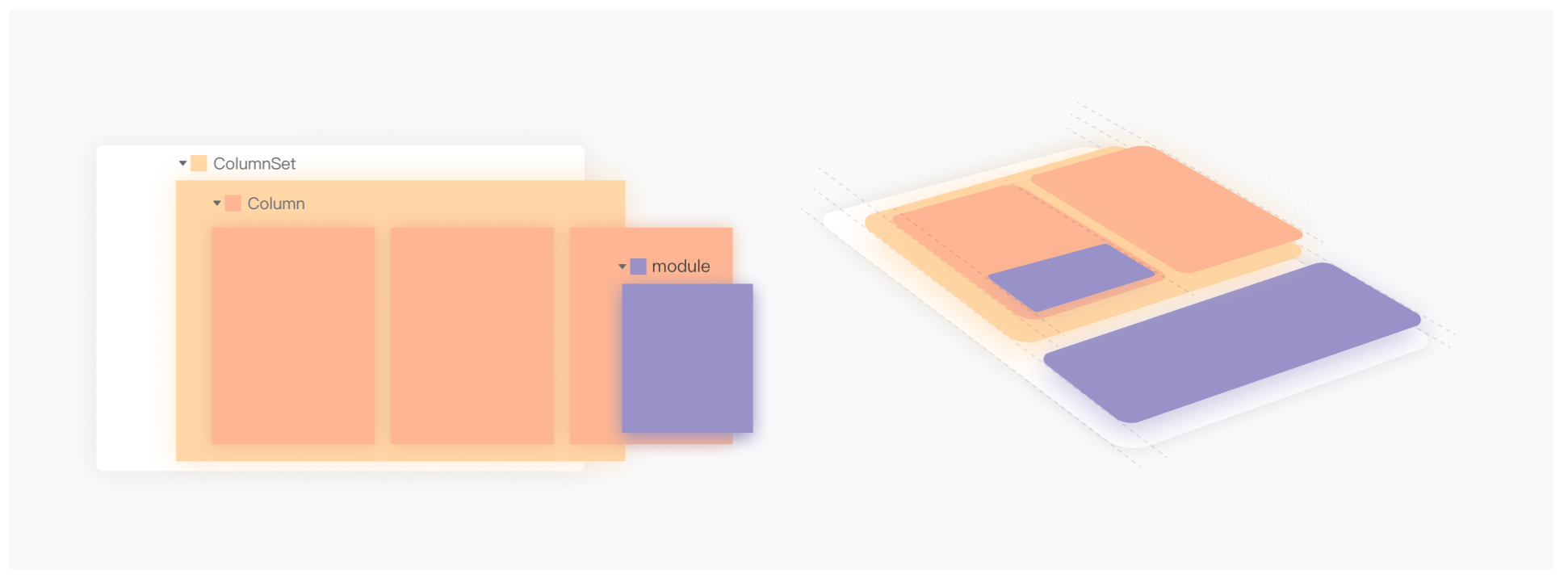
列容器中再嵌套分栏的层级关系如下图所示。

## 组件属性
### JSON 结构
以下为一个分栏组件的卡片 JSON 数据:
```JSON
{
"tag": "column_set", // 分栏的标签。
"horizontal_spacing": "large", // 分栏中列容器之间的间距。默认值 default(为 8px)。
"horizontal_align": "left", // 列容器水平对齐的方式。默认值 left。
"margin": "0px", // 列容器的外边距。
"flex_mode": "none", // 移动端和 PC 端的窄屏幕下,各列的自适应方式。默认值 none。
"background_style": "default", // 分栏的背景色样式。默认值 default。
"action": { // 在此处设置点击分栏时的交互配置。
"multi_url": {
"url": "https://open.feishu.cn",
"pc_url": "https://open.feishu.com",
"ios_url": "https://developer.apple.com/",
"android_url": "https://developer.android.com/"
}
},
"columns": [
// 列配置
{
"tag": "column",
"background_style": "default", // 列的背景色样式。默认值 default。
"width": "auto", // 列容器的宽度。默认值 auto。
"weight": 1, // 当 width 取值 weighted 时生效,表示当前列的宽度占比。
"vertical_align": "center", // 列垂直居中的方式。
"vertical_spacing": "4px", // 列内子组件纵向间距。默认值 default(8px)。
"padding": "8px", // 列容器的内边距。默认值 0px。
"action": {
// 在此处设置点击列时的交互配置。
"multi_url": {
"url": "https://www.baidu.com",
"pc_url": "https://www.baidu.com",
"ios_url": "https://www.google.com",
"android_url": "https://www.apple.com.cn"
}
},
"elements": [] // 列容器内嵌的组件,不支持内嵌表格组件、多图混排组件和表单容器。
}
]
}
```
### 分栏字段说明
分栏(column_set)各属性字段说明如下表所示。
字段名称 | 是否必填 | 类型 | 默认值 | 客户端版本要求 | 说明
---|---|---|---|---|---
tag | 是 | String | / | 无 | 组件的标签。分栏组件的固定值为 column_set。
horizontal_spacing | 否 | String | default | 无 | 各列之间的水平分栏间距。取值:
- default:默认间距,8px
- small:窄间距,4px
- large:大间距,12px
- [0,28px]:自定义间距
horizontal_align | 否 | String | left | V7.4 及以上版本 | 列容器水平对齐的方式。可取值:
- left:左对齐
- center:居中对齐
- right:右对齐
margin | 否 | String | 0px | V7.4 及以上版本 | 列的外边距。值的取值范围为 [0,28]px。可选值:
- 单值,如 "10px",表示列的四个外边距都为 10 px。
- 多值,如 "4px 12px 4px 12px",表示列的上、右、下、左的外边距分别为 4px,12px,4px,12px。四个值必填,使用空格间隔。
**注意**:首行列的上外边距强制为 0,末行列的下外边距强制为 0。
flex_mode | 否 | String | none | 无 | 移动端和 PC 端的窄屏幕下,各列的自适应方式。取值:
- none:不做布局上的自适应,在窄屏幕下按比例压缩列宽度
- stretch:列布局变为行布局,且每列(行)宽度强制拉伸为 100%,所有列自适应为上下堆叠排布
- flow:列流式排布(自动换行),当一行展示不下一列时,自动换至下一行展示
- bisect:两列等分布局
- trisect:三列等分布局
background_style | 否 | String | default | 无 | 分栏的背景色样式。可取值:
- default:默认的白底样式,客户端深色主题下为黑底样式
- 卡片支持的颜色枚举值和 RGBA 语法自定义颜色。参考[颜色枚举值](https://open.feishu.cn/document/uAjLw4CM/ukzMukzMukzM/feishu-cards/enumerations-for-fields-related-to-color)。
**注意**:当存在分栏的嵌套时,上层分栏的颜色覆盖下层分栏的颜色。
columns | 是 | column[] | 空 | 无 | 分栏中列的配置。
action | 否 | Action | / | 无 | 设置点击分栏时的交互配置。当前仅支持跳转交互。如果布局容器内有交互组件,则优先响应交互组件定义的交互。
└ multi_url | 否 | Struct | 空 | 无 | 配置各个端的链接地址。
└└ url | 否 | String | 空 | 无 | 兜底的跳转链接。
└└ android_url | 否 | String | 空 | 无 | Android 端的跳转链接。可配置为 `lark://msgcard/unsupported_action` 声明当前端不允许跳转。
└└ ios_url | 否 | String | 空 | 无 | iOS 端的跳转链接。可配置为 `lark://msgcard/unsupported_action` 声明当前端不允许跳转。
└└ pc_url | 否 | String | 空 | 无 | PC 端的跳转链接。可配置为 `lark://msgcard/unsupported_action` 声明当前端不允许跳转。
### 列字段说明
分栏中列(column)的各属性字段说明如下表所示。
字段名称 | 是否必填 | 类型 | 默认值 | 客户端版本要求 | 说明
---|---|---|---|---|---
tag | 是 | String | / | 无 | 列的标签,固定取值为 `column`。
background_style | 否 | String | default | V7.4 及以上版本 | 列的背景色样式。可取值:
- **default**:默认的白底样式,客户端深色主题下为黑底样式
- 卡片支持的颜色枚举值和 RGBA 语法自定义颜色。参考[颜色枚举值](https://open.feishu.cn/document/uAjLw4CM/ukzMukzMukzM/feishu-cards/enumerations-for-fields-related-to-color)
width | 否 | String | auto | 无 | 列宽度。仅 `flex_mode` 为 `none` 时,生效此属性。取值:
- **auto**:列宽度与列内元素宽度一致
- **weighted**:列宽度按 `weight` 参数定义的权重分布
- 具体数值,如 100px。取值范围为 [16,600]px。V7.4 及以上版本支持该枚举
weight | 否 | Number | 1 | 无 | 当 `width` 字段取值为 `weighted` 时生效,表示当前列的宽度占比。取值范围为 1 ~ 5 之间的整数。
vertical_align | 否 | String | top | 无 | 列垂直居中的方式。可取值:
- **top**:上对齐
- **center**:居中对齐
- **bottom**:下对齐
vertical_spacing | 否 | String | | V7.4 及以上版本 | 列内组件的纵向间距。取值:
- **default**:默认间距,8px
- **medium**:中等间距
- **large**:大间距
- 具体数值,如 8px。取值范围为 [0,28]px
padding | 否 | String | 0px | V7.4 及以上版本 | 列的内边距。值的取值范围为 [0,28]px。可选值:
- 单值,如 "10px",表示列的四个外边距都为 10 px。
- 多值,如 "4px 12px 4px 12px",表示列的上、右、下、左的外边距分别为 4px,12px,4px,12px。四个值必填,使用空格间隔。
elements | 否 | Element 或 ColumnSet[] | 空 | 空 | 列容器中内嵌的组件。可内嵌组件参考上文嵌套关系。
action | 否 | Action | / | V7.4 及以上版本 | 设置点击列时的交互配置。当前仅支持跳转交互。如果布局容器内有交互组件,则优先响应交互组件定义的交互。
└ multi_url | 否 | Struct | 空 | V7.4 及以上版本 | 配置各个端的链接地址。
└└ url | 否 | String | 空 | V7.4 及以上版本 | 兜底的链接地址。
└└ android_url | 否 | String | 空 | V7.4 及以上版本 | Android 端的链接地址。可配置为 `lark://msgcard/unsupported_action` 声明当前端不允许跳转。
└└ ios_url | 否 | String | 空 | V7.4 及以上版本 | iOS 端的链接地址。可配置为 `lark://msgcard/unsupported_action` 声明当前端不允许跳转。
└└ pc_url | 否 | String | 空 | V7.4 及以上版本 | PC 端的链接地址。可配置为 `lark://msgcard/unsupported_action` 声明当前端不允许跳转。
## 示例代码
### 示例一:数据报表
以下的 JSON 示例代码可实现如下图所示的卡片效果:
| 桌面端效果 | 窄屏及移动端自适应效果 |
| ---------------------------------------------------------------------------------------------------------------------------------------------------------------------------------------------------------------------------------------------------------- | ---------------------------------------------------------------------------------------------------------------------------------------------------------------------------------------------------------------------------------------------------------- |
|  |  |
```json
{
"elements": [
{
"tag": "markdown",
"content": "**个人审批效率总览**\n"
},
{
"tag": "column_set",
"flex_mode": "bisect",
"background_style": "grey",
"horizontal_spacing": "default",
"columns": [
{
"tag": "column",
"width": "weighted",
"weight": 1,
"elements": [
{
"tag": "markdown",
"text_align": "center",
"content": "已审批单量\n**${total_count}单**\n${total_percent}"
}
]
},
{
"tag": "column",
"width": "weighted",
"weight": 1,
"elements": [
{
"tag": "markdown",
"text_align": "center",
"content": "平均审批耗时\n**${hours}小时**\n${hours_percent}"
}
]
},
{
"tag": "column",
"width": "weighted",
"weight": 1,
"elements": [
{
"tag": "markdown",
"text_align": "center",
"content": "待批率\n**${pending}**\n${pending_rate}"
}
]
}
]
},
{
"tag": "markdown",
"content": "**团队审批效率参考:**"
},
{
"tag": "column_set",
"flex_mode": "none",
"background_style": "grey",
"columns": [
{
"tag": "column",
"width": "weighted",
"weight": 1,
"vertical_align": "top",
"elements": [
{
"tag": "markdown",
"content": "**审批人**",
"text_align": "center"
}
]
},
{
"tag": "column",
"width": "weighted",
"weight": 1,
"vertical_align": "top",
"elements": [
{
"tag": "markdown",
"content": "**审批时长**",
"text_align": "center"
}
]
},
{
"tag": "column",
"width": "weighted",
"weight": 1,
"vertical_align": "top",
"elements": [
{
"tag": "markdown",
"content": "**对比上周变化**",
"text_align": "center"
}
]
}
]
},
{
"tag": "column_set",
"flex_mode": "none",
"background_style": "default",
"columns": [
{
"tag": "column",
"width": "weighted",
"weight": 1,
"vertical_align": "top",
"elements": [
{
"tag": "markdown",
"content": "${person}",
"text_align": "center"
}
]
},
{
"tag": "column",
"width": "weighted",
"weight": 1,
"vertical_align": "top",
"elements": [
{
"tag": "markdown",
"content": "${time}",
"text_align": "center"
}
]
},
{
"tag": "column",
"width": "weighted",
"weight": 1,
"vertical_align": "top",
"elements": [
{
"tag": "markdown",
"content": "${week_rate}",
"text_align": "center"
}
]
}
],
"_varloop": "${group_table}"
}
]
}
```
### 示例二:差旅卡片
以下的 JSON 示例代码可实现如下图所示的卡片效果:
| 桌面端效果 | 窄屏及移动端自适应效果 |
| ---------------------------------------------------------------------------------------------------------------------------------------------------------------------------------------------------------------------------------------------------------- | ---------------------------------------------------------------------------------------------------------------------------------------------------------------------------------------------------------------------------------------------------------- |
|  |  |
```json
{
"header": {
"title": {
"tag": "plain_text",
"content": "🏨 酒店申请已通过,请选择房型"
},
"template": "green"
},
"elements": [
{
"tag": "markdown",
"content": "入住酒店:杭州xxxx酒店\n📍 浙江省杭州市西湖区"
},
{
"tag": "hr"
},
{
"tag": "column_set",
"flex_mode": "none",
"background_style": "default",
"horizontal_spacing": "default",
"action": {
"multi_url": {
"url": "https://open.feishu.cn",
"android_url": "https://developer.android.com/",
"ios_url": "https://developer.apple.com/",
"pc_url": "https://www.windows.com"
}
},
"columns": [
{
"tag": "column",
"width": "weighted",
"weight": 1,
"vertical_align": "center",
"elements": [
{
"tag": "img",
"img_key": "img_v2_120b03c8-27e3-456f-89c0-90ede1aa59ag",
"mode": "fit_horizontal",
"alt": {
"tag": "plain_text",
"content": ""
}
}
]
},
{
"tag": "column",
"width": "weighted",
"weight": 3,
"elements": [
{
"tag": "markdown",
"text_align": "left",
"content": "**高级双床房**\n双早|40-47㎡|有窗户|双床\n¥699 起"
}
]
}
]
},
{
"tag": "hr"
},
{
"tag": "column_set",
"flex_mode": "none",
"background_style": "default",
"horizontal_spacing": "default",
"action": {
"multi_url": {
"url": "https://open.feishu.cn",
"android_url": "https://developer.android.com/",
"ios_url": "https://developer.apple.com/",
"pc_url": "https://www.windows.com"
}
},
"columns": [
{
"tag": "column",
"width": "weighted",
"weight": 1,
"vertical_align": "center",
"elements": [
{
"tag": "img",
"img_key": "img_v2_120b03c8-27e3-456f-89c0-90ede1aa59ag",
"mode": "fit_horizontal",
"alt": {
"tag": "plain_text",
"content": ""
}
}
]
},
{
"tag": "column",
"width": "weighted",
"weight": 3,
"elements": [
{
"tag": "markdown",
"text_align": "left",
"content": "**精品大床房**\n双早|40-47㎡|有窗户|大床\n¥666 起"
}
]
}
]
}
]
}
```