# Overview

Permissions mainly provide closed-loop operation capabilities related to permissions such as role query, creation authorization, update authorization, and removal authorization for various functional modules in Feishu personnel. It also provides query interfaces related to commonly used roles, such as query HRBP, query territorial BP , etc.

## Related concepts

| **Name**    | **Description**                                                                                                                                                                                                           |
| ----------- | ------------------------------------------------------------------------------------------------------------------------------------------------------------------------------------------------------------------------- |
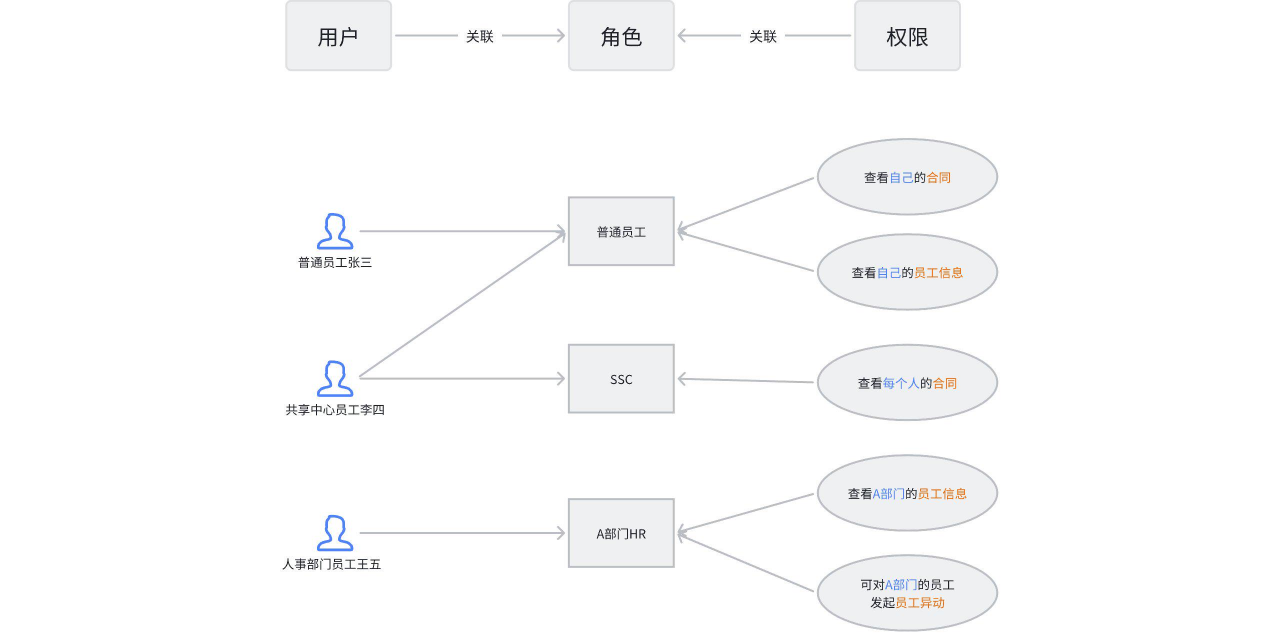
| User        | Each employee in the enterprise is a user in Feishu HR.                                                                                                                                                                   |
| Role        | A role can be associated with multiple permission spots. If an employee is granted a certain role, the employee has the corresponding permission spot associated with that role.                                          |
| Permissions | Each page, function, and operation in Feishu personnel corresponds to a different permission spot. Roles can only view or operate corresponding resources if they have a certain permission spot.                         |
| Authorized  | The process of assigning corresponding roles to designated employees is called authorization.When authorizing organizational roles for employees, you need to specify the appropriate scope for the management dimension. |

## Permission model

![image.png](//sf3-cn.feishucdn.com/obj/open-platform-opendoc/09889aa776101e274712ef5987819bb8_Gy5VXaDeVP.png?height=644&lazyload=true&width=1280)

## Application scenarios

| **Interface**                                                                                                                                              | **Application scenarios**                                                                                                                                                                                                                                                                                                                                                                                                                                                                                                                                                                                                                                                                                                                                                                                                                                                                                                                                                                                                                                                        |
| ---------------------------------------------------------------------------------------------------------------------------------------------------------- | -------------------------------------------------------------------------------------------------------------------------------------------------------------------------------------------------------------------------------------------------------------------------------------------------------------------------------------------------------------------------------------------------------------------------------------------------------------------------------------------------------------------------------------------------------------------------------------------------------------------------------------------------------------------------------------------------------------------------------------------------------------------------------------------------------------------------------------------------------------------------------------------------------------------------------------------------------------------------------------------------------------------------------------------------------------------------------- |
| [Get role list in batch](https://open.larkoffice.com/document/server-docs/corehr-v1/authorization/list)                                                    | Used to query the role list in ["Feishu Personnel" management background ](https://people.feishu.cn/people)- Settings - Role Configuration, and the returned information includes the role ID, role name, role category, role status, management dimension, creator and other related information.                                                                                                                                                                                                                                                                                                                                                                                                                                                                                                                                                                                                                                                                                                                                                                               |
| [Query Employee HRBP/Location BP](https://open.larkoffice.com/document/uAjLw4CM/ukTMukTMukTM/corehr-v2/employees-bp/batch_get)                             | It is used to query the HRBP and territorial BP of employees. It can control whether to obtain the HRBP and territorial BP from the superior department through parameters. The returned results mainly contain the employee ID of BP. If you want to get detailed information, you can call the [search employee information ](https://open.larkoffice.com/document/server-docs/corehr-v1/employee/search)interface to query the detailed information of employees.                                                                                                                                                                                                                                                                                                                                                                                                                                                                                                                                                                                                             |
| [Query department HRBP](https://open.larkoffice.com/document/uAjLw4CM/ukTMukTMukTM/corehr-v2/bp/get_by_department)                                         | Used to query the HRBP of a department, obtain the HRBP of the department by passing in the department ID.The department ID can be viewed from the ["Feishu Personnel" management background ](https://people.feishu.cn/people)- Organization Management - Department details and ID, and can also be obtained through the [search department information ](https://open.larkoffice.com/document/server-docs/corehr-v1/organization-management/department/search)interface.The return value of the query is the employee ID of BP. If you want to get detailed information, you can call the [search employee information ](https://open.larkoffice.com/document/server-docs/corehr-v1/employee/search)interface to query the detailed information of employees.                                                                                                                                                                                                                                                                                                                 |
| [Query the HRBP/territorial BP of the department/location](https://open.larkoffice.com/document/server-docs/corehr-v1/authorization/query)                 | Used to query HRBP/local BP of department/location, supports batch query. Note that when querying local BP, the corresponding department ID is also a required field. The return value of the query is the employee ID of BP. If you want to get detailed information, you can call the [search employee information ](https://open.larkoffice.com/document/server-docs/corehr-v1/employee/search)interface to query the detailed information of employees.                                                                                                                                                                                                                                                                                                                                                                                                                                                                                                                                                                                                                      |
| [Get HRBP list](https://open.larkoffice.com/document/uAjLw4CM/ukTMukTMukTM/corehr-v2/bp/list)                                                              | Used to query the HRBP list of each department, without specifying the department ID for query, the return value of the query is the employee ID and department ID of the BP. If you want to obtain employee details, you can call the [search employee information ](https://open.larkoffice.com/document/server-docs/corehr-v1/employee/search)interface to query employee details. If you want to obtain department details, you can call the [search department information ](https://open.larkoffice.com/document/server-docs/corehr-v1/organization-management/department/search)interface to obtain it.                                                                                                                                                                                                                                                                                                                                                                                                                                                                   |
| [Batch query user authorization](https://open.larkoffice.com/document/uAjLw4CM/ukTMukTMukTM/reference/corehr-v1/authorization/query)                       | Used to query the authorization information in the ["Feishu Personnel" management background ](https://people.feishu.cn/people)-settings-authorization configuration, the interface return value contains the authorized employee ID, the corresponding role information granted, and the authorized management dimension or scope.In the query, you can specify employee IDs in batches for query, and return the authorization information of all users currently specified in the query results.When specifying a role ID, the returned results will be filtered and only the authorization information of the specified role will be returned.When none is specified, the first page_size users from all tenant employees are queried and the corresponding authorization results are returned. (Not recommended)                                                                                                                                                                                                                                                            |
| [Query individual user authorization](https://open.larkoffice.com/document/uAjLw4CM/ukTMukTMukTM/reference/corehr-v1/authorization/get_by_param)           | Used to query the authorization information of a single user in the ["Feishu Personnel" management background ](https://people.feishu.cn/people)- Settings - Authorization Configuration, the ID of the employee needs to be specified, and the returned results include the employee ID, the corresponding role information granted, and the management dimension or scope of the authorization.                                                                                                                                                                                                                                                                                                                                                                                                                                                                                                                                                                                                                                                                                |
| [Authorize roles for users](https://open.larkoffice.com/document/uAjLw4CM/ukTMukTMukTM/reference/corehr-v1/authorization/add_role_assign)                  | Used to grant roles and management scope to employees. Currently, only roles managed by organizational structure are supported. This interface is a data incremental authorization interface. To continue to authorize users who have been authorized for a certain role, the data range will be added on the basis of the original authorized data range.                                                                                                                                                                                                                                                                                                                                                                                                                                                                                                                                                                                                                                                                                                                       |
| [Update the user's authorized data range](https://open.larkoffice.com/document/uAjLw4CM/ukTMukTMukTM/reference/corehr-v1/authorization/update_role_assign) | Used to update the user's authorized data range. The updated data range is subject to the data range submitted this time. The unsubmitted part will be removed. Please use it differently from [the authorized role for users ](https://open.larkoffice.com/document/uAjLw4CM/ukTMukTMukTM/reference/corehr-v1/authorization/add_role_assign).                                                                                                                                                                                                                                                                                                                                                                                                                                                                                                                                                                                                                                                                                                                                   |
| [Remove user authorized roles](https://open.larkoffice.com/document/uAjLw4CM/ukTMukTMukTM/reference/corehr-v1/authorization/remove_role_assign)            | Used to remove the specified role authorized by the user and the scope of its authorization. The existing authorization information of the user can be obtained by [querying a single user authorization ](https://open.larkoffice.com/document/uAjLw4CM/ukTMukTMukTM/reference/corehr-v1/authorization/get_by_param)interface query, or by viewing the authorization information of existing users in the ["Feishu Personnel" management background ](https://people.feishu.cn/people)- Settings - Authorization Configuration.                                                                                                                                                                                                                                                                                                                                                                                                                                                                                                                                                 |
| [Obtain the authorization list of organizational roles](https://open.larkoffice.com/document/server-docs/corehr-v1/authorization/search)                   | Used to query authorization information for organizational roles.The ID of the role needs to be passed in. The way to obtain the role ID can be obtained by [batch obtaining the role list ](https://open.larkoffice.com/document/server-docs/corehr-v1/authorization/list).The management scope of the role needs to be specified.Supports two query methods:<br>&emsp;The parameter value of 1 only searches for the specified department/workplace/company/social security city. If there is no authorization information, it will return empty.<br>&emsp;The parameter value of 2 is when specified, department/work location/company/social security city, no authorization information, look up the first authorization record and return directly.<br>The returned authorization list contains information such as authorized User Identification and authorized management dimensions. To obtain detailed information, you can use the [search department information ](https://open.larkoffice.com/document/server-docs/corehr-v1/organization-management/department/search)interface. |
| [[Event] Change of Organization Role Authorization](https://open.larkoffice.com/document/server-docs/corehr-v1/authorization/updated)                    | This event is triggered when the role authorization on the organization changes.<br>Scenario example:<br><br>Initial state: HRBP of "Technical Department" is "Zhang San"<br>&emsp;The administrator 2022-12-01 operation, add "Li Si" on the HRBP of "Technical Department", and it takes effect 2023-01-15<br>Trigger event result:<br>&emsp;&emsp;Trigger time: 2023-01-15<br>&emsp;&emsp;Trigger content:<br>&emsp;&emsp;&emsp;&emsp;Role: HRBP (Role ID)<br>&emsp;&emsp;&emsp;&emsp;Department: Technology Department (Department ID)<br>&emsp;&emsp;&emsp;&emsp;Employee: Zhang San, Li Si (Employee ID)<br><br>  Initial state: HRBP of "Technical Department" is "Zhang San"<br>&emsp;The administrator 2022-12-01 operation and deleted the HRBP permission of "Zhang San" in the permission management background<br>Trigger event result:<br>&emsp;&emsp;Trigger time: 2022-12-01<br>&emsp;&emsp;Trigger content:<br>&emsp;&emsp;&emsp;&emsp;Role: HRBP (Role ID)<br>&emsp;&emsp;&emsp;&emsp;Department: Technology Department (Department ID)<br>&emsp;&emsp;&emsp;&emsp;Employee: null|