# Multi-column layout

Multi-column layout is a layout container capability provided by the message card building tool. You can use multi-column layout to arrange multiple column containers horizontally, and freely combine graphic and text content within the column containers. This solves the problem of multi-column content alignment and also enables flexible graphic and text mixing.warning
The multi-column layout is a component of the legacy message card building tool. To learn about the corresponding updated component, refer to [Column Set](https://open.feishu.cn/document/uAjLw4CM/ukzMukzMukzM/feishu-cards/card-components/containers/column-set).

## Features

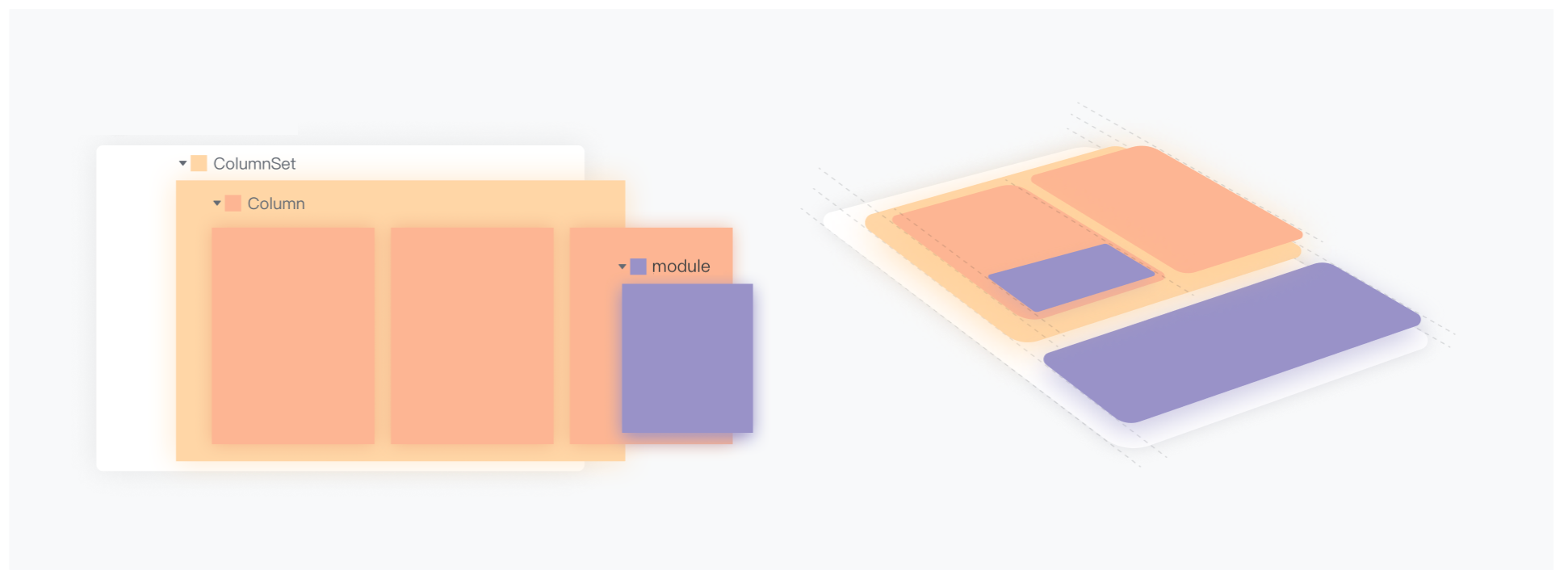
The multi-column layout container consists of **multi-column layout** (column_set) and **column** (column). Multiple columns can be filled horizontally in a container, and element components such as text and pictures can be stacked vertically within each column, or a new multi-column layout can be nested.

The nested relationship between multi-column layout, columns, and element components is shown in the figure below.

![Picture](//sf3-cn.feishucdn.com/obj/open-platform-opendoc/9b253ea6e463d2841c8295b26873c3f7_HFdllfNdSZ.png?height=722&lazyload=true&maxWidth=600&width=1942)

The hierarchical relationship of multi-column layouts is nested within columns, as shown in the figure below.

![Picture](//sf3-cn.feishucdn.com/obj/open-platform-opendoc/e2b6909f3881bc78965466cc736d5ec6_DgUY8Y6R9T.png?height=584&lazyload=true&maxWidth=600&width=2034)

The layout container provides attributes such as content alignment, container width, and interaction mode to facilitate you to better layout the content. Based on this layout method, you can build data tables, product article lists, travel information, etc. mixed message cards that are rich in graphics and text, and interactive and friendly.warning
**Note:**
* Multiple levels of nesting may cause the display space to be compressed and affect the display quality of the card, so please try to avoid multiple levels of nesting.
* The components currently supported in the column include: [Text component](https://open.feishu.cn/document/ukTMukTMukTM/uUzNwUjL1cDM14SN3ATN), [Markdown](https://open.feishu.cn/document/ukTMukTMukTM/uADOwUjLwgDM14CM4ATN), [Picture](https://open.feishu.cn/document/ukTMukTMukTM/uUjNwUjL1YDM14SN2ATN), [Separating line](https://open.feishu.cn/document/ukTMukTMukTM/uQjNwUjL0YDM14CN2ATN), [Remarks](https://open.feishu.cn/document/ukTMukTMukTM/ucjNwUjL3YDM14yN2ATN), [Double column text](https://open.feishu.cn/document/ukTMukTMukTM/uYzNwUjL2cDM14iN3ATN), [Text + Button](https://open.feishu.cn/document/ukTMukTMukTM/uYzM3QjL2MzN04iNzcDN/component-list/combinations/text-button), [Text + Image](https://open.feishu.cn/document/ukTMukTMukTM/uYzM3QjL2MzN04iNzcDN/component-list/combinations/text-image), [Text + Option picker](https://open.feishu.cn/document/ukTMukTMukTM/uYzM3QjL2MzN04iNzcDN/component-list/combinations/text-option-picker), [Text + Overflow button](https://open.feishu.cn/document/ukTMukTMukTM/uYzM3QjL2MzN04iNzcDN/component-list/combinations/text-overflow-button), [Text + Date picker](https://open.feishu.cn/document/ukTMukTMukTM/uYzM3QjL2MzN04iNzcDN/component-list/combinations/text-date-picker). 

## Component display

In the message card building tool, the multi-column layout component is configured as follows:

- Set column proportions

When adding a multi-column layout component, you can select the applicable column proportions.

![image.png](//sf3-cn.feishucdn.com/obj/open-platform-opendoc/efa7d827edd6cc1ae2df055444797b3f_7NCPHek9Un.png?height=1146&lazyload=true&maxWidth=600&width=2286)

- Configure layout style

After selecting a multi-column layout, you can configure the style and interaction of the layout.

![image.png](//sf3-cn.feishucdn.com/obj/open-platform-opendoc/f6fac9701d125c7ad32a9cfdfae2e34d_gYXhbG3upJ.png?height=1130&lazyload=true&maxWidth=600&width=1674)

- **Flex mode**: Set the display of multi-column layout in narrow screen scenarios. You can choose **None**, **Stretch**, **Flow**, **Bisect**, **Trisect**. For specific parameter configuration instructions, please refer to the `flex_mode` parameter in the **Parameter description** chapter below.
    - **Horizontal column spacing**: The spacing between columns in a multi-column layout, optional **Default**, **Small**.
    - **Background style**: Optional **Default** (that is, the default white background style), **Gray**.
    - **Bind loop variable**: You can add loop object array variables. For descriptions of variables, see [Configure Card Variables](https://open.feishu.cn/document/ukTMukTMukTM/ucTNwUjL3UDM14yN1ATN/configure-card-variables).
    - **Interaction**: After enabling interaction, you can configure jump links for multi-column layouts. Supports enabling differentiated jumps and configuring different jump links for PC, Android, and iOS.

- Configure column layout

After selecting a column in a multi-column layout, you can configure the style of the column layout.

![image.png](//sf3-cn.feishucdn.com/obj/open-platform-opendoc/0153bfde1b4092f440bfeb48308172ac_jGNemnhrKp.png?height=840&lazyload=true&maxWidth=600&width=1668)

- **Width**: After selecting **Weighted**, you can manually set **Weight**, and the system will adapt the width of each column according to the proportion. When **Auto** is selected, the column width remains consistent with the width of the elements within the column.
     - **Vertical alignment mode**: You can choose **Top**, **Center**, **Bottom**.

## Application scenarios

Multi-column layout is often used in the following scenarios:

* **Data report push scenario**: Using multi-column layout, you can quickly build a neat and screen-adaptive multi-column data table, which solves the tedious typesetting process of traditional report construction and the style problem of being unable to adapt to various screens.

* **Mixed picture and text scenario**: Multi-column layout and flexible horizontal and vertical column layout capabilities allow you to quickly build ideal picture and text message cards. Effectively reduce the time-consuming manual adjustment of graphic and text layout.

## Parameter description

The parameter description of multi-column layout is shown in the following table.

Parameters | Required | Type | Description
---|---|---|---
tag | Yes | String | The identifier of the multi-column layout container, fixed value: column_set.
flex_mode | Yes | String | The adaptive method of each column under the narrow screen of mobile and PC. Value:<br>* **none**: Do not adapt the layout, and compress the column width proportionally on narrow screens.<br>* **stretch**: The column layout changes to a row layout, and the width of each column (row) is forced to stretch to 100%, and all columns are adaptively stacked up and down.<br>* **flow**: Column flow arrangement (automatic line wrapping). When a row cannot be displayed in the next column, it will automatically be displayed in the next row.<br>* **bisect**: Two columns of equal distribution layout.<br>* **trisect**: three-column equal distribution layout.<br>**Default**: none.
background_style | No | String | Background color style for multi-column layouts. Value:<br>* **default**: The default white background style, black background in dark mode.<br>* **grey**: gray background style.<br>When there is a nesting of multi-column layouts, the color of the upper multi-column layout overrides the color of the lower multi-column layout.
horizontal_spacing | No | String | The horizontal column spacing between columns in a multi-column layout. Value:<br>* **default**: Default spacing.<br>* **small**: Narrow spacing.
columns | No | column[] | In a multi-column layout container, the configuration information of each column container. See **column parameter description** below for details.
action | No | action | Set the interaction configuration when clicking the layout container. Currently only jump interactions are supported. If there is an interactive component in the layout container, the interaction defined by the interactive component will be responded to first.<br>The sample configuration is as follows, which supports embedded url elements. For the description of this element, see [url](https://open.feishu.cn/document/ukTMukTMukTM/uczNwUjL3cDM14yN3ATN).<br>```<br>{<br>"action": {<br>"multi_url": {<br>"url": "https://open.feishu.cn",<br>"pc_url": "https://open.feishu.com",<br>"ios_url": "https://developer.apple.com/",<br>"android_url": "https://developer.android.com/"<br>}<br>}<br>}<br>```

## Column parameter description

Parameters | Required | Type | Description
---|---|---|---
tag | Yes | String | Column container identifier, fixed value: `column`.
width | No | String | Column width property. Value:<br>* **auto**: The column width is consistent with the width of the elements in the column.<br>* **weighted**: Column widths are distributed according to the weight defined by the `weight` parameter.
weight | No | number | Effective when `width` takes the value `weighted`, indicating the width ratio of the current column. Value range: 1 ~ 5
vertical_align | No | String | The vertical alignment of members within the column. Value:<br>* **top**: Top alignment.<br>* **center**: Center alignment.<br>* **bottom**: bottom alignment.
elements | No | Elements[]<br>ColumnSet[] | The card element that needs to be displayed in the column.

## JSON examples and effects

### Example 1: Data report

JSON example:

```json
{
   "elements": [
     {
       "tag": "markdown",
       "content": "**Overview of Personal Approval Efficiency**\n"
     },
     {
       "tag": "column_set",
       "flex_mode": "bisect",
       "background_style": "grey",
       "horizontal_spacing": "default",
       "columns": [
         {
           "tag": "column",
           "width": "weighted",
           "weight": 1,
           "elements": [
             {
               "tag": "markdown",
               "text_align": "center",
               "content": "Amount of approved orders\n**${total_count} orders**\n${total_percent}"
             }
           ]
         },
         {
           "tag": "column",
           "width": "weighted",
           "weight": 1,
           "elements": [
             {
               "tag": "markdown",
               "text_align": "center",
               "content": "Average approval time\n**${hours} hours**\n${hours_percent}"
             }
           ]
         },
         {
           "tag": "column",
           "width": "weighted",
           "weight": 1,
           "elements": [
             {
               "tag": "markdown",
               "text_align": "center",
               "content": "Pending rate\n**${pending}**\n${pending_rate}"
             }
           ]
         }
       ]
     },
     {
       "tag": "markdown",
       "content": "**Team approval efficiency reference:**"
     },
     {
       "tag": "column_set",
       "flex_mode": "none",
       "background_style": "grey",
       "columns": [
         {
           "tag": "column",
           "width": "weighted",
           "weight": 1,
           "vertical_align": "top",
           "elements": [
             {
               "tag": "markdown",
               "content": "**Approver**",
               "text_align": "center"
             }
           ]
         },
         {
           "tag": "column",
           "width": "weighted",
           "weight": 1,
           "vertical_align": "top",
           "elements": [
             {
               "tag": "markdown",
               "content": "**Approval time**",
               "text_align": "center"
             }
           ]
         },
         {
           "tag": "column",
           "width": "weighted",
           "weight": 1,
           "vertical_align": "top",
           "elements": [
             {
               "tag": "markdown",
               "content": "**Comparison of changes last week**",
               "text_align": "center"
             }
           ]
         }
       ]
     },
     {
       "tag": "column_set",
       "flex_mode": "none",
       "background_style": "default",
       "columns": [
         {
           "tag": "column",
           "width": "weighted",
           "weight": 1,
           "vertical_align": "top",
           "elements": [
             {
               "tag": "markdown",
               "content": "${person}",
               "text_align": "center"
             }
           ]
         },
         {
           "tag": "column",
           "width": "weighted",
           "weight": 1,
           "vertical_align": "top",
           "elements": [
             {
               "tag": "markdown",
               "content": "${time}",
               "text_align": "center"
             }
           ]
         },
         {
           "tag": "column",
           "width": "weighted",
           "weight": 1,
           "vertical_align": "top",
           "elements": [
             {
               "tag": "markdown",
               "content": "${week_rate}",
               "text_align": "center"
             }
           ]
         }
       ],
       "_varloop": "${group_table}"
     }
   ]
}
```

Show results:

Desktop effect | Narrow screen and mobile adaptive effect
---|---
![image.png](//sf3-cn.feishucdn.com/obj/open-platform-opendoc/30ab154bd623a1eba81de08e19f20fd0_Vg4bjfs8Tw.png?height=730&lazyload=true&width=1198) | ![image.png](//sf3-cn.feishucdn.com/obj/open-platform-opendoc/08a0cada9c639f74ad62fffa58030ad0_5OitPYPzMC.png?height=824&lazyload=true&width=458)

### Example 2: Travel card

JSON example:

```json
{
   "header": {
     "title": {
       "tag": "plain_text",
       "content": "🏨 The hotel application has been approved, please select the room type"
     },
     "template": "green"
   },
   "elements": [
     {
       "tag": "markdown",
       "content": "**Check-in hotel:**[Hangzhouxxxx Hotel](https://open.feishu.cn/)\n📍 Xihu District, Hangzhou City, Zhejiang Province "
     },
     {
       "tag": "hr"
     },
     {
       "tag": "column_set",
       "flex_mode": "none",
       "background_style": "default",
       "horizontal_spacing": "default",
       "action": {
         "multi_url": {
           "url": "https://open.feishu.cn",
           "android_url": "https://developer.android.com/",
           "ios_url": "https://developer.apple.com/",
           "pc_url": "https://www.windows.com"
         }
       },
       "columns": [
         {
           "tag": "column",
           "width": "weighted",
           "weight": 1,
           "vertical_align": "center",
           "elements": [
             {
               "tag": "img",
               "img_key": "img_v2_120b03c8-27e3-456f-89c0-90ede1aa59ag",
               "mode": "fit_horizontal",
               "alt": {
                 "tag": "plain_text",
                 "content": ""
               }
             }
           ]
         },
         {
           "tag": "column",
           "width": "weighted",
           "weight": 3,
           "elements": [
             {
               "tag": "markdown",
               "text_align": "left",
               "content": "**Superior Twin Room**\nDouble breakfast|40-47㎡|With windows|Twin beds\n From ¥699"
             }
           ]
         }
       ]
     },
     {
       "tag": "hr"
     },
     {
       "tag": "column_set",
       "flex_mode": "none",
       "background_style": "default",
       "horizontal_spacing": "default",
       "action": {
         "multi_url": {
           "url": "https://open.feishu.cn",
           "android_url": "https://developer.android.com/",
           "ios_url": "https://developer.apple.com/",
           "pc_url": "https://www.windows.com"
         }
       },
       "columns": [
         {
           "tag": "column",
           "width": "weighted",
           "weight": 1,
           "vertical_align": "center",
           "elements": [
             {
               "tag": "img",
               "img_key": "img_v2_120b03c8-27e3-456f-89c0-90ede1aa59ag",
               "mode": "fit_horizontal",
               "alt": {
                 "tag": "plain_text",
                 "content": ""
               }
             }
           ]
         },
         {
           "tag": "column",
           "width": "weighted",
           "weight": 3,
           "elements": [
             {
               "tag": "markdown",
               "text_align": "left",
               "content": "**Boutique King Room**\nDouble breakfast|40-47㎡|With window|Big bed\n From ¥666"
             }
           ]
         }
       ]
     }
   ]
}
```

Desktop effect | Narrow screen and mobile adaptive effect
---|---
![image.png](//sf3-cn.feishucdn.com/obj/open-platform-opendoc/95466d64b72f420e99ebf66d75d3a8e8_0wEQDLNXDP.png?height=800&lazyload=true&width=1204) | ![image.png](//sf3-cn.feishucdn.com/obj/open-platform-opendoc/f9987be156a1d8ebb52ec060ec5abcda_3uZMHWR6xS.png?height=576&lazyload=true&width=464)