# Errno 错误码
### Errno错误码是什么
在使用API/组件的过程中,当需要抛出异常时,我们会通过API的fail回调返回的res对象内增加errno错误码信息。
### Errno错误码示例
```js
tt.API({
success (res) {
console.log('API 调用成功');
},
fail (res) {
console.log(res.errno);
}
});
```
### Errno错误码背景
我们希望errno错误码可以在解决历史问题的同时,更可以面向未来的帮助到开发者更好的调试和处理线上发生的不同的错误场景。
#### 历史问题
* 目前我们的存量API中,当返回err信息时,有些API只返回了errMsg字段,有些虽然同时返回了errCode字段,但是在格式上无法保证统一规范。
* 存量的errCode存在返回的粒度不足,errMsg表达的信息过于抽象等问题。
* 同时,即便是相同的API,也存在不同的客户端返回的errCode表意不同,粒度不同的情况,如相同类型的错误,会出现Android返回了某种errCode,而iOS未返回errCode的情况。
由此,我们设计了全新的错误码规范:errno来帮助开发者。
errno错误码有以下新特性:
* errno在错误码格式上做了统一的设计规范
* errno在不同客户端环境中,返回的err信息在粒度和表意上都保持一致。
* errno在不同API中表达通用err信息时,使用一致的错误码。
* errno的格式符合一定规则,熟练的开发者可以基于errno的组成规则快速定位问题发生在哪个API内。
### Errno错误码设计规范
#### Common errno
Common errno错误码一般为三位,用来标识所有API中可能返回的『通用』err信息, 如
* 100: Unknown error, 未知错误,一般为API内部出现了非预期的错误,如常驻环境变量不可用等。
* 101: Unknown exception, API框架内未知异常,如API内某内部变量空指针异常。
#### Biz errno
Biz errno错误码一般为七位,其中
* 1-2位用于标识{开发文档 - 客户端文档}内API的一级类目。
* 3-4位用于标识{开发文档 - 客户端文档}内API的二级类目。
* 5-7位用于标识{开发文档 - 客户端文档}内每个API每个具体的错误类型。
参考现有的API目录,以整个『开发接口』目录为例
* 开放接口(一级类目:10)
* 登录 (二级类目: 01)
* login (具体错误类型 020)
* 用户信息(二级类目:02)
那么我们可以做这样的理解,当调用tt.login这个API时,异常场景中,该API会返回1001020这样的biz errno。
### Errno错误码字典
我们提供了errno错误码字典供开发者查询,因为存量API数量很多,该字典会逐步&持续更新
**注意事项**:所有Errno错误码计划从飞书V5.15版本正式支持, 不仅可以通过下面的表格查看,也可以通过对应的API文档查看
| **errno** | **errString** | **含义** |**归属**|
| ------ | ------ | ---------------------- | ---------- |----------|
| 0 | ok | 调用成功时返回 |通用
| 100 | unknown error | 未知错误,API 内部非预期的错误 | 通用
| 101 | unknwon exception | 框架未知错误 |通用
| 102 | internal error | 内部错误 |通用
| 103 | feature not support | API 不可用 |通用
| 104 | invalid parameter | 参数错误 |通用
| 105 | authentication fail | 鉴权失败 |通用
| 106 | system permission denied | 系统拒绝授权 |通用
| 107 | user permission denied | 用户拒绝授权 |通用
| 108 | organization permission denied | 无组织权限 |通用
| 109 | Page destroyed | API 调起的页面被销毁 |通用
| 110 | API call prohibited | API 禁止调用 |通用
| 111 | Too many API calls | API 调用太频繁 |通用
| 112 | Unable to call this API in the background | 无法在后台调用此 API |通用
| 113 | Background API calls exceed allowed limit | 后台 API 调用超出允许的限制 |通用
| 201 | No read permission | 文件无读权限 |通用
| 202 | No write permission | 文件无写权限 |通用
| 203 | File does not exist | 文件不存在 |通用
| 204 | File already exists | 文件已存在 |通用
| 205 | Directory not empty | 文件夹非空 |通用
| 206 | Is not directory | 不是文件夹 |通用
| 207 | Is not file | 不是文件 |通用
| 208 | Total size limit exceeded | 超出总写入大小限制 |通用
| 209 | Unable to operate on a path and its subpath at the same time | 不能同时操作路径和它的子路径 |通用
| 210 | Data to read exceeds size limit | 读取的文件内容大小超过阈值 |通用
| 211 | No permission to encrypt or decrypt | 加解密禁用操作 |通用
| 212 | Data to write exceeds size limit | 写入的文件内容大小超过阈值 |通用
| 213 | Is invalid filePath | 不合法的文件路径 |通用
| 214 | File name too long | 文件名过长,长度最大限制为255个字符 |通用
| 301 | Network request cancelled | 网络请求取消 |通用
| 302 | Connection timed out | 网络超时 |通用
| 303 | No network connection | 网络离线 |通用
| 304 | Internal error in network SDK | 网络 SDK 内部错误 |通用
| 305 | Network failure | 网络失败 |通用
| 306 | Unable to download file | 文件下载失败 |通用
| 307 | Network SDK Parameter error | 网络 SDK 参数错误 |通用
| 1000001 | server error | 服务端返回错误 |[login](https://open.feishu.cn/document/uYjL24iN/uYzMuYzMuYzM)
| 1000002 | update session failed | 保存session失败 |[login](https://open.feishu.cn/document/uYjL24iN/uYzMuYzMuYzM)
| 1001001 | invalid session, please login | session无效,需要先调用tt.login登陆 |[getUserInfo](https://open.feishu.cn/document/uYjL24iN/ucjMx4yNyEjL3ITM)
| 1001002 | get user info failed | 获取用户信息失败 |[getUserInfo](https://open.feishu.cn/document/uYjL24iN/ucjMx4yNyEjL3ITM)
| 1002002 | Cancel | 取消 | 开放接口-聊天
| 1002011 | Unable to launch a chat with the bot. Please check if the bot capability has been enabled for your app | 打开机器人聊天失败,请确定小程序有开启机器人功能 |[enterBot](https://open.feishu.cn/document/uYjL24iN/uAjM1EjLwITNx4CMyUTM)
| 1002012 | Parameter error. openId and openChatId cannot be both empty | 参数错误. openId 和 openChatId 不能同时为空 |[enterChat](https://open.feishu.cn/document/uYjL24iN/ukDM04SOwQjL5ADN)
| 1002013 | Wrong mode. Please switch to appCenter mode | Mode 错误. 请切换为 appCenter 模式 |[toggleChat](https://open.feishu.cn/document/uYjL24iN/ugDM04COwQjL4ADN/toggleChat)
| 1003001 | Parameter error. Some values exist in both choosenIds and disableChosenIds | 参数错误,choosenIds 和 disableChosenIds 有交集 |[chooseContact](https://open.feishu.cn/document/uYjL24iN/uMTM04yMxQjLzEDN)
| 1003003 | Cancel | 取消 |[chooseContact](https://open.feishu.cn/document/uYjL24iN/uMTM04yMxQjLzEDN)
| 1004001 | Failed to get session | 获取session失败 |人脸比对
| 1004002 | Invalid response. Failed to request identity | 请求身份信息,服务端返回数据格式不正确 |人脸比对
| 1004003 | Invalid response. Failed to request user_ticket | 请求ticket,服务端返回数据格式不正确 |人脸比对
| 1004004 | Server error: %s (error code: %d) | 服务端错误 |人脸比对
| 1004005 | Network error: %s | 网络请求失败 |人脸比对
| 1004009 | Failed to read images for authentication | 读取认证图片失败 |人脸比对
| 1004010 | Resource download timeout | 资源文件下载超时 |人脸比对
| 1004011 | Failed to save image | 保存图片失败 |人脸比对
| 1100001 | invalid title and content | title和content不能同时为空 |[showModal](https://open.feishu.cn/document/uYjL24iN/ugDNy4CO0IjL4QjM)
| 1300001 | User canceled the operation | 用户取消 | 媒体-图片
| 1300002 | Unable to open album | 打开相册失败 | 媒体-图片
| 1300003 | Unable to compress image | 压缩图片失败 | 媒体-图片
| 1300004 | Invalid file type. Only .JPG images are supported currently. | 非法的文件类型,目前仅支持 JPG 格式的图片 | 媒体-图片
| 1300007 | Unable to load image | 网络图片加载失败 | 媒体-图片
| 1300008 | Invalid image size | 图片大小不合法 | 媒体-图片
| 1300009 | Invalid image data | 无效的图片数据 | 媒体-图片
| 1300010 | Unable to save locally due to your organization's security configuration | 抱歉,由于你所在组织的安全配置,该文件不能被保存到本地 | 媒体-图片
| 1300011 | Image format not supported | 不支持的图片格式 | 媒体-图片
| 1300012 | Unable to save image | 系统保存图片失败 | 媒体-图片
| 1300013 | startShootHigherPriorityFailed | 开始拍摄硬件资源抢占失败(有更高优先级业务占用) | 媒体-图片
| 1301001 | User canceled the operation | 用户取消 | 媒体-视频
| 1301002 | Empty image or video | 从系统相册中选择的图片或视频为空 | 媒体-视频
| 1301003 | Empty video | 从系统相册中选择的视频为空 | 媒体-视频
| 1301004 | Video duration exceeds the maximum limit | 视频时长超出可选取的最大时长 | 媒体-视频
| 1301010 | Unable to save locally due to your organization's security configuration | 抱歉,由于你所在组织的安全配置,该文件不能被保存到本地 | 媒体-视频
| 1301011 | Video format not supported | 不支持的视频格式 | 媒体-视频
| 1301012 | Unable to save video | 系统保存视频失败 | 媒体-视频
| 1301013 | startShootHigherPriorityFailed | 开始拍摄硬件资源抢占失败(有更高优先级业务占用) | 媒体-视频
| 1305001 | Unable to record. A higher priority media event is being processed | 开始录制音频抢占播放失败(有优先级更高的业务方在播放) | 媒体-录音
| 1305002 | Unable to record. A higher priority media event is being processed | 恢复录制音频抢占播放失败(有优先级更高的业务方在播放) | 媒体-录音
| 1305003 | OperateRecorder %s failed, reason: %s | 录音API 调用失败的其他错误 | 媒体-录音
| 1306001 | Path not be supported | 不支持网络路径 | [getVideoInfo](https://open.feishu.cn/document/uYjL24iN/uITMx4iMxEjLyETM/getvideoinfo)
| 1306002 | Unable to load video | 视频加载失败 | [getVideoInfo](https://open.feishu.cn/document/uYjL24iN/uITMx4iMxEjLyETM/getvideoinfo)
| 1306003 | Can't get info from video file | 获取视频信息失败 | [getVideoInfo](https://open.feishu.cn/document/uYjL24iN/uITMx4iMxEjLyETM/getvideoinfo)
| 1306004 | Type not be supported | 不支持的文件格式 | [getVideoInfo](https://open.feishu.cn/document/uYjL24iN/uITMx4iMxEjLyETM/getvideoinfo)
| 1406001 | invoke openSchema too fast | 两次调用tt.openSchema间隔小于500ms |[openSchema](https://open.feishu.cn/document/uYjL24iN/ukzN4IjL5cDOy4SO3gjM)
| 1406002 | empty schema param | schema为空 |[openSchema](https://open.feishu.cn/document/uYjL24iN/ukzN4IjL5cDOy4SO3gjM)
| 1406003 | not in the white list | schema不在白名单内 |[openSchema](https://open.feishu.cn/document/uYjL24iN/ukzN4IjL5cDOy4SO3gjM)
| 1406004 | schema invalid | 非法schema |[openSchema](https://open.feishu.cn/document/uYjL24iN/ukzN4IjL5cDOy4SO3gjM)
| 1501001 | Bluetooth adapter not initialized | 蓝牙适配器未初始化 |[蓝牙](https://open.feishu.cn/document/uYjL24iN/uYzNxYjL2cTM24iN3EjN)
| 1501002 | Bluetooth adapter not available | 当前蓝牙适配器不可用 |[蓝牙](https://open.feishu.cn/document/uYjL24iN/uYzNxYjL2cTM24iN3EjN)
| 1501003 | Device not found | 没有找到指定设备 |[蓝牙](https://open.feishu.cn/document/uYjL24iN/uYzNxYjL2cTM24iN3EjN)
| 1501004 | Connection failed | 连接失败 |[蓝牙](https://open.feishu.cn/document/uYjL24iN/uYzNxYjL2cTM24iN3EjN)
| 1501005 | Service not found | 没有找到指定服务 |[蓝牙](https://open.feishu.cn/document/uYjL24iN/uYzNxYjL2cTM24iN3EjN)
| 1501006 | Characteristic not found | 没有找到指定特征值 |[蓝牙](https://open.feishu.cn/document/uYjL24iN/uYzNxYjL2cTM24iN3EjN)
| 1501007 | Connection lost | 当前连接已断开 |[蓝牙](https://open.feishu.cn/document/uYjL24iN/uYzNxYjL2cTM24iN3EjN)
| 1501008 | Operation not available on this characteristic | 当前特征值不支持此操作 |[蓝牙](https://open.feishu.cn/document/uYjL24iN/uYzNxYjL2cTM24iN3EjN)
| 1501009 | System error | 系统错误 |[蓝牙](https://open.feishu.cn/document/uYjL24iN/uYzNxYjL2cTM24iN3EjN)
| 1501010 | BLE not available on this device | 系统不支持,Android系统版本低于4.3 |[蓝牙](https://open.feishu.cn/document/uYjL24iN/uYzNxYjL2cTM24iN3EjN)
| 1501011 | Descriptor not found | 没有找到指定描述符 |[蓝牙](https://open.feishu.cn/document/uYjL24iN/uYzNxYjL2cTM24iN3EjN)
| 1501012 | Invalid data | 发送的数据为空或格式错误 |[蓝牙](https://open.feishu.cn/document/uYjL24iN/uYzNxYjL2cTM24iN3EjN)
| 1501013 | Operation timed out | 操作超时 |[蓝牙](https://open.feishu.cn/document/uYjL24iN/uYzNxYjL2cTM24iN3EjN)
| 1503001 | Not supported by the device/system | 系统或设备不支持 |[Beacon](https://open.feishu.cn/document/uYjL24iN/uQTOuQTOuQTO/ibeacon/ibeacon-api-error-code)
| 1503002 | Search already started | 已经开始搜索 |[Beacon](https://open.feishu.cn/document/uYjL24iN/uQTOuQTOuQTO/ibeacon/ibeacon-api-error-code)
| 1503003 | Search not started yet | 还未开始搜索 |[Beacon](https://open.feishu.cn/document/uYjL24iN/uQTOuQTOuQTO/ibeacon/ibeacon-api-error-code)
| 1503004 | Location service not available | 位置服务不可用 |[Beacon](https://open.feishu.cn/document/uYjL24iN/uQTOuQTOuQTO/ibeacon/ibeacon-api-error-code)
| 1503005 | Bluetooth service not available | 蓝牙服务不可用 |[Beacon](https://open.feishu.cn/document/uYjL24iN/uQTOuQTOuQTO/ibeacon/ibeacon-api-error-code)
| 1504001 | NFC is not avaliable | 当前设备不支持NFC |[NFC](https://open.feishu.cn/document/uYjL24iN/uQzM4YjL0MDO24CNzgjN/nfc-error-codes)
| 1504003 | system NFC switch not opened | 当前设备未开启NFC |[NFC](https://open.feishu.cn/document/uYjL24iN/uQzM4YjL0MDO24CNzgjN/nfc-error-codes)
| 1504204 | Tech already connected | 当前设备NFC已连接 |[NFC](https://open.feishu.cn/document/uYjL24iN/uQzM4YjL0MDO24CNzgjN/nfc-error-codes)
| 1504205 | Tech has not connected | 当前设备NFC未连接 |[NFC](https://open.feishu.cn/document/uYjL24iN/uQzM4YjL0MDO24CNzgjN/nfc-error-codes)
| 1504206 | NFC tag has not been discoveryed | 系统未发现NFC标签 |[NFC](https://open.feishu.cn/document/uYjL24iN/uQzM4YjL0MDO24CNzgjN/nfc-error-codes)
| 1504208 | unavailable tech | 当前NFC标签不支持该tech |[NFC](https://open.feishu.cn/document/uYjL24iN/uQzM4YjL0MDO24CNzgjN/nfc-error-codes)
| 1504209 | function not support | 当前设备不支持该NFC能力 |[NFC](https://open.feishu.cn/document/uYjL24iN/uQzM4YjL0MDO24CNzgjN/nfc-error-codes)
| 1504211 | data is null | 基础数据传输参数错误 |[NFC](https://open.feishu.cn/document/uYjL24iN/uQzM4YjL0MDO24CNzgjN/nfc-error-codes)
| 1504212 | array buffer is empty | array buffer数据传输参数错误 |[NFC](https://open.feishu.cn/document/uYjL24iN/uQzM4YjL0MDO24CNzgjN/nfc-error-codes)
| 1504213 | base64 value is empty | base64数据传输参数错误 |[NFC](https://open.feishu.cn/document/uYjL24iN/uQzM4YjL0MDO24CNzgjN/nfc-error-codes)
| 1504214 | base64 decode failed | base64数据解码失败 |[NFC](https://open.feishu.cn/document/uYjL24iN/uQzM4YjL0MDO24CNzgjN/nfc-error-codes)
| 1504215 | transceive data failed | 数据传输协议报错,导致result为空 |[NFC](https://open.feishu.cn/document/uYjL24iN/uQzM4YjL0MDO24CNzgjN/nfc-error-codes)
| 1504216 | nfc type is empty | NFC标签为空 |[NFC](https://open.feishu.cn/document/uYjL24iN/uQzM4YjL0MDO24CNzgjN/nfc-error-codes)
| 1504217 | nfc service dead | NFC服务已断开 |[NFC](https://open.feishu.cn/document/uYjL24iN/uQzM4YjL0MDO24CNzgjN/nfc-error-codes)
| 1505001 | Scanning now. Please do not call the API again | 现在正在扫码,不能重复调用(iOS特有) |[scanCode](https://open.feishu.cn/document/uYjL24iN/uYzNx4iN3EjL2cTM)
| 1505002 | User canceled scanning | 用户取消扫码操作 |[scanCode](https://open.feishu.cn/document/uYjL24iN/uYzNx4iN3EjL2cTM)
| 1506001 | Wi-Fi not connected | wifi未连接 |[getConnectedWifi](https://open.feishu.cn/document/uYjL24iN/ugjNx4CO2EjL4YTM)
| 1506002 | Invalid Wi-Fi information | 无效的WIFI 信息 |[getConnectedWifi](https://open.feishu.cn/document/uYjL24iN/ugjNx4CO2EjL4YTM)
| 1507001 | Unable to access clipboard in the background | 禁止在后台访问剪切板 |[剪贴板](https://open.feishu.cn/document/uYjL24iN/ukjNx4SO2EjL5YTM)
| 1510001 | Screenshot disabled by admin | 管理员禁止截屏 |[截屏监听](https://open.feishu.cn/document/uYjL24iN/uIjNwEjLyYDMx4iM2ATM/grantscreenshot)
| 1511001 | Accelerometer unavailable on the device | 加速度计在当前设备不可用(iOS特有) |[加速度计](https://open.feishu.cn/document/uYjL24iN/ukjNx4SO2EjL5YTM)
| 1511002 | Accelerometer enabled already | 加速度计已经开启过了(iOS特有) |[加速度计](https://open.feishu.cn/document/uYjL24iN/ukjNx4SO2EjL5YTM)
| 1700001 | The admin has disabled access to location | 租户管理员在后端关闭了位置服务,需要联系管理员处理 | [getLocation/startLocationUpdate](https://open.feishu.cn/document/uYjL24iN/uUTOz4SN5MjL1kzM) |
| 1700002 | Network error | 网络异常 | [getLocation/startLocationUpdate](https://open.feishu.cn/document/uYjL24iN/uUTOz4SN5MjL1kzM) |
| 1700003 | Location request timed out | 定位请求超时 | [getLocation/startLocationUpdate](https://open.feishu.cn/document/uYjL24iN/uUTOz4SN5MjL1kzM) |
| 1700004 | Unable to access location | 定位失败,暂时无法访问位置信息 | [getLocation/startLocationUpdate](https://open.feishu.cn/document/uYjL24iN/uUTOz4SN5MjL1kzM) |
| 1700005 | Google services not available. Please install Google services first | 谷歌服务不可用,请先安装谷歌服务(Android 特有) | Location API |
| 1700006 | Please check the status of location services and access to location | 请检查定位服务和定位权限状态 | [getLocation/startLocationUpdate](https://open.feishu.cn/document/uYjL24iN/uUTOz4SN5MjL1kzM) |
| 1700007 | The user exited the location selection page without sending location | 用户在发送位置信息前退出选择位置页面 | [chooseLocation](https://open.feishu.cn/document/uYjL24iN/uUDN1EjL1QTNx4SN0UTM) |
| 1700008 | Reverse geocode request yielded no result | 获取位置信息失败 | [reverseGeocode](https://open.feishu.cn/document/uYjL24iN/uMTOuMTOuMTO/reversegeocode) |
| 1801001 | exceed storage item max size | 单个 key 存储的最大数据长度大于 1MB |[setStorage](https://open.feishu.cn/document/uYjL24iN/uETOx4SM5EjLxkTM)
| 1801002 | total storage size exceed | 所有数据存储长度大于 10MB |[setStorage](https://open.feishu.cn/document/uYjL24iN/uETOx4SM5EjLxkTM)
| 1802001 | key not found | 值为空 |[getStorage](https://open.feishu.cn/document/uYjL24iN/ukDOx4SO4EjL5gTM)
| 1804001 | clear storage fail | 清除storage失败 |[clearStorage](https://open.feishu.cn/document/uYjL24iN/uUTOx4SN5EjL1kTM)
| 2400001 | not use loading | 未配置useStartLoading |Block API
| 2700001 | Unable to get session | 获取session失败 |[requestAccess](https://open.feishu.cn/document/uYjL24iN/uUzMuUzMuUzM/requestaccess)
| 2700002 | Authorization terminated unexpectedly. Error code: xx; error message: xx | 授权过程失败, code: xx, msg: xx ( 含义参见 [服务端通用错误码](https://open.feishu.cn/document/ukTMukTMukTM/ugjM14COyUjL4ITN) ) |[requestAccess](https://open.feishu.cn/document/uYjL24iN/uUzMuUzMuUzM/requestaccess)
以下错误码是 [h5sdk.config](https://open.feishu.cn/document/uYjL24iN/uQjMuQjMuQjM/authentication/h5sdkconfig) 归属的错误码,供检索。
错误码 | 描述 | 排查建议
---|---|---
1012 | 参数类型错误 | 根据本文输入参数说明进行自检。
1014 | 网络异常错误 | 检查设备网络。
10001 | 网络请求失败 | 稍后重试。
10002 | 网络请求返回数据格式错误 | \-
333430 | userId 或者 appId 不合法 | \-
333440 | app 不存在 | 前往 **开发者后台 > 应用详情页 > 凭证与基础信息** 检查 appId 是否正确。
333441 | 签名错误 | 签名错误是指客户端将用户构造的 signature 字段传递至服务端验证时,与服务端构造的 signature 不一致,所以服务端会认为该签名不合法。
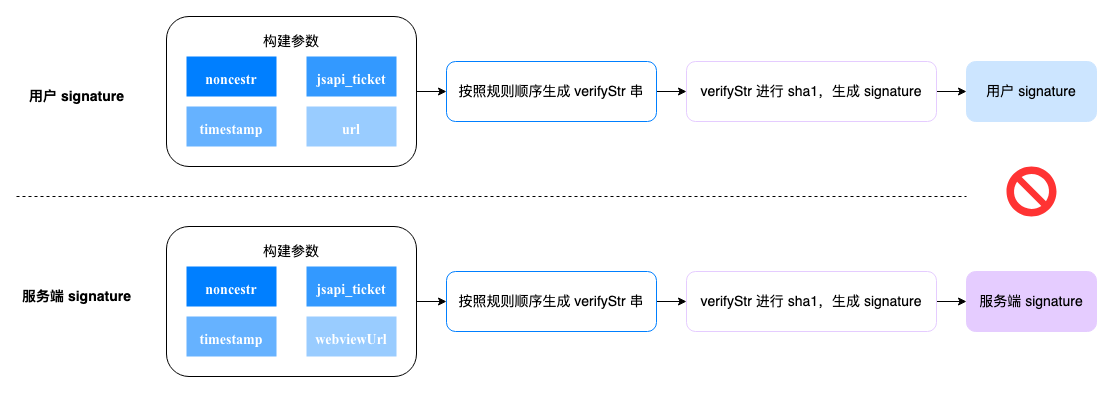
实际报错时会返回开放平台服务端的 `signature`、`jsticket`、`nonce_str`、`url`、`timestamp` 信息,这些信息与你开发的项目中构造的鉴权参数有不一致的问题。
```json
{
"errorCode": 333441,
"errorMessage": "invalid signature: signature: c872b****, jsticket: g1014****, nonce_str: zdcW****, url: https://www.example.com, timestamp: %!s(int64=1234)"
}
```
原因与排查方案:
- 构建的参数不一致。排查方案:
- 确认 config 接口内的 nonceStr 参数名为驼峰写法。
- 确认 config 接口内的 nonceStr、timestamp 参数与服务端生成签名时的 noncestr、timestamp 参数一致。
- 确认 config 接口内的 appid 参数与获取 access_token 时的 appid 参数一致。
- 确认 URL 是页面完整的 URL(请在当前页面`alert(location.href.split('#')[0])`确认),包括`http(s)://`部分,以及`?`后面的 GET 参数部分,但不包括`'#'(hash)`后面的部分。**建议代码编写就用 `location.href.split('#')[0]` 方式获取,不要手写,以免和实际使用不一致**。
- 如果是单页面应用,且使用 react-router 或 vue-router 等(类似 pushState、replaceState)进行页面跳转时(即 vue-router 的 history 模式或者 react-router 的 browserHistory),可以尝试将最后一次不用 vue-router 或者 react-router 跳转的页面 URL 传到当前页面进行鉴权,该方式需要根据实际情况进行处理。
- 确保使用的 access_token 和 jsapi_ticket 没有过期。
- sha1 算法出错。需确认签名算法是否为 sha1。
- 生成 verifyStr 规则错误。生成 verifyStr 字符串时,必须按照 jsapi_ticket、noncestr、timestamp、url 顺序进行拼接。
333442 | app 没找到有效的 jsapi_ticket | 检查 config 中的 app_id 与获取 jsapi_ticket 的 app_id 是否一致,或者所使用的 jsapi_ticket 是否已过期。如何获取 jsapi_tocket 参见[获取 JSAPI 临时授权凭证](https://open.feishu.cn/document/ukTMukTMukTM/uYTM5UjL2ETO14iNxkTN/h5_js_sdk/authorization)。
333443 | 签名重复 | 10 分钟内再次验签,请 10 分钟后重试。
333444 | 签名过期 | 签名有效期为 10 分钟,每次调用 config 前重新计算签名,不建议缓存签名。
333445 | JSAPI 未授权 | 调用 Config 接口时,在参数 jsApiList 里添加相应 API。
333446 | JSAPI 不存在 | 前往 [H5 JSAPI 总览](https://open.feishu.cn/document/uYjL24iN/uMTMuMTMuMTM/) 查阅 JSAPI,确认是否写错。
333447 | 安全域名未设置 | 应用开发者需要在 **开发者后台 > 应用详情页 > 安全设置 > H5可信域名** 中设置需要调用 JSAPI 接口的页面所在域名。
333448 | 页面不在安全域名内 | 应用开发者需要在 **开发者后台 > 应用详情页 > 安全设置 > H5可信域名** 中检查需要调用 JSAPI 接口的页面所在域名。
333449 | 应用不可见 | 应用对该用户没有可见性,应用开发者需要在 **开发者后台 > 应用详情页 > 版本管理与发布 > 创建版本 > 可用范围** 中配置可见性。
333450 | 用户 open_id 不正确 | 需要检查传入的用户 open_id 是否正确。获取方式参考[如何获取 Open ID](https://open.feishu.cn/document/uAjLw4CM/ugTN1YjL4UTN24CO1UjN/trouble-shooting/how-to-obtain-openid)。
9999169x | invalid session 用户登录态校验失败,x=[1-4] | \-
### Errno错误码最佳实践
我们以tt.login API为例
```js
tt.login({
success (res) {
console.log('API 调用成功');
},
fail (res) {
if (res.errno === 1001020) {
console.log('errno : ' + res.errno + " des : " + res.errString);
} else if (res.errCode === 20101) {
// 该API可能存在存量的errCode,依然可以使用
}
}
});
```
最佳实践规则
* 当fail回调中同时存在errno和errCode时,我们强烈建议优先以errno错误码为准。
* errString字段是errno的辅助信息,一般情况下可以帮助开发者在开发环境中更直接的理解当前的error类型,但不要把errString内的string信息作为逻辑判断的依赖。
* 若一个API存在存量的errCode,我们会保持现状,不删除,不修改,如果开发者的存量代码依赖了这些errCode, 可以继续保留这些代码作为对旧版本飞书的兼容性逻辑。