# Bridge.updateResize
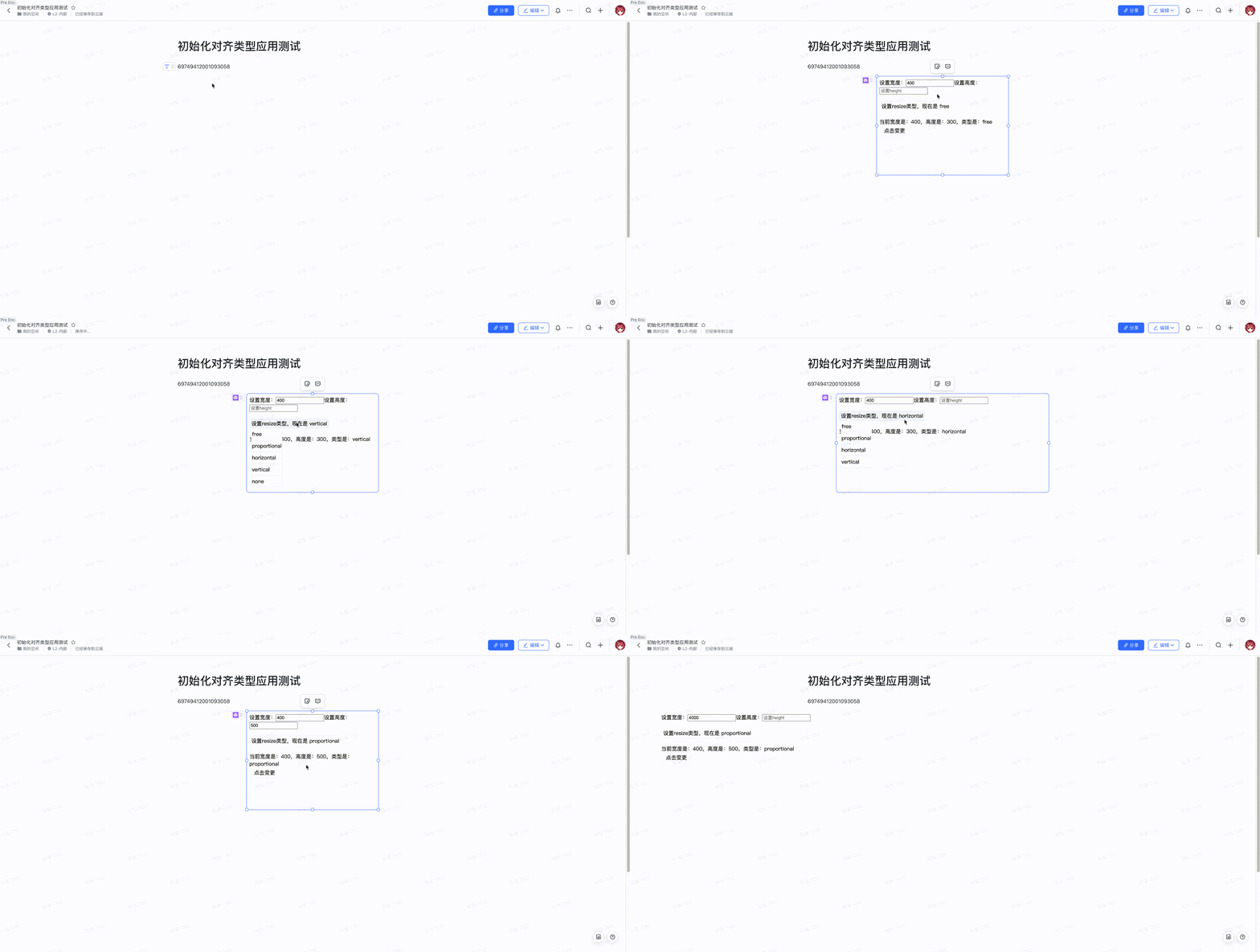
更新宿主容器的宽高或resize类型,如果有某项不指定,则该项不变,该方法为异步调用。
**注意事项**:- 移动端不支持resize,最好在移动端场景不要调用这个api,移动端可以用updateHeight。
- 更新宽高是协同的,调了updateResize后的宽高其他用户也会看到同样的宽高。
## 可用性说明
权限要求 | 视图可用说明 | 平台可用 | 场景
---|---|---|---
可写 | 正文小组件 | PC | 演示模式
## 输入(传入的是个对象)
名称 | 数据类型 | 是否必填 | 描述
---|---|---|---
width | number | 否 | 设置的宿主宽度
height | number | 否 | 设置的宿主高度
resizeType | - 'free'
- 'proportional'
- 'horizontal'
- 'vertical'
- 'none' | 否 | 设置的宿主resize类型
- 'free' : 自由resize,能随意缩放应用
- 'proportional':比例resize,只能对角按比例缩放
- 'horizontal' :水平resize,只能在水平方向缩放
- 'vertical':垂直resize,只能在垂直方向缩放
- 'none':不能缩放当resizeType是'none'时宽度则自动撑满文档
## 输出
无
## 示例代码
### 调用示例
```js
const DocMiniApp = new BlockitClient().initAPI();
DocMiniApp.Bridge.updateResize({width: 100});
DocMiniApp.Bridge.updateResize({height: 100});
DocMiniApp.Bridge.updateResize({resizeType: 'free' });
DocMiniApp.Bridge.updateResize({width: 100, height: 100, resizeType: 'free' });
DocMiniApp.Bridge.updateResize({width: 100, height: 100});
```
## Demo示例
[03 云文档小组件快速开发指南](https://open.feishu.cn/document/uAjLw4CM/uYjL24iN/docs-add-on/03-cloud-document-widget-quick-development-guide/03-cloud-document-widget-quick-developme) 创建应用后,把下面代码复制粘贴到对应文件
**App.tsx**
```js
import { useState, useCallback, useRef, useEffect } from 'react';
import { BlockitClient } from '@lark-opdev/block-docs-addon-api';
import './App.less';
const DocMiniApp = new BlockitClient().initAPI();
export default () => {
const [size, setSize] = useState({
width: 2000,
height: 300,
resizeType: 'free',
});
const [resizeType, setResizeType] = useState('free');
const [hasInit, setHasInit] = useState(false);
const resize = useRef({
width: 2000,
height: 300,
resizeType: 'free',
});
const domRef = useRef(null);
const canvasRef = useRef(null);
const widthChange = useCallback((e) => {
resize.current.width = Number(e.target.value);
}, [])
const heightChange = useCallback((e) => {
resize.current.height = Number(e.target.value);
}, []);
const updateResize = useCallback(() => {
DocMiniApp.Bridge.updateResize(resize.current);
setSize(resize.current);
}, []);
const handleItemClick = useCallback((key: string) => {
return () => {
resize.current.resizeType = key;
setResizeType(key);
}
}, []);
// 先高度自适应,再加载结束
useEffect(() => {
DocMiniApp.Bridge.updateResize({
height: document.body.clientHeight, // 这里需要3.5班车才能在加载前读到body的高度,预计4月6日全量
resizeType: 'free',
});
DocMiniApp.LifeCycle.notifyAppReady(); // 通知小组件加载结束,如果没这行代码小组件会一直是加载状态
}, []);
return (
);
};
```
**App.less(这个文件需要新建)**
```css
body {
margin: 0;
}
.demo {
position: relative;
overflow: hidden;
}
.set-resize-button{
margin-top: 20px;
background-color: white;
width: fit-content;
user-select: none;
line-height: 14px;
border-radius: 8px;
border: 1px #f2f3f5 solid;
padding: 8px 5px;
text-align: center;
position: relative;
&:hover {
background-color: #f2f3f5;
.set-resize-menu {
visibility: visible;
animation: showmenu 0.6s;
}
}
.set-resize-menu {
visibility: hidden;
position: absolute;
background-color: white;
padding: 0;
top: 12px;
list-style-type: none;
border-radius: 8px;
border: 1px #f2f3f5 solid;
overflow: hidden;
li {
cursor: pointer;
width: 100%;
padding: 10px 0;
text-align: left;
border: 1px #f2f3f5 solid;
&:hover {
background-color: #f2f3f5;
}
}
}
}
.click-update-resize {
cursor: pointer;
background-color: white;
width: 80px;
line-height: 14px;
border-radius: 8px;
border: 1px #f2f3f5 solid;
padding: 8px 5px;
text-align: center;
&:hover {
background-color: #f2f3f5;
}
}
.height-fit {
margin-top: 10px;
height: 400px;
font-size: 30px;
text-align: center;
line-height: 400px;
background-color: #f2f3f5;
}
@keyframes showmenu {
0% {max-height: 0;}
100% {max-height: 182px;}
}
```
app.json
```json
{
"manifestVersion": 1,
"appID": 这里要填你的appId,
"appType": "docs-addon",
"blockTypeID": 这里要填你的blockTypeId,
"projectName": "demo",
"contributes": {
"addPanel": {
"initialHeight": 300,
"view": "index.html",
"initialWidth": 2000, /* 初始宽度,可以设个较大的宽度保证组件超出文档正文最大宽度,或不要这个变量初始宽度就是文档正文宽度 */
"resizeType": "free", /* 初始resize类型 */
"useHostLoading": true, /* 管理生命周期的loading态*/
"align": "center" /* 需要居中对齐才能宽度超过文档正文宽度 */
}
}
}
```
返回示例
上面的代码实现的效果