# 刷新 user_access_token
OAuth 令牌接口,可用于刷新 user_access_token 以及获取新的 refresh_token。
- `user_access_token` 为用户访问凭证,使用该凭证可以以用户身份调用 OpenAPI,该凭证存在有效期,可通过 `refresh_token` 进行刷新。
- 用户授权时,用户必须拥有[应用的使用权限](https://open.feishu.cn/document/home/introduction-to-scope-and-authorization/availability),否则调用本接口将会报错误码 20010。
- `refresh_token` 用于获取新的 `user_access_token`,且仅能使用一次。在获取新的 `user_access_token` 时会返回新的 `refresh_token`,原 `refresh_token` 立即失效。
- 首次获取 `refresh_token` 的方式参见[获取 user_access_token](https://open.feishu.cn/document/uAjLw4CM/ukTMukTMukTM/authentication-management/access-token/get-user-access-token)。
**注意事项**:本接口实现遵循 [RFC 6749 - The OAuth 2.0 Authorization Framework](https://datatracker.ietf.org/doc/html/rfc6749) ,你可以使用[标准的 OAuth 客户端库](https://oauth.net/code/)进行接入(**推荐**)
## 前置工作
### 开通 offline_access 权限
获取 `refresh_token` 需前往开放平台应用后台的**权限管理**模块开通 `offline_access` 权限,并在[发起授权](https://open.feishu.cn/document/common-capabilities/sso/api/obtain-oauth-code)时在 `scope` 参数中声明该权限。
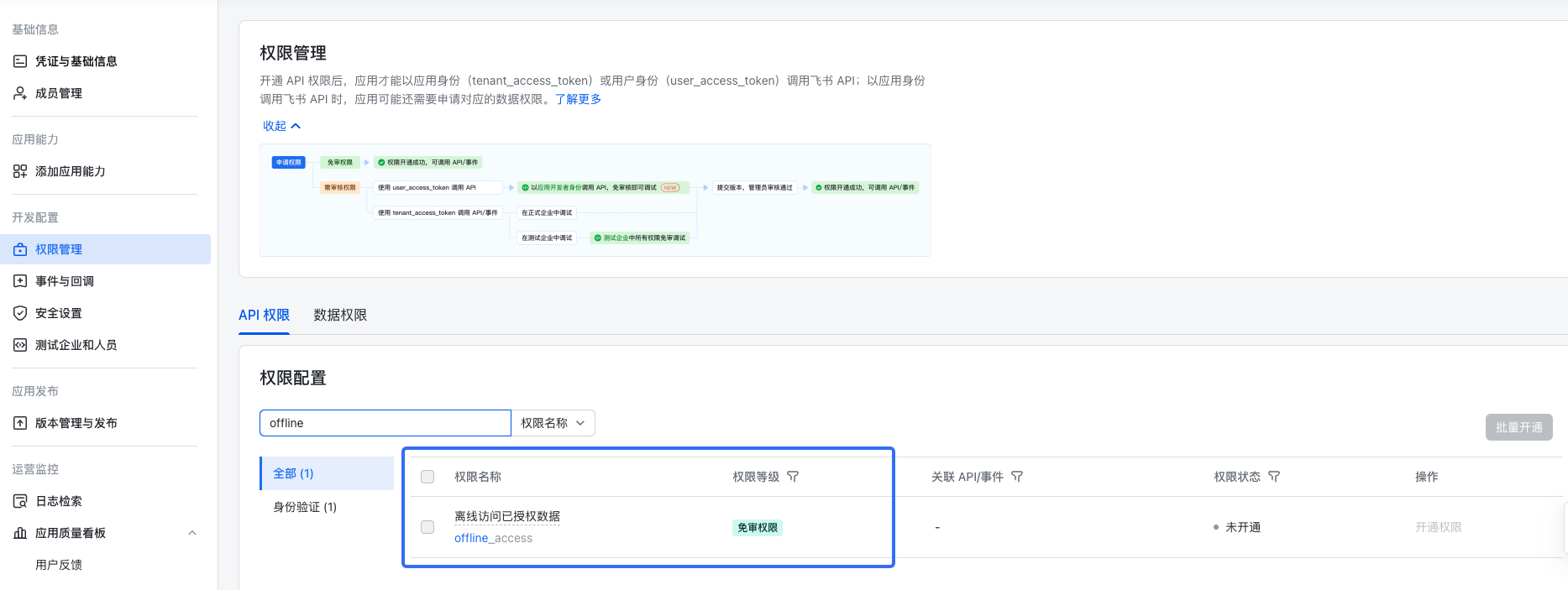
在开通 `offline_access` 权限后,如需获取 `refresh_token`,在[发起授权](https://open.feishu.cn/document/common-capabilities/sso/api/obtain-oauth-code)时,授权链接的`scope` 参数中必须拼接 `offline_access`,例如:
```
https://accounts.feishu.cn/open-apis/authen/v1/authorize?client_id=cli_a5d611352af9d00b&redirect_uri=https%3A%2F%2Fexample.com%2Fapi%2Foauth%2Fcallback&scope=bitable:app:readonly%20offline_access
```
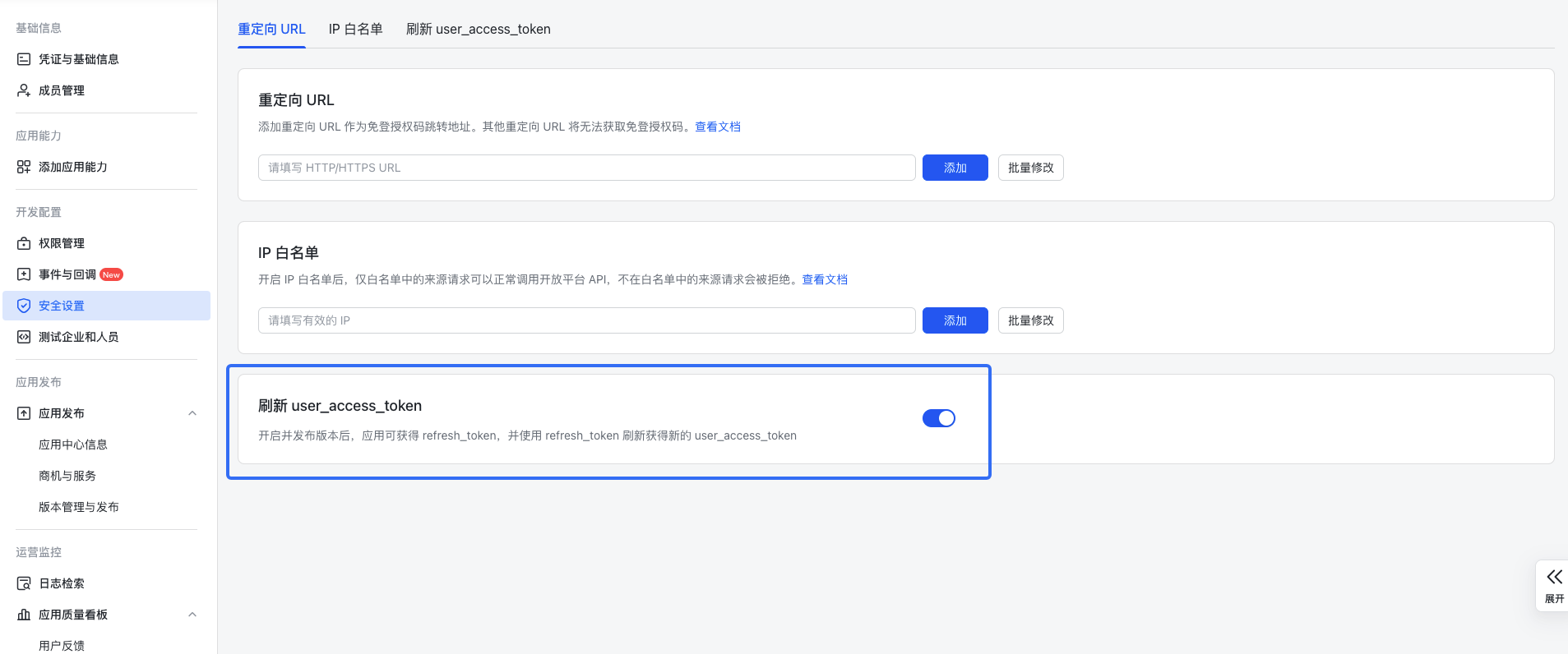
### 开启刷新 user_access_token 的安全设置
**注意事项**:- 如果你看不到此开关则无需关注,其默认处于开启状态。
- 完成配置后需要发布应用使配置生效。具体操作参见[发布企业自建应用](https://open.feishu.cn/document/home/introduction-to-custom-app-development/self-built-application-development-process#baf09c7d)、[发布商店应用](https://open.feishu.cn/document/uMzNwEjLzcDMx4yM3ATM/uYjMyUjL2IjM14iNyITN)。
前往开放平台应用后台的**安全设置**模块,打开刷新 `user_access_token` 的开关。
## 请求
**注意事项**:为了避免刷新 `user_access_token` 的行为被滥用,在用户授权应用 365 天后,应用必须通过用户[重新授权](https://open.feishu.cn/document/uAjLw4CM/ukTMukTMukTM/authentication-management/access-token/get-user-access-token)的方式来获取 `user_access_token` 与 `refresh_token`。如果 `refresh_token` 到期后继续刷新`user_access_token`将报错(错误码为 20037),可参考以下[错误码描述信息](#错误码)进行处理。
**注意事项**:刷新后请更新本地`refresh_token`,原`refresh_token`将无法再使用。原 `user_access_token` 不受影响,在其过期时间到达前仍可正常使用。
基本 |
---|---
HTTP URL | https://open.feishu.cn/open-apis/authen/v2/oauth/token
HTTP Method | POST
接口频率限制 | [1000 次/分钟、50 次/秒](https://open.feishu.cn/document/ukTMukTMukTM/uUzN04SN3QjL1cDN)
支持的应用类型 | Custom App、Store App
权限要求
**调用该 API 所需的权限。开启其中任意一项权限即可调用
** | 无
字段权限要求 | `refresh_token` 以及 `refresh_token_expires_in` 字段仅在具备以下权限时返回:
offline_access(offline_access)
### 请求头
名称 | 类型 | 必填 | 描述
---|---|---|---
Content-Type | string | 是 | 请求体类型。
**固定值:**`application/json; charset=utf-8`
### 请求体
名称 | 类型 | 必填 | 描述
---|---|---|---
grant_type | string | 是 | 授权类型。
**固定值:**`refresh_token`
client_id | string | 是 | 应用的 App ID,可以在开发者后台中的应用详情页面找到该值。
**示例值:**`cli_a5ca35a685b0x26e`
client_secret | string | 是 | 应用的 App Secret,可以在开发者后台中的应用详情页面找到该值,详见:[如何获取应用的 App ID](https://open.feishu.cn/document/uAjLw4CM/ugTN1YjL4UTN24CO1UjN/trouble-shooting/how-to-obtain-app-id)。
**示例值:**`baBqE5um9LbFGDy3X7LcfxQX1sqpXlwy`
refresh_token | string | 是 | 刷新令牌,用于刷新 `user_access_token` 以及 `refresh_token`。
**注意事项**:请务必注意本接口仅支持[获取 user_access_token](https://open.feishu.cn/document/uAjLw4CM/ukTMukTMukTM/authentication-management/access-token/get-user-access-token)和[刷新 user_access_token](https://open.feishu.cn/document/uAjLw4CM/ukTMukTMukTM/authentication-management/access-token/refresh-user-access-token)接口返回的 `refresh_token`
**示例值:**`eyJhbGciOiJFUzI1NiIs**********XXOYOZz1mfgIYHwM8ZJA`
scope | string | 否 | 该参数用于缩减 `user_access_token` 的权限范围。
例如:
1. 在[获取授权码](https://open.feishu.cn/document/common-capabilities/sso/api/obtain-oauth-code)时通过 `scope` 参数授权了 `contact:user.base:readonly contact:contact.base:readonly contact:user.employee:readonly` 三个权限。
2. 在当前接口可通过 `scope` 参数传入 `contact:user.base:readonly`,将 `user_access_token` 的权限缩减为 `contact:user.base:readonly` 这一个。
**注意**:
- 如果不指定当前参数,生成的 `user_access_token` 将包含用户授权时的所有权限。
- 当前参数不能传入重复的权限,否则会接口调用会报错,返回错误码 20067。
- 当前参数不能传入未授权的权限(即[获取授权码](https://open.feishu.cn/document/common-capabilities/sso/api/obtain-oauth-code)时用户已授权范围外的其他权限),否则接口调用会报错,返回错误码 20068。
- 多次调用当前接口缩减权限的范围不会叠加。例如,用户授予了权限 A 和 B,第一次调用该接口缩减为权限 A,则 `user_access_token` 只包含权限 A;第二次调用该接口缩减为权限 B,则 `user_access_token` 只包含权限 B。
- 生效的权限列表可通过本接口返回值 scope 查看。
**格式要求:** 以空格分隔的 `scope` 列表
**示例值:**`auth:user.id:read task:task:read`
### 请求体示例
```json
{
"grant_type": "refresh_token",
"client_id": "cli_a5ca35a685b0x26e",
"client_secret": "baBqE5um9LbFGDy3X7LcfxQX1sqpXlwy",
"refresh_token": "eyJhbGciOiJFUzI1NiIs**********XXOYOZz1mfgIYHwM8ZJA"
}
```
## 响应
响应体类型为 `application/json; charset=utf-8`。
### 响应体
名称 | 类型 | 描述
---|---|---
code | int | 错误码,为 0 时表明请求成功,非 0 表示失败,请参照下文错误码一节妥善处理
access_token | string | 即 `user_access_token`,仅在请求成功时返回
expires_in | int | 即 `user_access_token` 的有效期,单位为秒,仅在请求成功时返回
**注意事项**:建议使用该字段以确定 `user_access_token` 的过期时间,不要硬编码有效期
refresh_token | string | 用于刷新 `user_access_token`,该字段仅在请求成功且用户授予 `offline_access` 权限时返回:
offline_access(offline_access)
**注意事项**:`refresh_token` 仅能被使用一次。
refresh_token_expires_in | int | 即 `refresh_token` 的有效期,单位为秒,仅在返回 `refresh_token` 时返回。
**注意事项**:建议在到期前重新调用当前接口获取新的 `refresh_token`。
token_type | string | 值固定为 `Bearer`,仅在请求成功时返回
scope | string | 本次请求所获得的 `access_token` 实际具备的权限列表,以空格分隔。服务端会根据情况对申请的 scope 进行裁剪,最终实际授予的权限范围请以该字段为准。该字段仅在请求成功时返回。
error | string | 错误类型,仅在请求失败时返回
error_description | string | 具体的错误信息,仅在请求失败时返回
### 响应体示例
成功响应示例:
```json
{
"code": 0,
"access_token": "eyJhbGciOiJFUzI1NiIs**********X6wrZHYKDxJkWwhdkrYg",
"expires_in": 7200, // 非固定值,请务必根据响应体中返回的实际值来确定 access_token 的有效期
"refresh_token": "eyJhbGciOiJFUzI1NiIs**********VXOYOZYZmfgIYHWM0ZJA",
"refresh_token_expires_in": 604800, // 非固定值,请务必根据响应体中返回的实际值来确定 refresh_token 的有效期
"scope": "auth:user.id:read offline_access task:task:read user_profile",
"token_type": "Bearer"
}
```
失败响应示例:
```json
{
"code": 20050,
"error": "server_error",
"error_description": "An unexpected server error occurred. Please retry your request."
}
```
### 错误码
HTTP 状态码 | 错误码 | 描述 | 排查建议
---|---|---|---
400 | 20001 | The request is missing a required parameter. | 必要参数缺失,请检查请求时传入的参数是否有误
400 | 20002 | The client secret is invalid. | 应用认证失败,请检查提供的 `client_id` 与 `client_secret` 是否正确。获取方式参见 [如何获取应用的 App ID](https://open.feishu.cn/document/uAjLw4CM/ugTN1YjL4UTN24CO1UjN/trouble-shooting/how-to-obtain-app-id)。
400 | 20008 | The user does not exist. | 用户不存在,请检查发起授权的用户的当前状态
400 | 20009 | The specified app is not installed. | 租户未安装应用,请检查应用状态
400 | 20010 | The user does not have permission to use this app. | 用户无应用使用权限,请检查发起授权的用户是否仍具有应用使用权限
400 | 20024 | The provided authorization code or refresh token does not match the provided client ID. | 提供的 `refresh_token` 与 `client_id` 不匹配,请勿混用不同应用的凭证
400 | 20026 | The refresh token passed is invalid. Please check the value. | 请检查请求体中 `refresh_token` 字段的取值
请注意本接口仅支持 v2 版本接口下发的 `refresh_token`
400 | 20036 | The specified grant_type is not supported. | 无效的 `grant_type`,请检查请求体中 `grant_type` 字段的取值
400 | 20037 | The refresh token passed has expired. Please generate a new one. | `refresh_token` 已过期,请[重新发起授权流程](https://open.feishu.cn/document/uAjLw4CM/ukTMukTMukTM/authentication-management/access-token/get-user-access-token)以获取新的 `refresh_token`
400 | 20048 | The specified app does not exist. | 应用不存在,请检查应用状态
500 | 20050 | An unexpected server error occurred. Please retry your request. | 内部服务错误,请稍后重试,如果持续报错请联系[技术支持](https://applink.feishu.cn/TLJpeNdW)
400 | 20063 | The request is malformed. Please check your request. | 请求体中缺少必要字段,请根据具体的错误信息补齐字段
400 | 20064 | The refresh token has been revoked. Please note that a refresh token can only be used once. | `refresh_token` 已被撤销,请[重新发起授权流程](https://open.feishu.cn/document/uAjLw4CM/ukTMukTMukTM/authentication-management/access-token/get-user-access-token)以获取新的 `refresh_token`
400 | 20066 | The user status is invalid. | 用户状态非法,请检查发起授权的用户的当前状态
400 | 20067 | The provided scope list contains duplicate scopes. Please ensure all scopes are unique. | 无效的 `scope` 列表,其中存在重复项,请确保传入的 `scope` 列表中没有重复项
400 | 20068 | The provided scope list contains scopes that are not permitted. Please ensure all scopes are allowed. | 无效的 `scope` 列表,其中存在用户未授权的权限。当前接口 `scope` 参数传入的权限必须是[获取授权码](https://open.feishu.cn/document/common-capabilities/sso/api/obtain-oauth-code)时 `scope` 参数值的子集。
例如,在获取授权码时,用户授权了权限 A、B,则当前接口 `scope` 可传入的值只有权限 A、B,若传入权限 C 则会返回当前错误码。
400 | 20069 | The specified app is not enabled. | 应用未启用,请检查应用状态
400 | 20070 | Multiple authentication methods were provided. Please only use one to proceed. | 请求时同时使用了 `Basic Authentication` 和 `client_secret` 两种身份验证方式。请仅使用 `client_id`、`client_secret` 身份验证方式调用本接口。
503 | 20072 | The server is temporarily unavailable. Please retry your request. | 服务暂不可用,请稍后重试
400 | 20073 | The refresh token has been used. Please note that a refresh token can only be used once. | 请[重新发起授权流程](https://open.feishu.cn/document/uAjLw4CM/ukTMukTMukTM/authentication-management/access-token/get-user-access-token)以获取新的 `refresh_token`
400 | 20074 | The specified app is not allowed to refresh token. | 请在应用管理后台检查是否开启了刷新 `user_access_token` 开关,注意发版后生效